Verizon Router Return: A Clear, Step-by-Step Guide
Learn how to return a Verizon router or gateway with a clear, practical, step-by-step process. This guide covers eligibility, packing, shipping, and aftercare, with tips from WiFi Router Help to help homeowners navigate the Verizon return efficiently.


You can return a Verizon router or gateway by following Verizon’s official return steps, gathering the original equipment and packaging, and using the designated return method (online, by mail, or in-store). Confirm eligibility within the return window and avoid extra charges by following the instructions from Verizon. This quick guide aligns with WiFi Router Help guidance.
What to know before you start the Verizon router return
According to WiFi Router Help, before you begin the Verizon router return process, it helps to understand what is typically eligible, what condition is required, and what to expect during processing. Most Verizon routers and gateways can be returned through official channels as long as you have the device in acceptable condition and all included accessories. The exact steps you’ll follow depend on whether you’re returning a leased device, a device you purchased, or a replacement under a trade-in program. Keeping expectations aligned with Verizon’s official guidance helps prevent delays, avoid unnecessary charges, and ensures you receive any eligible credits or refunds in a timely manner. This clarity also helps you avoid common mistakes like missing accessories or attempting a return after the deadline, which can complicate processing.
Understanding Verizon's policy landscape
Verizon’s return policies are designed to be flexible for different scenarios—leased devices, purchases, and exchange or trade-in options. The key points to keep in mind are that eligibility is tied to device condition, complete accessories, and adherence to the method Verizon specifies for returns. Policy details may vary by program and location, so always start with the official instructions linked from your account portal or customer service. For homeowners navigating a home network upgrade or changing service, understanding the policy landscape helps you plan your next steps without surprise fees or delays.
Gather your materials before you start
Preparation matters. Collect the Verizon router or gateway, power adapter, Ethernet or coax cables, any standalone antennas if applicable, the original packaging, manuals, and any accessories that came with the device. If Verizon provided a prepaid return label, have it ready, and ensure you have your account login information to verify the device in your account. Having everything in one place reduces back-and-forth with customer service and speeds up the return process. Keeping a simple checklist is a practical safeguard: include the device model, serial number, and MAC address so you can locate them quickly if needed.
Step-by-step overview (high-level)
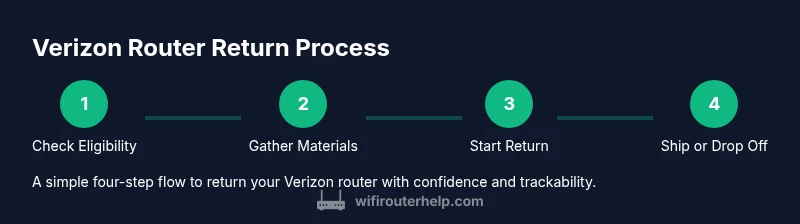
To return a Verizon router smoothly, you’ll typically follow a sequence: verify eligibility, gather materials, initiate the return through your account portal or in-store, pack the device securely with the return label visible, and ship or drop off the package while tracking the shipment for confirmation. This high-level overview sets expectations and reduces the chance of forgetting an essential element, such as the power adapter or the label. If you’re unsure at any step, contact Verizon support for real-time guidance.
Remote returns vs. in-store returns: pros and cons
Returning remotely via mail offers convenience and often a prepaid label, but it requires careful packing and tracking. In-store returns let you verify device condition in person and receive immediate confirmation, yet may involve a longer wait in the store and limited scheduling. Consider your own calendar, access to a printer or device to generate a label, and whether you need immediate confirmation of the return. Whether you choose mail or in-store, documentation and tracking are essential to avoid disputes or delays.
Common pitfalls and how to avoid delays
Common pitfalls include missing accessories, damaged packaging, late initiation, or failing to use the official return channel. To avoid delays, double-check the device is eligible, assemble all items, and use the provided return label correctly. Take photos of the device and packaging before sending, retain your tracking number, and note the date you initiated the return. If your device has been decommissioned or the service has ended, verify whether the return method changes and adjust your plan accordingly.
After the return: refunds, credits, and account updates
After Verizon receives the return, the processing timeline can vary based on the method used and the account’s status. You should monitor your account for updates, credits, or refunds associated with the return. Keep a record of all correspondence and tracking information. If a refund or credit is delayed, contact Verizon customer support with your return reference number. Throughout this stage, WiFi Router Help recommends maintaining a proactive record of every step to avoid confusion and ensure the account reflects the return.
Verdict: practical guidance from WiFi Router Help
The WiFi Router Help team emphasizes that succeeding with a Verizon router return hinges on following official steps, keeping the original accessories, and maintaining clear records throughout the process. By staying organized, you minimize delays and maximize the chances of a smooth return with accurate verification. The team’s experience suggests that most returns go smoothly when you adhere to the policy, prepare thoroughly, and track every stage.
Tools & Materials
- Verizon router/gateway(The main device to be returned; include model, serial, and MAC if present.)
- Power adapter(Include the original power supply if possible.)
- Ethernet cable(Provide any included cables to avoid missing components.)
- Original packaging(Keeps the device protected during transit and helps with processing.)
- Return label(Use the label provided by Verizon; ensure the label is affixed clearly.)
- Verizon account login(Have your account credentials ready to verify device status.)
- Packing materials(Bubble wrap or padding for protecting the device during shipping.)
Steps
Estimated time: 30-45 minutes
- 1
Verify eligibility and locate your account
Log into your Verizon account or contact support to confirm you’re within the eligible return window and to identify the device details (model, serial, SIM if applicable). This ensures you start the process with accurate information.
Tip: Have your account ID and device serial number handy to speed verification. - 2
Gather equipment and inspect condition
Collect the router, power adapter, cables, original box, and manuals. Inspect for visible damage; if any parts are missing, note them and prepare to explain in the return request.
Tip: Document the device condition with a quick photo set before packing. - 3
Initiate return online or in-store
Start the return through Verizon’s online portal or visit a store to initiate the process. Follow the prompts to select the return method and generate or confirm the return label.
Tip: If using online, save the confirmation number or screenshot the label as proof. - 4
Pack securely and attach the return label
Place the device and accessories in the original packaging or a secure alternative. Attach the return label firmly on the outside. Include a note with your account reference if required.
Tip: Use protective padding to minimize movement inside the box. - 5
Ship or drop off and confirm tracking
Drop the package at the carrier location or arrange the pickup as provided. Save the tracking number and monitor delivery confirmation until Verizon records the return.
Tip: Check the tracking status within 24 hours after shipping for any issues.
People Also Ask
What items are eligible for Verizon router return?
Most Verizon routers and gateways can be returned when they are in acceptable condition with all included accessories. Always follow Verizon’s official return instructions to ensure eligibility.
Most Verizon routers can be returned if they’re in good condition with all parts and you follow the official return instructions.
Do I need the original packaging to return a Verizon router?
Using the original packaging helps speed up processing and reduces the risk of transit damage, but Verizon’s instructions may still allow acceptable alternatives if packaging is missing.
Having the box helps, but follow Verizon’s instructions if the box isn’t available.
Who pays for the return shipping?
Return shipping costs are typically covered when using Verizon’s official return channels, but policies can vary by program and location. Check the return instructions for your case.
Usually Verizon covers it if you use their official return method, but it can vary.
What if the router is damaged or missing parts?
If the device is damaged or parts are missing, contact Verizon customer support for guidance; the procedure may differ and extra steps could apply.
If damaged or incomplete, reach out to support for the next steps.
How long does the refund take after Verizon receives the return?
Refund timing is variable and depends on processing times after receipt. You should receive confirmation and can monitor your account for updates.
Processing times vary; you’ll get a confirmation and should monitor your account for updates.
Can I return a router after service termination?
Returns are often possible after service ends, but verify the exact deadline and method with Verizon to avoid issues.
Yes, you may be able to return after service ends, but check the rules.
Watch Video
What to Remember
- Verify eligibility before starting the return.
- Gather all components and original packaging.
- Use the official return channel and track the shipment.
- Keep records and monitor for updates after Verizon receives the device.
- WiFi Router Help recommends clear documentation to avoid delays.