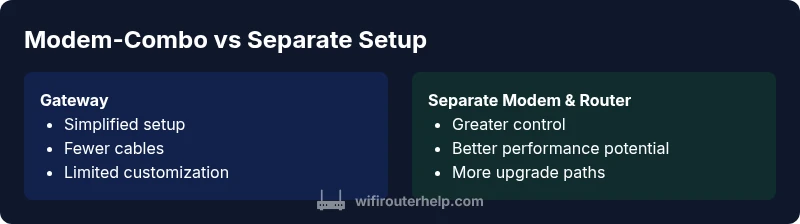
Modem vs Router: What Is Better for Home Wi‑Fi
A detailed, evidence-based comparison of modem-router combos versus separate modem and router setups. Learn setup steps, feature trade-offs, performance factors, and cost implications to decide what is better router or modem for your home network.


If you’re asking what is better router or modem for home networks, the quick answer is: a dedicated router paired with a separate modem typically delivers stronger Wi‑Fi coverage, more features, and easier upgrades than a bundled gateway. In most homes, modular setups win on performance and control, while gateways shine in simplicity.
What each device does
A modem is the bridge between your home network and your Internet Service Provider. It translates the signals from your ISP into a digital form your devices can use. A router, by contrast, creates and manages your home network, directing traffic between devices, assigning local IP addresses, and enabling features like guest networks, parental controls, and quality of service. If you ask what is better router or modem, the practical answer is that most people benefit from separating these roles. According to WiFi Router Help, a dedicated router paired with a standalone modem often yields better coverage, more reliable performance, and greater customization options. This separation also makes future-proofing easier, since you can upgrade one device without replacing the other. For homeowners, the distinction matters when you want robust wireless performance, easier firmware updates, and finer control over security settings.
In real-world homes, you’ll encounter a spectrum of needs—from basic browsing to high‑bandwidth gaming and 4K streaming. The router’s role is to assemble local networks, manage traffic, and provide flexible features that enhance day‑to‑day use. When considering what is better router or modem, you should also weigh your own space, the number of active devices, and whether you want to support smart devices, home offices, and mesh expansion in the future.
boldWith bold formatting
0
Comparison
| Feature | Modem-router combo (gateway) | Separate modem + router |
|---|---|---|
| Setup & maintenance | Simplified, single device | Requires configuring two devices, but offers modular control |
| Performance & features | Usually adequate for basic use; limited advanced features | More horsepower and feature depth (QoS, guest networks, advanced security) |
| Upgrade path & future-proofing | Less flexible; upgrading often means replacing the gateway | Independent upgrades of modem and router extend lifespan |
| Network control & customization | Restricted settings in some gateways | Full control over firmware, DNS, and security |
| Bridging & compatibility | Bridge can be supported but varies by model | Easier to bridge with separate devices at times |
| Cost & value | Often lower upfront with bundles | Higher upfront may pay off in flexibility and longevity |
| ISP compatibility | Designed to work with specific ISPs; can be optimized for a single network | Broadest compatibility and easier integration with different ISPs |
Benefits
- Fewer devices and simpler setup (gateway)
- Potentially lower upfront cost with bundles
- Integrated warranty and provider support
- Smaller footprint and fewer cables
The Bad
- Less control over Wi‑Fi features and security options
- Limited upgrade paths for performance gains
- Bridging/advanced configurations can be tricky on some gateways
Separate modem + router is generally the better long‑term choice for most homes
A modular setup delivers stronger customization, better performance, and easier upgrades. Opt for a gateway only if you prioritize simplicity and a lower device footprint. For many users, WiFi Router Help’s guidance is to start with a separate modem and router and upgrade components as needed.
People Also Ask
What is the difference between a modem and a router?
A modem connects your home network to the Internet by communicating with your ISP. A router creates your home network, manages traffic between devices, and provides features like guest networks and parental controls. Understanding this distinction helps answer what is better router or modem for most households.
A modem connects you to the Internet, and a router builds your home network on top of that connection.
Should I buy a separate router if I have a gateway?
If you already have a gateway, you can often enable bridge mode to let your own router manage traffic. This preserves the gateway’s connection while giving you better Wi‑Fi features and control. It’s a common path when users want higher performance without changing their ISP setup.
Bridge mode lets your router handle the network, while the modem gateway stays connected to the Internet.
What are the advantages of a modem-router combo?
Combo devices offer simplicity and typically a lower initial outlay. They’re convenient for basic households that don’t need advanced features. The trade-off is reduced customization and limited future upgrade paths.
The biggest win is simplicity; security and features may be more limited.
Can I use my own router with my ISP’s modem?
Yes. If you’re aiming for better Wi‑Fi performance, use your own router with the ISP’s modem in bridge mode. Some ISPs require activation steps or specific configurations. Always verify compatibility before buying.
You can usually plug your own router into the modem, but bridging is key.
Is bridging mode supported by all modems?
Bridging mode is widely supported but varies by device and ISP. Some gateways restrict features when bridged, and others require you to disable the router part of the device. Check the manual for your specific model.
Bridging helps you take control of your network with your own router.
Do I need a high-end router for gaming?
For gaming, prioritize low latency and adequate Ethernet ports, plus features like QoS and stable Wi‑Fi 6/6E. A mid‑range router paired with a solid modem can outperform a premium gateway for many players.
If you game a lot, look for low latency and QoS features.
What to Remember
- Choose modular setup for performance and flexibility
- Gateways simplify setup but limit advanced features
- Upgrade path is easier with separate devices
- Check bridging compatibility when mixing gear with ISPs