Modem vs Router: Which Is Better for Your Home Network in 2026
A rigorous comparison of gateway versus separate modem and router setups to help homeowners decide which is better for their home network in 2026.


Is router or modem better? For most homes, a separate modem and router offer stronger performance, greater flexibility, and easier upgrades than a gateway device. If you value simplicity and minimal commitment, a modem-router combo can be convenient, especially with ISP equipment. The best choice depends on your speed, growth plans, and how much you want to customize your network.
What each device does and why it matters
At its core, a modem translates signals from your internet service into a form your home network can use, while a router distributes that connection to multiple devices and creates your home Wi‑Fi. A gateway combines both functions in a single box. Understanding the difference is essential when asking is router or modem better, because the best choice depends on how you use and grow your network. According to WiFi Router Help, the distinction is not just hardware jargon—it's about control, performance, and future-proofing. A dedicated router gives you centralized control over SSIDs, guest networks, bandwidth allocation, and security rules. A compatible modem ensures you connect to your ISP reliably and without unnecessary bottlenecks. For most households, separating these two roles yields the most flexibility and better long-term value, especially if you plan to upgrade your internet speed or add mesh systems later.
However, the exact benefits hinge on your situation, and you should assess your current plan and future needs. If you are asking is router or modem better for a small apartment with a modest internet speed, a gateway may feel sufficient, but the moment you upgrade speed or add multiple smart devices, the advantages of separate devices become evident. The WiFi Router Help team notes that planning for growth reduces the risk of frequent replacements and can save money over the device lifecycle.
},
How Internet Plans and Connection Types Influence the Decision
Your choice is heavily influenced by whether you have fiber, cable, DSL, or a mixed internet setup. Fiber connections typically benefit from high-end routers that can exploit the raw speed and low latency, while cable and DSL users may see more pronounced gains from a modern router paired with a capable modem. The question often boils down to whether your service supports a true bridge mode and how much you value features like QoS, guest networks, and parental controls. Based on WiFi Router Help research, gateway devices often wire you into ISP-managed firmware and limited customization, which can simplify maintenance but constrain performance optimization. If you plan to scale to faster speeds or add mesh nodes, a separate modem and router provides a smoother upgrade path. In practice, your decision should align with the speed tier you expect to reach in the next 12–24 months and whether your ISP supports or restricts third-party devices.
When you review your current plan, check for terms like bridge mode, compatibility lists, and the ability to use your own router with the ISP-provisioned modem. If bridge mode is unavailable, a gateway may still work but you might face double NAT issues and some games or streaming apps may experience latency. The takeaway is to strike a balance between current needs and futureproofing, especially if you anticipate faster speeds or more devices. The WiFi Router Help analysis shows that users who invest in separate devices generally enjoy simpler troubleshooting and faster iterative upgrades, even when initial costs are higher.
Comparison
| Feature | Gateway (modem/router combo) | Separate modem + router setup |
|---|---|---|
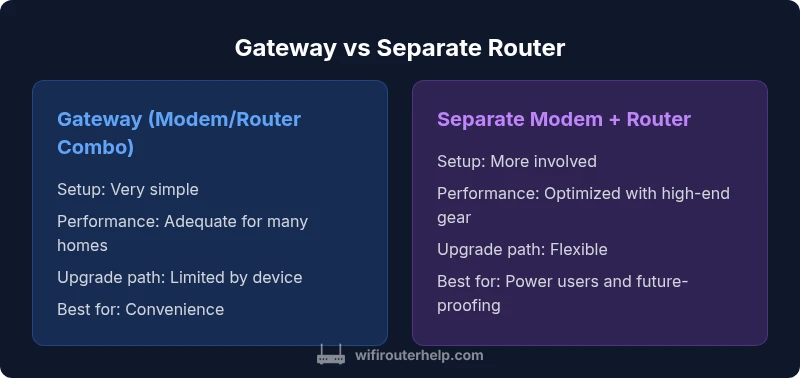
| Setup & management simplicity | Very simple, single box | Two devices require a bit more configuration but offer clear separation of duties |
| Performance and customization | Decent performance with basic features | Best performance with high-end router and tailored settings |
| Upgrade path / flexibility | Limited by device, upgrades involve a new gateway | Highly flexible; upgrade individual components and mesh systems |
| Security updates / firmware control | ISP controls firmware; updates may be slower | Independent updates from each vendor; more control |
| ISP compatibility & future-proofing | Broadly compatible but tied to gateway device | More adaptable to speed upgrades and new standards |
| Cost of ownership | Lower upfront if provided by ISP | Higher upfront for two devices, often better long-term value |
| Best for | Convenience and simplicity | Power users, gamers, and future-proofing |
Benefits
- Greater flexibility with separate modem and router
- Better performance and customization options
- Easier upgrades and future-proofing
- Clear fault isolation between devices
The Bad
- Higher initial setup complexity
- Higher upfront cost for two devices
- Requires more space and power
- Possible compatibility considerations with ISPs
Separate modem + router setup generally wins for performance and future-proofing
If you want long-term flexibility and peak performance, invest in a dedicated modem and router. Gateways offer convenience, but they tie you to a single device with limited upgrade paths and sometimes slower firmware updates. The best choice depends on your current plan, anticipated speed upgrades, and how much you value customization.
People Also Ask
What is the difference between a modem and a router?
A modem connects your home network to your internet service provider, translating signals from the ISP. A router creates your home network, distributing that internet connection to devices via wired or wireless connections. A gateway combines both functions in one device, which can simplify setup but may limit future upgrades.
A modem gets you online, a router creates your home Wi‑Fi. A gateway does both at once, but you trade some control for simplicity.
Can I use my own router with an ISP-provided modem?
Yes, in most cases you can. You may need to enable bridge mode on the ISP modem or disable its firewall/NAT features to avoid double NAT issues. Using your own router typically gives you better features and performance.
Yes—most ISPs let you use your own router with their modem; just check for bridge mode and settings.
Do gateway devices support QoS or mesh networking?
Many gateways offer basic QoS and can support some mesh ecosystems, but performance and advanced features usually lag behind dedicated gear. If you rely on precise traffic management or large-scale mesh, separate devices are preferable.
Gateways can do basics like QoS, but dedicated gear handles it better.
Which setup is best for gaming or streaming?
For gaming and streaming, a separate modem + router provides more consistent performance and lower latency due to higher-end routers, bigger buffers, and better traffic management.
For smooth gaming, separate modem and router are usually better.
Is it worth upgrading to a new gateway or separate devices when speeds improve?
If you expect significant speed increases or more devices, upgrading separate devices often yields better ROI due to scalable hardware and longer support life. A gateway may suffice for minor speed bumps but upgrades can be more costly later.
Upgrading separate devices tends to pay off as speeds grow.
What to Remember
- Evaluate current and future speed needs before buying
- Prefer separate modem + router for performance and upgrades
- Gateways are convenient but less flexible long-term
- Plan for firmware updates and security management
- Consider mesh compatibility if expanding coverage