Router or Modem for Internet: Which Do You Need in 2026
Explore whether you should use a modem, a router, or a combined gateway for your home internet. Objective guidance on setup, performance, and future-proofing for 2026.


Choosing between a modem and a router hinges on how your home network is used. In short, a modem connects you to your ISP, while a router creates and manages your local network, including Wi‑Fi. For most homes, using a separate router behind a modem offers flexibility, easier upgrades, and better coverage.
Understanding the core roles: modem and router in a home network
In most homes, the internet experience is shaped by two devices that perform different jobs: the modem and the router. The modem is the interface to your Internet Service Provider (ISP); it translates the provider's signal into a usable connection. The router, on the other hand, manages your local network, assigns IP addresses, and creates the WiFi you rely on for phones, laptops, and smart devices. When you think about router or modem for internet, you should distinguish these roles to map your needs to the right setup. This distinction matters whether you subscribe to fiber, cable, DSL, or fixed wireless. The WiFi Router Help team emphasizes that clarity here saves time, reduces guesswork, and makes future upgrades smoother. Your choice will affect coverage, security, and how easily you troubleshoot issues in a busy home.
How a modem works and why you might need one
A modem connects directly to the external network provided by your ISP. It modulates and demodulates signals to establish a stable path for data. In most households, you need a modem to access the internet, unless your ISP offers a gateway device that combines this function with routing. The modem's job is simple yet critical: it provides the bridge between the provider's network and your home devices. If you own a standalone modem, you have control over compatible routers and firmware updates, which can improve long-term reliability and security. Some ISPs continue to rent or lease modems, so ownership becomes a cost decision as well as a performance choice. Remember to verify compatibility with your service plan and to consider future upgrades when selecting a modem.
How a router works and what it adds to your home network
A router creates the local network inside your home. It assigns IP addresses, routes traffic between devices, and manages the shared connection to the internet. A modern router also provides WiFi, guest networks, parental controls, and quality of service (QoS) features to prioritize gaming or video calls. By distributing your internet signal to multiple devices, a router reduces bottlenecks and helps devices compete for bandwidth without constant manual configuration. Through smart firmware and periodic updates, a router stays resilient against evolving security threats. For households with many devices, a strong wireless standard, multiple antennas, and robust processing power matter more than a single modem's capabilities.
When you need a separate modem and router (vs gateway)
In many scenarios, buying separate devices makes sense. Cable and fiber plans often present a choice between using a provider's gateway or owning a modem plus router. A separate modem plus router gives you granular control over security settings, firmware, and network naming. It also simplifies upgrading; you can swap one device without reconfiguring the other. The gateway option can be convenient for minimal setup and for providers that require a specific device. However, gateways can limit customization, complicate certain advanced features, and may tie you more closely to the provider's update schedule. WiFi Router Help recommends evaluating your space, performance needs, and future plans before deciding.
Gateway devices: benefits and trade-offs
A gateway consolidates modem and router functions into a single box. The benefit is a simpler ceiling of setup and fewer cables, which appeals to many households. For apartments or small homes with modest coverage needs, a gateway can be sufficient. The trade-offs include less flexibility for customizing WiFi settings, fewer choices for high-end mesh networking, and potential limitations on security features or firmware updates. If your goal is to minimize clutter, a gateway may be attractive, but if you anticipate growing your network or needing advanced controls, a separate router often delivers better long-term value.
Internet access types and how that affects your choice
Different internet technologies influence device choices. Cable and fiber connections typically require a modem, and sometimes an ISP supplies a gateway. DSL often uses a modem as well. Fixed wireless arrangements may rely on additional devices. Regardless of the access method, the decision to pair a modem with a router or to use a gateway hinges on your coverage needs, compatibility, and future plans for expansion, such as adding mesh networking or guest networks. Understanding these types helps you avoid overpaying for features you won't use while ensuring you have enough bandwidth for streaming, work-from-home tasks, and smart devices.
Setup paths: fresh installs and upgrading
For a fresh home network, start with a modem and a router that support your speed tier and provide strong wireless coverage. If upgrading, verify compatibility with your ISP and note any required settings such as bridge mode or double-NAT considerations. A clean setup includes labeling cables, enabling WPA3 or WPA2 security, creating unique network names, and keeping firmware up to date. Pro tip: document your network passwords and the default admin credentials in a secure note. Proper cabling and power management help maintain reliability and reduce troubleshooting time.
Security and privacy: best practices for devices
Reset devices to factory defaults before adding your own credentials. Use strong, unique passwords for all admin accounts and your WiFi networks. Keep firmware up to date to minimize vulnerabilities, and enable features like guest networks and firewall protections where possible. Consider separating IoT devices on a dedicated network to reduce risk to more sensitive devices. Regularly review connected devices and monitor for unusual activity. These steps apply to both modems and routers, but a separate router often offers more granular controls and updates.
Performance and reliability: what matters in real homes
Performance isn't only about peak speeds; it also depends on coverage, interference, and device density. A robust router can balance traffic, minimize dead zones, and support modern WiFi standards. In practice, you might notice that a strong router behind a modem improves streaming stability, reduces buffering, and provides better gaming consistency. The most reliable setups involve a modem compatible with your service and a router with enough processing power, antennas, and features to handle your home's layout and device count.
Cost, value, and upgrade planning
Costs vary with technology, provider requirements, and feature sets. Renting a gateway from an ISP can be convenient but adds ongoing costs. Owning a modem and router offers long-term value through control and upgradability, even though the upfront price is higher. When planning upgrades, consider support for newer WiFi standards, security updates, and the ability to add mesh networks as your home grows. If you anticipate moving to higher speeds or smarter homes, a dedicated router is a safer bet.
Step-by-step practical setup checklist
- Confirm compatibility with your ISP for both modem and router
- Connect the modem to the incoming line and power
- Connect the router to the modem and power
- Access the router's admin interface to configure network name (SSID) and password
- Enable WPA3 if available and set up a guest network
- Update firmware on both devices and test coverage around the home
- Label devices and cables for easy future maintenance
- Consider enabling bridge mode if using a gateway or double NAT troubleshooting
Common pitfalls and quick troubleshooting tips
Be mindful of double NAT when using two devices; you may need bridge mode on the gateway or a DMZ rule on the router. If you experience slow WiFi, check placement, interference, and channel selection. Update firmware regularly and reset credentials if needed. Ensure your modem and router are compatible with your ISP's service and that your devices use secure settings. For persistent issues, contact your ISP or device maker's support with a clear description of the problem.
Comparison
| Feature | Modem | Router |
|---|---|---|
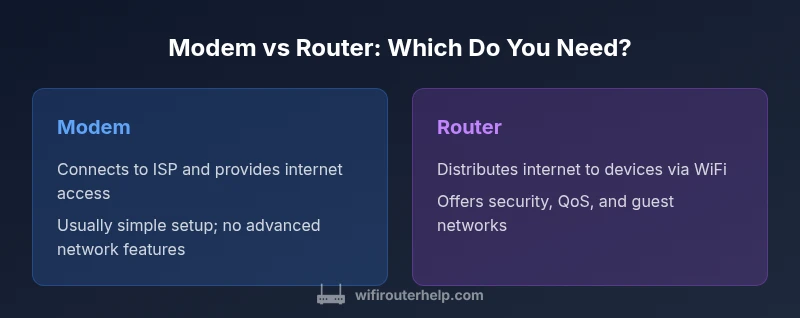
| Role in network | Connects to ISP and provides internet access | Distributes internet to devices via wired and wireless connections |
| Best use case | Direct connection when ISP-provided gateway is required or preferred | Standalone device for flexible control and Wi-Fi |
| Setup complexity | Typically a single connection from the wall outlet to modem | Requires configuring network name, password, and security |
| Performance focus | Reliability of the ISP link; no local routing features | Coverage, speed, and device management within your home network |
| Cost range | Low upfront cost if you already have a gateway or rental modem | Higher upfront cost but longer-term value with control |
| Future-proofing | Limited future flexibility without replacing device | Higher potential for upgrades and mesh integration |
| Security features | Basic firewall and gateway features | Advanced options for QoS, guest networks, and parental controls |
| Best for | Direct ISP connection, simple setups, or when the ISP requires a modem | Homes needing reliable Wi-Fi, advanced settings, and scalable networks |
Benefits
- Clear separation of roles lets you upgrade either device independently
- More control over Wi-Fi settings, security, and guest networks
- Easier troubleshooting since issues are localized to one device
- Better compatibility with future networking gear and mesh systems
The Bad
- Requires more setup work and extra space
- Potential extra cost for multiple devices or higher-end modems
- Cable clutter and more cables to manage
Dedicated router + modem is generally the better long-term choice for most homes.
You’ll gain better Wi‑Fi coverage, stronger security options, and more flexible configuration. Gateways remain convenient but can constrain customization and future upgrades.
People Also Ask
What is the fundamental difference between a modem and a router?
A modem connects you to your ISP and provides internet access. A router creates your home network and distributes that access to devices, usually via WiFi. You may use a gateway that combines both functions, but you lose some flexibility.
A modem gets you online; a router builds your home network and Wi‑Fi.
Do I need a separate modem if my ISP provides a gateway?
Not always; many ISPs offer gateways that include a modem and router. If you want more control or better coverage, you can use a standalone router behind the gateway or place the gateway in bridge mode where supported.
You might not need a separate modem with a gateway, but check bridge mode options.
Can I replace both devices with a single gateway?
Yes, many homes use a single gateway device. However, gateways often limit advanced configurations, and upgrading in the future may require replacing the device.
A single gateway can work, but it may limit advanced features.
What should I consider for fiber Internet?
Fiber services often require a compatible ONT/terminator and a router; some providers supply a gateway. If you own your gear, ensure compatibility with your service and consider a router with strong wireless performance.
For fiber, check whether your provider mandates a gateway or supports bridge mode.
What are the security benefits of a separate router?
A separate router often provides stronger firewall features, more frequent updates, guest networks, and finer QoS controls. Regular firmware updates and strong passwords uplift security.
A dedicated router usually offers better security controls and easier updates.
What to Remember
- Define your internet plan and space before choosing devices
- Prefer a separate router for scalable Wi‑Fi and security features
- Check if ISP gateway can be used in bridge mode before buying
- Budget for a future upgrade path with mesh networking
- Prioritize devices with good security features and firmware support