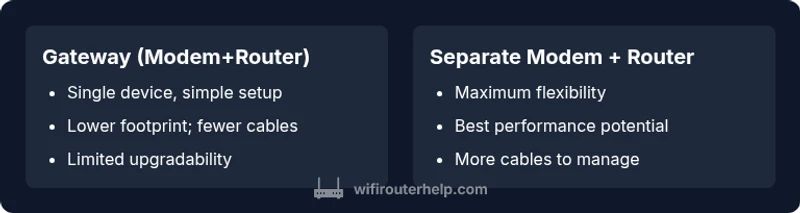
Router vs Modem: A Practical Comparison for Home Networks
A thorough, data-driven guide to choosing between a router, modem, gateway, or combined device for reliable home networking. Learn setup, performance, security, and upgrade implications with practical guidance from WiFi Router Help.


TL;DR: A modem connects your home to the internet, while a router creates and manages your local network. If you can, pair a dedicated modem with a separate router for best performance, flexibility, and upgrade options. A modem-router gateway is simpler but sacrifices some control and future-proofing, which matters for gaming, smart homes, and multiple devices.
Understanding the Core Roles: Modems, Routers, and Gateways
When you set up a home network, you’ll encounter three core devices: a modem, a router, and sometimes a gateway. A modem is the bridge between your home and your internet service provider (ISP); it translates the signal from the ISP into a usable internet connection for your home. A router, on the other hand, creates a private network inside your home—often including Wi‑Fi—and directs traffic between devices, printers, smart home hubs, and your internet connection. A gateway combines both roles in a single box; it provides a modem and a router in one device. In practice, many households end up with a gateway for simplicity, but professionals—like the WiFi Router Help team—often recommend separating the roles to maximize performance and future-proofing. According to WiFi Router Help, the key distinction to keep in mind is the scope of control: a modem enables internet access, while a router enables local networking and device management. If your goal is reliable, scalable performance across many devices, a dedicated router paired with a standalone modem is usually the preferred path. For smaller apartments or limited technical comfort, a gateway can be a sensible starting point, especially when space and wiring are tight. The choice should reflect your household size, device count, and how you use the network (gaming, streaming, work-from-home).
Comparison
| Feature | modem-router gateway (combo) | separate modem + router |
|---|---|---|
| Setup complexity | Low (single device) | Moderate (two devices) |
| Upgrade flexibility | Limited (one device) | Excellent (separate devices) |
| WiFi performance and coverage | Depends on built-in router; may be adequate for smaller spaces | Typically better with a dedicated high-quality router and a capable modem |
| Network security and features | Gateway features built-in; may have fewer advanced options | Full feature set with a modular router (QoS, guest networks, firewall) |
| Reliability and troubleshooting | Simpler, but single point of failure risk | Easier troubleshooting; modular upgrades are straightforward |
| Cost range | Lower upfront (gateway) | Higher upfront but long-term value (two devices) |
Benefits
- Simplified setup with a single device
- Lower upfront cost in small spaces
- Fewer cables and routing clutter
- Fewer devices to manage for non-technical users
The Bad
- Less flexibility for upgrading individual components
- Potential single point of failure if the device malfunctions
- Limited advanced features compared to a high-end standalone router
- Higher long-term costs if you replace components separately
Separate modem and router generally offer the best balance of performance and future-proofing.
Choose a dedicated modem + router when you want strong performance, easier upgrades, and richer feature sets. A gateway can be a solid, cost-effective option for smaller spaces or less technical users, but it trades flexibility and long-term scalability.
People Also Ask
What is the main difference between a router and a modem?
A modem connects your home network to the internet via your ISP, translating the signal from the provider. A router creates and manages your local network, distributing internet to devices and handling tasks like Wi‑Fi, security, and device management. Together they enable home connectivity; a gateway combines both roles in one box.
A modem connects you to the internet; a router runs your home network. A gateway does both in one box.
Can I use a router without a separate modem?
No, a router requires a path to the internet, which is provided by a modem (or a gateway that includes one). If your ISP provides only a modem, you’ll need a router to create your local network. If your ISP provides a gateway, you can still connect a separate router for better performance and features.
You need a device that connects to the internet first; then a router creates your home network.
Do I need a gateway if my ISP provides a router?
If your ISP offers a router as part of a gateway, you can use it, but you may miss advanced features or upgrade flexibility. Many users pair their own router with a standard modem for improved performance and control.
Using your own router with the ISP’s gateway is common for better control and performance.
How does a mesh system fit with modem/router setups?
A mesh system can extend coverage by adding multiple nodes, usually connected to a central router or gateway. Ensure your gateway/modem combo or separate modem supports bridge mode if you want the mesh system to handle routing features exclusively.
Mesh works well with a separate router or a gateway that supports bridge mode.
What is bridge mode and when should I use it?
Bridge mode disables the router functionality in a gateway so another router can handle routing and features like QoS. Use bridge mode when you want to deploy a superior third-party router with your existing modem-gateway setup.
Bridge mode lets your own router take over routing duties from the gateway.
Are there security risks with a gateway vs dedicated router?
Both setups can be secure with proper configuration. Gateways often have fewer advanced security features; a dedicated router allows finer control over firewall rules, firmware updates, and guest networks, which can improve overall security.
Security depends on configuration and updates; dedicated routers often offer more control.
What to Remember
- Decide based on household size and device count
- Prefer separate devices for performance and upgrades
- Gateway devices simplify setup but limit future-proofing
- Plan for security and features like QoS and guest networks
- Expect costs to balance upfront vs. long-term value
- Ensure compatibility with your ISP and plan switch options