Router vs Modem: Understanding the Core Difference for Home Networks
Discover the essential differences between a router and a modem, how they interact, and when to use separate devices or a gateway for optimal home network performance.


At a high level, a modem connects your home to the internet, while a router creates the home network and wires or wireslessly distributes that connection to devices. In most homes, you’ll use separate devices, though many ISPs provide a gateway that combines both functions. Understanding what is router vs modem helps you optimize performance and control.
What is Router vs Modem? Core Concepts
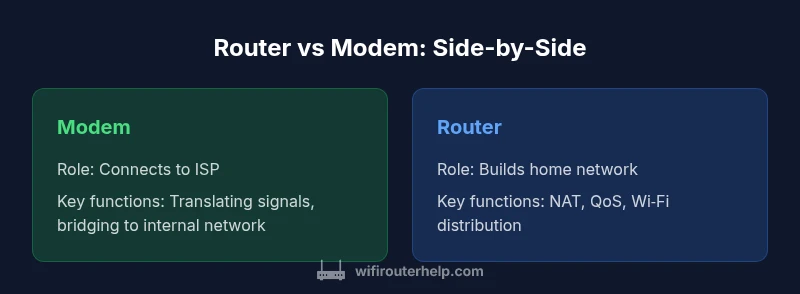
In any home network, the terms router and modem refer to two distinct roles that work together to deliver internet access. Simply put, the modem is the gateway to your Internet Service Provider (ISP), translating the incoming signal into the form your devices can understand. The router, on the other hand, creates the local network inside your home and distributes that connection to computers, phones, smart devices, and more, either over Wi‑Fi or wired Ethernet. Understanding what is router vs modem is essential for designing a network that is fast, stable, and secure. According to WiFi Router Help, recognizing these roles helps homeowners avoid buying the wrong device and makes future upgrades easier. In most households, this separation yields better performance and more flexible control than a single device that tries to do both. The precise responsibilities of each can vary by setup, but the core idea remains constant: the modem connects you to the internet; the router manages your home network. This distinction is the foundation for choosing equipment, planning coverage, and troubleshooting issues when performance lags. When you map your devices to these roles, you unlock a more predictable upgrade path and clearer diagnostics. The goal is a network that is as simple to manage as it is powerful.
How they work together in your home network
Developing a mental model of how data flows helps demystify the modem vs router split. Your ISP provides a data stream over a coax, fiber, or digital line; the modem converts that stream into packets your internal network can handle. The router takes those packets and decides where they should go, creating a local network with unique IP addresses, enforcing security rules, and coordinating traffic. In a typical household, your devices connect to the router via Wi‑Fi or Ethernet; the router then communicates with the modem to send and receive information to and from the broader internet. The result is a two-device stack that is modular and flexible. If you only have a single gateway device, the same responsibilities are wrapped into one box, which can simplify setup but limits customization. From a management perspective, you’ll configure your wireless network settings on the router side and set up security measures like WPA3, guest networks, and firewall rules. If you ever need to expand coverage, the router’s capabilities often determine how easily you can add range extenders or a mesh system. The takeaway is that the modem and router are complementary parts of a scalable home network rather than interchangeable pieces.
Separate modem + router vs gateway: core differences
Choosing between a separate modem plus router and a gateway often comes down to three practical considerations: control, performance, and future upgrades. With separate devices, you gain granular control over every aspect of your network—from the specific firewall rules to the way you prioritize traffic for gaming or video calls. A gateway bundle can be easier to set up, takes up less space, and reduces the number of cables; for many casual users, this is sufficient. Performance can tilt toward the separate devices when you invest in a high‑quality router and a modern modem, especially in homes with multiple floors or many smart devices. On the downside, two devices require more planning, more outlets, and more maintenance. Some ISPs place restrictions on compatible modems or require you to use their own gateway, which makes the choice more complex. Budgeting also plays a role: an integrated gateway might have a lower upfront cost but could limit future upgrades or the ability to tailor features like advanced QoS or VPN support. In short, the decision hinges on how much you value control and upgrade flexibility versus simplicity and compactness. WiFi Router Help consistently notes that the best long‑term setups tend to use separate devices for larger homes and enthusiasts who want advanced networking options.
Performance implications: speed, reliability, and wireless coverage
Performance in home networks is not just about raw speed; it is about consistency, latency, and how the network is configured. The modem handles the connection to your ISP, but the router determines how efficiently that connection is used inside your home. A high‑quality router with a modern wireless standard improves wireless coverage and reduces dead zones, especially on multi‑story homes. When you separate devices, you can upgrade the router to support new Wi‑Fi standards (for example, Wi‑Fi 6/6E) while keeping the modem unchanged if your ISP connection supports it. Conversely, a gateway device tends to be sufficient for lighter usage: basic web browsing, streaming, and light video conferencing in a small apartment. Real-world performance also depends on the number of devices actively connected, the distance from the router, interference from other networks, and how you configure features such as Quality of Service (QoS) and parental controls. If you want to maximize throughput for gaming or 4K streaming, ensure your router supports the needed features and place it centrally, away from obstructions. In this light, the separation of roles gives more room to optimize performance without compromising reliability.
Practical setup patterns for different homes
Different living spaces call for different equipment strategies. In a compact apartment with a single Wi‑Fi source, a single gateway or an energy‑efficient router‑modem pair can deliver solid coverage with minimal clutter. For a multi‑story house or a crowded smart‑home setup, a dedicated modem plus a strong router (or a mesh system) provides more uniform coverage and easier fault isolation. If you already own a high‑performance router, you can connect it to a standard modem and use bridge mode to hand off routing duties to your preferred device, though some ISPs require you to use their gateway in bridging scenarios. Consider the number of simultaneous streams you expect during peak hours. More devices, higher‑quality antennas, and multiple branches of Wi‑Fi will generally yield better results. Additionally, factor in future growth: if you anticipate adding smart home devices, gaming consoles, or home offices, plan for a router with robust processing power and multiple Ethernet ports. In short, map room by room, not just device count; your goal is stable, reliable coverage across all critical spaces.
Advanced concepts: bridge mode, NAT, DHCP, and IP addressing
Understanding advanced networking concepts helps you configure the system without surprises. NAT, or network address translation, lets multiple devices share a single public IP address; DHCP assigns private IPs to devices automatically. If you use a separate router with a modem, you may enable bridge mode on the gateway so the router handles NAT and DHCP; this avoids double NAT, which can cause performance hiccups in gaming or conferencing. In a bridge setup, the ISP gateway passes through the public IP and simply routes traffic to your primary router. You’ll still manage security and firewall settings on the router, while the modem remains in a more passive role. When you keep both devices fully active, you’ll manage IP addressing and port forwarding across both devices, which can be more complex but occasionally desirable in specialized setups. The key is to plan your network map ahead of time, labeling IP ranges and reserving addresses for critical equipment. This discipline reduces conflicts and makes troubleshooting faster.
Troubleshooting common issues and misconfigurations
Most router vs modem problems stem from simple misconfigurations or compatibility mismatches. If you lose internet after a power cycle, first confirm the modem is syncing properly with the ISP and that the router is receiving a public IP. Wi‑Fi coverage issues often point to interference, misplaced access points, or congestion from neighbor networks; adjusting channel width and selecting a less crowded channel can help. Double NAT is a frequent culprit when you connect a router behind another router or gateway; enabling bridge mode or using the gateway’s pass‑through feature can fix this. Password problems usually come from changed WPA/WPA2/WPA3 settings, or guest networks still in use. Regular firmware updates for both modem and router are essential for security and reliability. If you notice inconsistent performance, perform a baseline speed test with a wired connection to isolate wireless issues. Documenting your network topology helps you track changes and rapidly diagnose issues when new devices join the network.
How to choose: a practical decision framework
To choose between separate devices and a gateway, start with a decision framework. Step one: assess space, device count, and the size of your home. Step two: decide whether you want granular control over features like QoS, VPN, and firewall rules; if yes, separate devices are preferable. Step three: estimate your budget for both upfront costs and ongoing maintenance. Step four: consider ISP constraints and compatibility; some providers require using their gateway, others prefer third‑party gear. Step five: plan for future upgrades by selecting a router with sufficient CPU power, memory, and a broad feature set. Finally, if you want a balance, a mid‑range router paired with a reliable modem often delivers strong performance without overwhelming complexity. The core takeaway is to base your choice on current needs plus expected growth, not just short‑term convenience.
Maintenance and future-proofing your home network
Maintaining a router vs modem‑centric network involves regular updates, network hygiene, and mindful expansion. Keep firmware up to date on both devices and monitor security advisories from your manufacturer. Use strong, unique passwords, enable guest networks to keep visitors segmented, and review firewall settings periodically. When planning future upgrades, look for a router that supports newer Wi‑Fi standards and offers features your household will use, such as mesh compatibility, QoS, parental controls, and advanced VPN support. Additionally, maintain awareness of ISP changes; some providers update hardware requirements or policy terms. A well‑organized network map—labeling devices, IP addresses, and fixed ports—reduces complexity and speeds troubleshooting. By investing in a scalable solution now, you avoid repeated replacements as your home grows and technology evolves. The end result is a resilient, easy‑to‑manage network that remains capable for years to come.
Comparison
| Feature | Separate modem + router | Gateway (modem-router combo) |
|---|---|---|
| Setup complexity | Higher (two devices, separate configs) | Lower (one device, simpler setup) |
| Upgrade path | More flexible (swap/upgrade individually) | Limited upgrade options within a single device |
| Network management features | Advanced options (QoS, guest networks, customizable firewall) | Basics with fewer advanced options |
| Reliability and troubleshooting | Potentially longer support; more components to diagnose | Concentrated issues; simpler troubleshooting |
| Cost and space | Higher upfront cost; needs space for two devices | Lower upfront cost; one compact unit |
Benefits
- Greater control over performance and security with separate devices
- Easier upgrades and future-proofing as needs grow
- Optimal for large homes with many users and smart devices
The Bad
- Higher upfront cost and more equipment to manage
- Increased setup complexity and space requirements
- Two devices require more maintenance and power
Separate modem + router is the recommended approach for most homes.
For most households, using separate devices gives greater control over performance and security, and makes future upgrades easier. If simplicity and a lower upfront cost are highest priorities, a gateway may suffice.
People Also Ask
What is the difference between a modem and a router?
A modem connects you to the internet; a router builds the home network and distributes that connection to devices. They serve different roles, which is why many setups use separate hardware for best control and upgradability.
The modem gets you online, the router gets you wired or wireless access inside your home.
Can I use a single device that acts as both modem and router?
Yes, many providers offer a gateway that combines both functions. It’s simpler, but it can limit upgrade options and advanced networking features.
A single box can work, but it reduces flexibility if you want to upgrade parts later.
Bridge mode: what is it and when should I use it?
Bridge mode disables the gateway’s routing features so another router handles your network. Use it when you want full control from a third‑party router and to avoid double NAT.
Bridge mode makes your main router take the wheel, with the gateway acting like a pass-through.
Do I need a separate modem if my ISP provides a gateway?
Not necessarily. Check with your ISP for compatibility and whether your planned setup benefits from a dedicated modem and router instead.
It depends on your needs and what the provider allows.
How do I know if my router supports my internet speed?
Look for current Wi‑Fi standards (Wi‑Fi 6/6E) and a fast WAN/LAN interface. A newer router can handle higher speeds more reliably than older models.
Make sure the router supports the speed tier you have with your internet plan.
What factors should guide upgrading my home network?
Consider home size, device count, coverage needs, and whether you’ll benefit from features like QoS, mesh, and VPN. Prioritize future-proofing, not just current needs.
Think about space, devices, and future plans when upgrading.
What to Remember
- Assess your priorities: performance, coverage, or simplicity
- Prefer separate devices for flexibility and growth
- Use bridge mode when integrating third-party routers
- Check ISP compatibility before purchasing gear
- Plan for future upgrades to avoid repeat investments