Router vs a Modem: Clear Guidance for Home Networks
A balanced, evidence-based comparison of router vs a modem, with practical setup tips and performance guidance for reliable home networks and better coverage.


TL;DR: In most homes you need both a modem and a router to create a reliable network. A modem connects you to your ISP, while a router distributes Wi‑Fi and manages local devices. Some gateways combine both, but standalone routers typically offer better range, security, and features. The WiFi Router Help team suggests mapping your needs before buying.
Router vs a Modem: Definitions and Core Roles
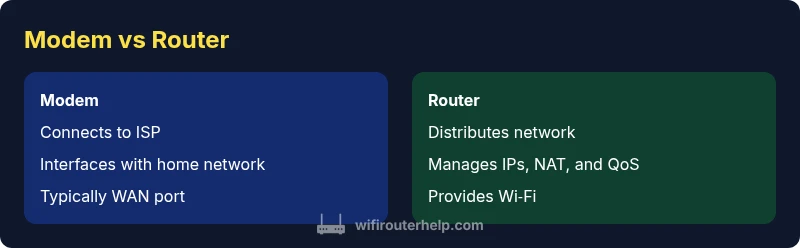
According to WiFi Router Help, understanding the two foundational pieces of a home network is essential when planning any upgrade. A modem is the device that interfaces with your Internet Service Provider (ISP). It translates the digital signal from the ISP into a form your local network can use. A router, by contrast, creates the home network itself. It assigns local IP addresses, directs traffic between devices, and distributes Wi‑Fi or wired connectivity. In many homes, a single gateway combines both functions, but this integration often trades off flexibility for simplicity. Grasping these roles helps homeowners decide what they truly need for stable performance and future-proofing.
In practical terms, think of the modem as the translator between the outside world and your network’s inside world, while the router is the traffic cop inside your house. This basic split matters whether you’re streaming, gaming, working remotely, or running a smart‑home setup. The goal is to separate the two roles so you can upgrade one component without replacing the other. Branding and terminology can vary, but the core ideas remain constant across ISPs and home setups.
titleOnlyForSearchIgnoreOnceNotNeededForGUIDanceInInitialBlockForSerpIndexingHowever
markdownForContentStyleNotApplied
Comparison
| Feature | Modem | Router |
|---|---|---|
| Primary role | Connects to ISP and Modulates signal over your last‑mile connection | Creates the home network, assigns local IPs, and distributes Wi‑Fi and wired connections |
| Nature of device | Typically a dedicated interface to the ISP signal (coax, fiber, or DSL) | Standalone device or a gateway that handles routing and Wi‑Fi |
| Best for | Simple, single‑device setups when ISP gateway suffices | Flexible, scalable homes with advanced features and better coverage |
| Setup complexity | Low to moderate (depends on provider and mode) | Moderate to high (depends on features like QoS, guest networks) |
| Security features | Basic NAT and firewall, firmware often tied to ISP updates | Advanced options: QoS, VPN, guest networks, parental controls, regular updates |
| Future-proofing | Limited if using an all‑in‑one gateway | High when using separate, upgradeable components |
Benefits
- Flexible upgrade path with separate devices
- Better performance and range with high‑end routers
- Stronger security controls and feature sets with updated firmware
- Clear fault isolation makes troubleshooting easier
- Easier to tailor coverage with mesh networking options
The Bad
- Higher upfront cost for two devices
- Slightly more setup effort and management
- Requires more space and power outlets
- Potential for misconfiguration if not careful
- Relying on multiple devices can complicate firmware updates
A modular modem + router setup generally provides the best balance of performance, control, and future-proofing.
For most homes, a separate modem and router yields superior coverage, security, and upgradeability compared with a single gateway. If simplicity and space are paramount, a gateway can be acceptable, but you’ll likely trade some flexibility over time.
People Also Ask
What is the fundamental difference between a router and a modem?
A modem connects your home network to the Internet by interfacing with your ISP. A router creates and manages your local network, assigns IP addresses, and distributes Wi‑Fi to devices. Understanding this separation helps you decide how to build a robust home network.
A modem brings the Internet into your home; a router shares it with all your devices.
Do I need a modem if my ISP provides a gateway?
If your ISP gateway can meet your coverage and performance needs, you may not need a separate modem. However, many users eventually prefer a dedicated router for better control, features, and longer-term upgradability.
A gateway can work, but a separate router often wins for flexibility.
Can I use a single device in a small apartment?
Yes. In small spaces, a single gateway can be sufficient and simple to manage. If you expect growth or demanding tasks, plan for a future upgrade to a separate router.
One device can do the job, but plan for growth.
What is bridge mode and when should I use it?
Bridge mode turns off a gateway’s routing features so you can run a separate router. Use it when you want a dedicated router to handle local traffic while the ISP gateway focuses on Internet access.
Use bridge mode if you want to use your own router for better control.
How often should I update router firmware?
Check for updates monthly and apply security patches promptly. Regular updates keep features current and reduce vulnerabilities.
Keep firmware up to date to stay secure and fast.
Is a two‑device setup worth it for a small home?
In small spaces, a two‑device setup can still be beneficial for reliability and security, but it may be overkill for very basic needs. Start with a good router and assess performance.
Two devices can be great for reliability, but not always needed in small spaces.
What to Remember
- Separate devices offer better flexibility and upgrade paths
- Dedicated routers improve range, QoS, and security features
- Bridge mode can help if you need to use a personal router with an ISP gateway
- Regular firmware updates are essential for security and performance
- Plan ahead for future needs like mesh networking and smart home growth