Router vs Modem for WiFi: A Practical Guide
A practical, evidence-based guide comparing router vs modem for wifi, with setup tips, security considerations, and upgrade paths for home networks.


Standalone router plus separate modem generally offers the best balance of control and future-proofing for wifi. Gateways simplify setup but limit upgrades. See our full comparison for scenarios, recommendations, and practical setup steps.
Why choosing between a router or modem for wifi matters
In the home network, the decision to use a separate router and modem or a single gateway device shapes ongoing performance, security, and the flexibility to grow. According to WiFi Router Help, this choice matters not only during initial setup but for how you manage devices, firmware, and future upgrades. For the average homeowner, the complexity of a two-device setup can pay off with improved tuning and expandability; for renters or busy households, a gateway can reduce touchpoints. When you assess your internet plan, number of connected devices, and desired features, you begin to see how the router or modem for wifi question maps directly to your daily experience. The rest of this guide breaks down the options, highlights the tradeoffs, and provides a practical framework you can apply to your situation. Throughout, we’ll emphasize real-world factors like compatibility, security, and long-term value so you can make a confident decision.
Understanding the two core components
A modem is the bridge between your ISP and your home network; it translates the signal from your internet service into data your devices can use. A router takes that data and creates a local network, assigns IP addresses, and directs traffic to devices like phones, laptops, and smart TVs. In many homes, a gateway device combines both functions in one box. When you think about router vs modem for wifi, the key differences come down to control, features, and upgrade paths. NAT, DHCP, firewall rules, and guest networking are typically managed at the router or gateway level, while the modem handles the connection to the wider internet. Understanding these roles helps you decide which path aligns with your goals, whether you’re optimizing for gaming, streaming, or smart-home reliability.
When a standalone modem is enough
Standalone modems are often all you need when your internet plan is straightforward and you already own a capable router. This setup shines for users who want maximum flexibility to swap routers as new devices or standards emerge, or who require advanced features like VLANs and robust Quality of Service (QoS) controls. If your ISP supports bridged operation or you control the bridge between the modem and a separate router, you can often achieve cleaner network management. Standalone modems also tend to reduce vendor lock-in, allowing you to pick a router whose firmware and feature set best meet your needs. For this path, check compatibility lists from your ISP and ensure your modem supports the speeds and technologies you subscribe to, without relying on a single, bundled solution.
When a standalone router is the better choice
A dedicated router becomes the centerpiece when your home network includes many devices, requires strong wireless coverage, or you want control over security and performance. A powerful router can deliver better Wi‑Fi range, more granular QoS, and more sophisticated firewall settings than a typical gateway device. This route also supports future growth: add mesh extenders, guest networks, and parental controls without being constrained by an all-in-one box. If your ISP provides only a basic modem or you prefer to shield your devices behind a robust routing layer, a standalone router plus a separate modem balances performance with upgradeability. It’s especially advantageous for gaming, streaming, and smart homes where latency, stability, and configurability matter most.
What a gateway device (modem+router) offers and where it falls short
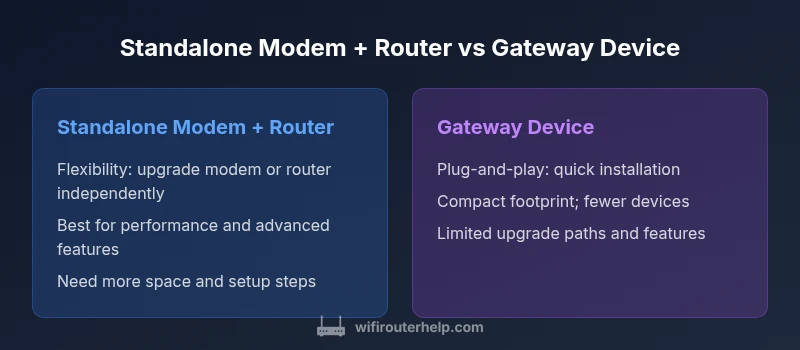
Gateway devices simplify installation by combining modem and router in a single unit, which can be ideal for small spaces or users who want plug‑and‑play setup with minimal tweaking. They reduce the number of devices to manage and can be sufficient for typical internet usage with a modest number of connected devices. However, all-in-one units can limit upgrade paths and sometimes constrain advanced features or precise control over traffic routing. If you’re in a rental or prefer a low-maintenance setup, a gateway might be a practical short‑term choice. For long-term performance, security, and customization, many users eventually migrate to a separate modem and router combination to preserve flexibility.
Practical considerations: speed, compatibility, and ISP requirements
When evaluating router vs modem for wifi, consider your internet plan, device density, and household behavior. Cable ISPs often use DOCSIS standards; newer DOCSIS versions are compatible with higher planned speeds but may require a newer modem. Fiber users will encounter different equipment requirements, typically involving an ONT and a compatible router. Compatibility with your ISP, bridging capabilities, and the ability to use your own router with a gateway or combo device should guide your choice. Make sure any device you buy supports your intended security features, firmware update policy, and local networking needs, such as guest networks or parental controls. In short, the decision hinges on how much you value upgradeability, control, and ongoing maintenance.
Setup pathways: from purchase to optimal configuration
Choosing between a modem and router for wifi starts with a clear plan. Step one is confirming compatibility with your ISP and the type of internet service (cable, fiber, or DSL). Step two is deciding your topology: standalone modem + router, or gateway device. Step three involves configuring the router’s fundamental settings: SSID, password, security mode (WPA3 if supported), and enabling a guest network. Step four is enabling essential security features: firewall rules, automatic firmware updates, and VPN considerations if applicable. Step five includes testing coverage, using tools to map dead zones, and adding optional mesh extenders if needed. Finally, step six is documenting your setup so future upgrades are straightforward. Throughout this process, you’ll want to keep the keyword router or modem for wifi in mind, ensuring every choice supports your long-term goals and household usage.
Security and maintenance implications
Security is a recurring priority when choosing between router vs modem for wifi. A standalone router lets you apply granular firewall rules, intrusion prevention features, and scheduled firmware updates for critical devices. An all-in-one gateway can simplify security if the vendor provides consistent, seamless updates, but may limit your ability to customize protections beyond the defaults. Regular maintenance—checking for firmware updates, reviewing connected devices, and adjusting guest networks—helps prevent common attacks and reduces the risk of compromise. Consider enabling automatic updates where possible, disable universal default passwords, and use strong, unique passwords for every device. If you manage a smart home, create separate networks for IoT devices and primary devices to minimize lateral movement in case a device is compromised.
Comparison
| Feature | Standalone Modem + Separate Router | Gateway Device (Modem + Router) |
|---|---|---|
| Upfront cost | Low to mid (two devices) | Medium (all-in-one) |
| Upgrade path & flexibility | High flexibility (swap components) | Lower flexibility (integrated system) |
| Performance tuning | High control and customization | Unified but constrained feature set |
| Space & power footprint | Two devices; larger footprint | Single device; compact |
| Troubleshooting simplicity | Easier to isolate issues | Single point of failure; simpler initial setup |
| Security & updates | Independent updates; advanced options | Unified updates; potential vendor lock-in |
| Best for | Tech-forward homes; future upgrades | Small spaces; plug-and-play |
Benefits
- Greater flexibility to upgrade components over time
- Better performance and customization with a dedicated router
- Easier to troubleshoot by isolating modem and router
- Supports advanced networking features (QoS, VLANs, firewall)
The Bad
- Two devices require more space and power
- Higher upfront cost
- More setup complexity and potential compatibility issues
Standalone router + separate modem is the recommended setup for most homes seeking flexibility and performance.
For most homes, separating the modem and router provides the best balance of performance, security, and future-proofing. Gateway devices offer convenience but limit upgrade options and advanced features. Use your ISP compatibility and space constraints to decide.
People Also Ask
What is the difference between a modem and a router?
A modem connects your home network to the Internet, translating signals from your ISP. A router distributes that connection to devices in your home, creating a local network and managing traffic. A gateway combines both functions in a single box, which can be convenient but less flexible.
A modem brings in the internet; a router shares it with devices at home. If you want more control, add a separate router.
Can I use a gateway device with fiber internet?
Fiber connections often require an optical network terminal (ONT) provided by the ISP; some gateway devices can work in bridge mode with an ONT, but check compatibility and service terms with your provider.
Yes, but you’ll often need the provider’s ONT and to confirm bridge options with your ISP.
Do I need bridging mode to use my own router with a gateway?
Bridge mode disables the gateway’s router and lets your own router handle routing and security. This is common when you want features your gateway doesn’t offer or prefer a specific router’s performance.
Bridge mode lets you use your own router with a gateway if you want more control.
Which setup is best for gaming?
A dedicated router with strong QoS and low latency is typically best for gaming. If you use a gateway, enable QoS and consider placing the router in a central location or adding mesh satellites to reduce latency.
For gaming, use a strong, configurable router and optimize QoS.
How do I bridge a gateway device?
Log in to the gateway’s admin page, locate Bridge Mode or IP Passthrough, and follow the prompts to disable routing features. Reboot and connect your own router to the gateway’s WAN/Internet port.
Bridge mode is usually found in the gateway settings under 'Advanced' or 'WAN' options.
Is NAT necessary for home networks?
NAT is standard for typical home networks to conserve public IP addresses and add a layer of security. In bridging mode, NAT is managed by your own router, not the gateway, which can be desirable for certain setups.
NAT is common; in bridge mode your router handles NAT.
What to Remember
- Choose separate modem + router for maximum control and future-proofing.
- Gateway devices simplify installation but constrain upgrades.
- Consider ISP compatibility and bridging when mixing devices.
- Security updates and feature sets should influence decisions.
- Budget wisely by balancing upfront cost with long-term value.