Modem vs Router: What Does a Modem Do Compared to a Router
A practical, vendor-neutral comparison of what a modem does vs a router, how they work, and when you need each for a reliable home network.


In short, a modem translates your internet signal from the ISP into a digital signal your home network can use, while a router creates and manages your local network, assigns IP addresses, and directs data between devices. The key difference is that the modem connects you to the internet, and the router distributes that connection to multiple devices.
What does a modem do compared to a router?
In modern home networks, most households rely on both a modem and a router, but their roles are distinct. The question what does a modem do compared to a router highlights the two devices' separate responsibilities. According to WiFi Router Help, a modem acts as the bridge between your home network and your Internet Service Provider (ISP), translating signals from the provider into a digital form your devices can use. A router, on the other hand, creates and manages your local network, assigns IP addresses, and directs data between devices. Understanding this fundamental separation helps homeowners troubleshoot connection gaps, plan upgrades, and choose equipment that matches their internet plans. By the end of this article, you'll see how these roles interact and where to invest for the best balance of performance, security, and simplicity.
How a modem connects you to the internet: the essential role
A modem serves as the translator between your ISP and your home devices. In most deployments, your internet service arrives via a physical medium—coaxial cable, telephone lines, fiber, or other media—and the modem converts that signal into a digital stream that your network can interpret. The specifics vary by technology: for example, cable modems use DOCSIS technology, while fiber layouts depend on an optical network terminal (ONT) that performs a similar conversion. The modem also manages the downstream and upstream channels the ISP uses to send and receive data, ensuring your devices can access the internet. This step is foundational; without a properly functioning modem, a router alone cannot access online resources.
How a router builds a local network: distributing access and control
A router’s core function is to create a home network from the internet connection you receive. It assigns private IP addresses on your home network, manages traffic between devices, and provides features like Wi‑Fi access, guest networks, firewall protection, and parental controls. Modern routers handle multiple devices, support stable streaming, and offer QoS (Quality of Service) settings so traffic from video calls or gaming gets priority when needed. In short, if the modem is the mouth through which data enters your home, the router is the brain that orchestrates it all. While some devices combine both roles into a gateway, many households prefer separating the two for flexibility and future-proofing.
Integrated gateways vs. separate devices: a quick framing
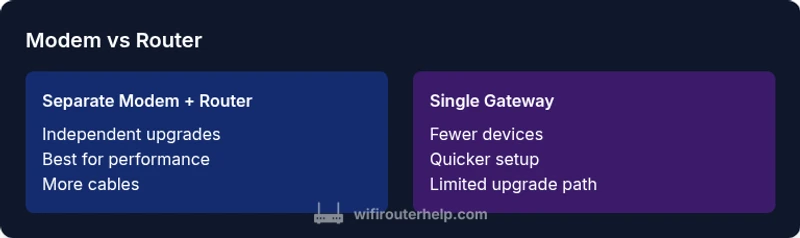
In many homes, ISPs provide a gateway device that combines modem and router functions. This can simplify setup and reduce clutter, but it also ties your router’s capabilities to one device, which may limit upgrade paths. Separating the modem and router gives you the freedom to swap in a higher-performance router when your network demands increase, or to replace the modem without touching the router. The best choice depends on your internet plan, home size, and willingness to manage two devices versus one. You’ll often see a trade-off between simplicity and customization, especially when aiming for optimal Wi‑Fi coverage and robust security.
Comparison
| Feature | Separate Modem + Router | Single Gateway (Modem-Router Combo) |
|---|---|---|
| Connectivity to ISP | Requires a separate modem device | Includes built-in modem in gateway |
| Upgrade path | Router upgrades independently; modem stays the same until ISP changes hardware | Gateway may constrain upgrades; device replacement often needed for newer features |
| Customization and features | High flexibility: advanced QoS, VPN, guest networks, mesh setups | Often mid-range features; some gateways lock features behind ISP firmware |
| Placement and cabling | Two devices: more cables and space, but flexible placement | One device: fewer cables, simpler setup |
| Security updates and firmware | Independent updates for modem and router; vendor-driven schedules vary | Updates tied to gateway firmware; may be slower or less frequent |
| Cost considerations | Higher upfront cost, but longer-term flexibility; easy to upgrade selectively | Lower upfront cost but potential higher replacement cost if the gateway becomes obsolete |
Benefits
- Clear separation enables independent upgrades of the router and modem
- Greater compatibility with a wide range of routers and network gear
- Potential for superior Wi‑Fi performance with a high-end router
- Easier troubleshooting: a problem can be isolated to one device
- Flexible future-proofing through selective hardware updates
The Bad
- More clutter: two devices require extra space and cabling
- Higher initial cost with two devices
- More complexity during setup and troubleshooting for non-technical users
- Possible ISP compatibility considerations if using non-ISP-supplied modems
Separate modem + router generally offers more flexibility and long-term value.
If you want maximum control over performance, security, and upgrade paths, choose a separate modem and router. A gateway is convenient for a simple setup, but it can limit future-proofing and customization.
People Also Ask
Do I need a separate modem if I already have a router?
Not necessarily. Some ISPs provide gateways that combine modem and router functions, which can be convenient. If you want more control or plan to upgrade your Wi‑Fi later, using a separate modem and router is common. Always verify compatibility with your ISP before purchasing.
You don’t always need two devices—ISPs often provide gateways, but separate modem and router offer more control and upgrade options.
Can a router replace a modem?
No. A router cannot connect directly to the internet without a modem or an ONT in fiber setups. A modem (or ONT) is required to translate the ISP signal to a digital form your router can manage.
A router alone won’t connect you to the internet; you still need a modem or an ONT for fiber.
What is bridge mode and when should I use it?
Bridge mode disables the router functions in a gateway, turning it into a passive network bridge. This is useful when you want to use a dedicated, more capable router behind a modem or gateway but still want to access the internet via the ISP connection.
Bridge mode lets you use your own router instead of the gateway’s built-in router.
How do I know if my ISP requires a specific modem?
Check your ISP’s official list of compatible modems or contact support. Some providers lock features to approved hardware, while others support third-party modems with compatible configurations.
Look up your ISP’s compatibility list to avoid surprises.
What is NAT and why does it matter?
Network Address Translation (NAT) lets multiple devices share a single public IP address. It helps with security and network management, especially when you run multiple devices, servers, or IoT products at home.
NAT helps your many devices share one public address securely.
What to Remember
- Separate devices offer greater upgrade flexibility
- A gateway simplifies setup but may limit advanced features
- For best performance, pair a high-quality router with a compatible modem
- Expect two devices to require a bit more space and planning
- Stay mindful of ISP compatibility when choosing a modem