Is Router the Same as Modem? A Practical Comparison
Is router the same as modem? Explore the difference, setups, and when to separate devices for performance, security, and future-proofing in this detailed comparison.


Is router the same as modem? In short: no. A modem connects your home network to your Internet Service Provider and translates signals from the ISP into a digital format. A router, by contrast, distributes that connection to multiple devices, creates a local network, assigns IP addresses, and manages traffic. Some devices combine both functions, but true separation often yields greater flexibility, easier upgrades, and better security.
is router the same as modem? Core distinctions
The
Core Roles: how each device fits into the network
A modem’s job is to translate the ISP signal into a usable data stream for your home network. Without a modem, your router would have no internet input. A router takes that input and creates local IPs, assigns devices their addresses, and determines how traffic moves within the network. It handles wireless distribution (Wi‑Fi) and wired connections, enabling features such as NAT, DHCP, firewall protections, and port forwarding. Many households benefit from keeping these roles separate, which allows you to upgrade one side (e.g., swap out the router for a faster model) without replacing the other. For most users, clarity about these roles helps avoid double NAT issues and simplifies troubleshooting.
When combined devices are convenient, but have trade-offs
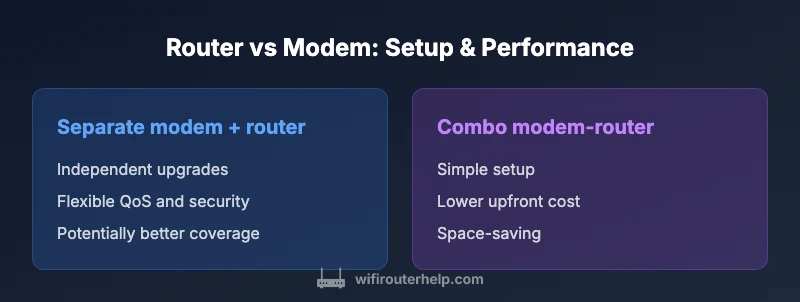
Some manufacturers market devices that function as both a modem and a router. These combo gateways are convenient, take up less space, and can simplify setup for non-technical users. However, the trade-offs include limited upgrade paths, potential performance bottlenecks, and less flexibility in choosing best-in-class hardware for each role. If you anticipate heavy streaming, gaming, or smart-home expansion, separating the devices often yields better long-term performance and configurability. In short, a combined device may be suitable for small households or where space and simplicity are priorities, but a modular approach offers more control as needs evolve.
Hooking them up: basic wiring and common configurations
At a minimum, you connect the modem to the internet service line (coax, fiber, or DSL, depending on your ISP). Then you connect the router to the modem’s Ethernet output to distribute the signal to devices. If you choose a separate modem and router, you’ll typically place the modem near the service entry and your router in a central location. If you opt for a combo device, you’ll use the built-in features to configure Wi‑Fi networks and security. A crucial concept to consider early is how you want to handle IP addressing and routing (DHCP, NAT) to ensure devices can access resources smoothly.
Why the distinction matters for reliability and security
Separating devices can improve reliability because a failure on one unit doesn’t necessarily bring the entire network down. It also makes it easier to upgrade or replace outdated hardware. On the security side, dedicated devices can offer more granular controls, stronger firmware update management, and targeted protections for devices on your network. For households that handle sensitive work or personal data, such controls are valuable. The keyword is flexibility: when is router the same as modem? The best answer is that flexibility is the core benefit of separating the roles.
ISP considerations and rental gear
Many ISPs offer rental modem-router hybrids or gateway devices as part of service. While convenient, rentals can be more expensive over time and limit customization. If long-term cost and control are priorities, owning your own equipment—modem from the ISP-validated list and a high-quality router—often provides better value and support for future upgrades. Be mindful of compatibility when purchasing a separate modem; some ISPs require approved models or activation setups.
Compatibility, bridge mode, and double NAT pitfalls
If you plan to use a separate router behind a supplied gateway, you may need to enable bridge mode on the ISP device. This disables the gateway’s routing functions and prevents double NAT, which can cause issues with VPNs or online gaming. Conversely, leaving the gateway in router mode while using your own router candouble the NAT layers and complicate port forwarding. A well-planned setup with bridge mode enabled on the ISP device ensures clean routing and easier troubleshooting.
Real-world scenarios: when to separate, when to combine
- Small apartments with modest internet needs: a single combo device can be sufficient for simplicity.
- Homes with multiple devices, performance demands, or smart homes: separate modem and router typically delivers better speed, coverage, and control.
- Home offices or gaming rigs: dedicated hardware and fine-grained QoS policies help maintain stable latency and throughput.
- Renters or temporary setups: a combo device offers rapid deployment and minimal maintenance, but upgrading later may require a new rental or device purchase.
Practical steps for a modular setup (quick start)
- Confirm compatibility: ensure the modem is approved by your ISP for use with your service. 2) Choose a router with the features you need (Wi‑Fi 6/6E, QoS, parental controls, security). 3) Decide on placement for best coverage (central, elevated, away from interference). 4) Connect the modem to the ISP line; connect the router to the modem. 5) Configure a unique SSID, separate guest network if needed, and set a strong admin password. 6) Enable automatic firmware updates for both devices. 7) Test speeds and run a basic security audit.
A note on terminology and staying up-to-date
Industry terminology can vary by vendor and region. The core concepts—modem for ISP connectivity and router for local network management—remain constant. Staying informed about firmware updates, security practices, and new features will help you keep the network reliable over time. Regular reviews of your setup, especially after hardware upgrades or ISP changes, will reduce downtime and confusion when asked to explain whether is router the same as modem.
Conclusion: setup, maintenance, and choosing a path
Choosing between a separate modem and router versus a combo gateway depends on priorities: cost, ease of setup, upgrade potential, and network control. The best practice for most homeowners aiming for resilience and future-proofing is to use a standalone modem with a capable router. This approach supports growth and provides a clear upgrade path as your needs evolve.
Comparison
| Feature | Separate modem + router | Combo modem-router device |
|---|---|---|
| Setup complexity | Moderate to high (two devices) | Low to moderate (one device) |
| Upgrade flexibility | High (independent upgrades) | Low (tied to one device) |
| Performance potential | Higher with dedicated hardware | Limited by integrated hardware |
| Initial cost | Typically higher upfront | Typically lower upfront |
| Security controls | Granular controls with separate devices | Simplified controls with fewer options |
| Best for | Custom networks, future-proofing, heavy usage | Simplicity, small spaces, easy setup |
Benefits
- Better performance potential with dedicated devices
- Greater flexibility in upgrades and troubleshooting
- Easier to isolate issues and manage security
- Customizable network features (guest networks, QoS, VLANs)
The Bad
- Higher upfront cost for two devices
- Increased setup complexity and cable management
- Space and power considerations for multiple units
- More devices to monitor and update
Separate modem and router generally offer more flexibility and future-proofing.
If you want peak control, easier upgrades, and robust security, use separate devices. A combo gateway can be sufficient for small households or a quick-start setup, but it trades long-term adaptability for simplicity.
People Also Ask
Is a router the same as a modem?
No. A modem connects to your ISP and translates signals into a digital stream, while a router creates and manages your home network. They serve different roles, though some devices combine both functions.
No—modems connect you to the internet, routers build your home network. They’re different devices, though some gateways combine both features.
Can I use my existing modem with a new router?
Yes, in most cases you can pair a separate router with your current modem. Ensure the modem is compatible with your ISP and that you configure bridge mode if needed to avoid double NAT.
Yes, you can usually pair a new router with your existing modem. Check compatibility and consider bridge mode to prevent double NAT.
What is bridge mode and when should I use it?
Bridge mode disables the routing features on your ISP gateway, allowing your separate router to handle all network duties. Use it when you want to avoid double NAT and maximize performance with your own router.
Bridge mode turns your ISP gateway into a simple modem, so your own router handles everything. It helps prevent double NAT and improves performance.
Should I rent ISP equipment or buy my own?
Buying your own modem and router often lowers long-term costs and gives you full control. Renting can be convenient upfront, but ongoing fees add up and limits customization.
Buying your own gear usually saves money over time and gives you control. Renting is easier upfront but costs more in the long run.
What happens if I have a double NAT problem?
Double NAT can break certain apps and games. Enabling bridge mode on the ISP device or placing your router in the correct network mode helps prevent this.
Double NAT can cause issues with some apps. Use bridge mode or proper configuration to fix it.
How do I upgrade firmware safely?
Update firmware on both devices from trusted sources. Back up configurations, avoid abrupt power loss during updates, and follow manufacturer guidance to minimize risk.
Keep firmware current, back up settings, and avoid power loss during updates.
What to Remember
- Separate modem + router provides flexibility and performance gains
- Combo devices simplify setup but limit upgrades
- Bridge mode can prevent double NAT with separate devices
- Choose based on household size, usage, and upgrade plans