Internet Router vs Modem: Understanding the Key Differences
Explore the differences between internet routers and modems, when to use each, and how to choose the right setup for reliable, secure home networking. Learn how to optimize throughput, coverage, and configuration.


In the debate of internet router vs modem, the modem connects your home to the Internet and translates your ISP signal, while the router builds your local network and shares that connection to devices over Wi‑Fi or Ethernet. For most homes, a gateway (modem-router combo) or a dedicated router with a separate modem offers better performance, clearer control, and stronger security.
What is a modem and what is a router? Roles and definitions
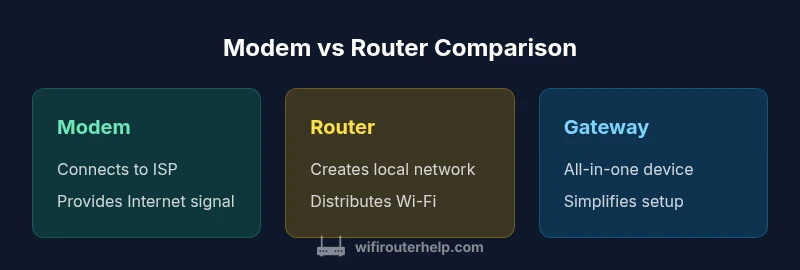
A modem is the device that connects your home network to your Internet service provider. It translates the signal from the ISP into a format your equipment can use. A router, on the other hand, creates a local network in your home, assigns IP addresses, and shares the Internet connection with devices via wires or Wi‑Fi. In the context of the keyword internet router vs modem, understanding these roles is essential for diagnosing performance issues, planning upgrades, and choosing the right hardware. According to WiFi Router Help, most homes benefit from at least one router role component, and modern setups often combine both functions in a gateway device. However, depending on your home size and usage, separating the two can offer clearer control and potential cost savings over time.
Key differences at a glance: speed, control, and scope
The most obvious difference is function: a modem connects to the Internet, a router serves devices on your network. Beyond that, you gain different levels of control over features such as NAT, firewall rules, guest networks, and QoS when you use a dedicated router. In practice, the choice affects speed distribution, network reliability, and ease of troubleshooting. When you evaluate internet router vs modem, you should consider whether you need Wi‑Fi coverage, wired performance, parental controls, and the ability to upgrade parts of the system separately. WiFi Router Help notes that dedicated routers typically deliver better Wi‑Fi performance and more robust features, while gateways simplify installation and reduce cable clutter. This distinction influences how you plan future upgrades and whether you prefer a modular or all-in-one solution.
How devices typically connect to household networks
At the ISP connection, the modem is the bridge that accepts the signal. If you are using two devices (modem and router), you connect the modem to the router's WAN port. If you use a gateway device, the gateway handles both tasks in one chassis. In bridging or pass‑through configurations, the router receives the Internet signal from the modem and then manages routing, NAT, and Wi‑Fi. Understanding these basics helps you decide whether you should place devices in a single room for better coverage or distribute them across floors for even distribution. The decision also affects troubleshooting steps when devices cannot access the Internet, as you will validate either the modem, the router, or both rather than chasing a single device.
Performance factors: throughput, latency, and reliability
Performance depends on the combination of hardware, firmware, and network topology. A separate modem + router allows you to upgrade one piece at a time, test for bottlenecks, and apply targeted improvements such as upgrading the router’s antenna, enabling QoS, or configuring VLANs. In general, a gateway can offer simpler management but might constrain advanced features or support for high‑end Wi‑Fi standards. Latency is influenced by processing time in devices and by how you place them in your home; adding mesh nodes or repositioning the router can reduce dead zones. WiFi Router Help’s analysis shows that many households see tangible improvements by starting with a better router and employing proper placement, rather than relying on the ISP’s gateway alone. Consider your Internet plan’s speed and your devices’ needs—gaming and streaming often benefit from separate, well‑positioned hardware.
Practical scenarios: fiber, cable, DSL, and mobile hotspots
Different Internet service types interact differently with modems and routers. Fiber connections often require a modem from the provider and a high‑performance router or mesh system to deliver full gigabit speeds. Cable modems vary by DOCSIS standard; pairing a DOCSIS 3.1 modem with a modern router typically yields strong performance. DSL services add potential bottlenecks if the router is not optimized for long copper runs. In many homes, mobile hotspots supplement fixed connections; however, they usually have data caps and less stable latency. In these situations, a dedicated router offering multiple WAN options, failover, and robust QoS can help maintain reliable performance. The bottom line: match your hardware to your service type and expected use cases like gaming, video conferencing, and smart‑home automation.
Security and privacy considerations
Security is not optional in modern home networks. Both a modem and a router should be kept up to date with firmware patches and configured with strong, unique passwords. A router provides essential security features such as firewall rules, guest networks, and network segmentation; you should enable these features where possible. If you use bridge mode to place a separate router in charge, you can avoid double‑NAT and ensure consistent firewall policy across devices. Regularly review connected devices and use device‑level protections like WPA3 and automatic firmware updates. WiFi Router Help highlights that a safer network begins with simple steps: disable WPS, enable automatic updates, and set a guest network for visitors.
How to decide: a step‑by‑step buying checklist
- Determine your home size and coverage needs; 2) Decide whether you want an all‑in‑one gateway or separate modem and router; 3) Check ISP compatibility for any modem; 4) Evaluate router features: Wi‑Fi standards, MU‑MIMO, QoS, parental controls; 5) Consider future upgrades, such as mesh systems or Wi‑Fi 6/6E support; 6) Budget for initial purchase and ongoing maintenance; 7) Plan for security: firmware updates and network segmentation.
Common pitfalls and missteps to avoid
Relying solely on an ISP gateway; underestimating the need for a strong router; selecting a modem that is not on the approved list; neglecting the importance of placement and channel selection; ignoring firmware updates; not enabling QoS for heavy traffic; failing to secure the network with strong passwords.
Maintenance and future-proofing: firmware, updates, and upgrades
Vendor firmware updates can fix security gaps and improve performance; set up automatic updates where possible. When upgrading hardware, consider the expected lifespan and compatibility with your Internet plan. If your home network grows, you may want to adopt a mesh system or a higher‑end router with smart features. The WiFi Router Help team recommends planning an upgrade cycle around service changes and new standards (e.g., Wi‑Fi 6/6E) to keep pace with bandwidth improvements.
Real-world case studies: small apartment vs multi‑story home
In small apartments, a single modern router with good placement often delivers reliable coverage and sufficient throughput for streaming and work from home. In multi‑story homes, extensions or a mesh system paired with a robust router helps to eliminate dead zones and stabilize latency, especially during peak usage times. These scenarios illustrate why many households benefit from a modular approach rather than relying solely on an ISP‑provided gateway.
Final thoughts: making the best choice for your home network
There is no one-size-fits-all solution. Your best option depends on your space, speed, device count, and comfort with configuration. If you value ease of setup and minimal cables, a gateway can be sufficient; if you want performance, flexibility, and future-proofing, consider a separate modem and router or a modern mesh system. The key is to plan for growth and regularly reassess your network as technologies evolve. According to WiFi Router Help, the right setup should balance complexity, cost, and coverage to keep your home network robust into the next decade.
Feature Comparison
| Feature | Standalone Modem | Standalone Router | Modem-Router Gateway (Gateway) |
|---|---|---|---|
| Typical use case | Bridges ISP signal to a separate router; no built-in Wi‑Fi. | Requires a modem or gateway to connect to Internet; handles Wi‑Fi and LAN. | All-in-one device that handles both modem and router functions in one chassis. |
| Setup complexity | Moderate (needs a separate router) | Moderate to high (depends on modem compatibility and network config) | Low (simplified setup, fewer devices). |
| Control over features | Limited (no routing features by itself) | Full control over routing/NAT/Firewall | Balanced: integrated gateway controls with built-in features |
| Cost range | $40-$100 | $60-$250 | $70-$300 |
| Best For | Users with existing modem or plan to upgrade router separately | Users seeking flexibility, advanced features, and strong Wi‑Fi | Small spaces or minimal setup needs with reduced cabling |
Benefits
- Flexibility to upgrade components independently
- Better long-term value for high-usage homes
- More granular control over security and QoS
- Clear troubleshooting by isolating components
The Bad
- Higher upfront cost for separate devices
- More cables and configuration steps
- Requires more space and ongoing maintenance
Separate modem + router generally offers the best balance of performance and control; gateways are ideal for simple setups.
If you value customization and future-proofing, separate modem and router. If convenience and minimal setup are priorities, a gateway device is often the easiest path.
People Also Ask
What is the difference between a modem and a router?
A modem connects your home network to the Internet service provider, translating signals from the network into data you can use. A router creates your local network, assigns IP addresses, and shares that Internet connection with devices via Wi-Fi or Ethernet.
A modem connects you to the Internet; a router creates and manages your home network. A single device can combine both functions, but you get more control with separate devices.
Do I need a separate router if I have a gateway provided by my ISP?
Not always. A gateway combines modem and router functions. You might want to replace it with a dedicated router for better Wi-Fi, features, and performance, especially in larger homes.
A gateway often works, but a separate router can give you better speed and features.
What is bridge mode and when should I use it?
Bridge mode disables the router functionality of a gateway so a separate router can handle all routing features. This is useful when you want advanced control or better Wi‑Fi coverage.
Bridge mode lets a separate router take over routing duties for more control.
Which is best for a large home with multiple floors?
A separate modem and a capable router (or a mesh system) typically provides the strongest coverage, with better control over settings and fewer bottlenecks.
For large homes, separate devices or a mesh system usually works best.
Are there any security considerations I should know?
Both devices should be kept updated and secured. A modern router with proper firmware, strong passwords, and enabled firewall protects your network; bridge mode can prevent double NAT issues.
Keep firmware updated and use strong passwords for better security.
Should I upgrade if my Internet speeds are slow?
If you’re experiencing slow Wi‑Fi, consider upgrading either your router or your mesh system, ensuring it supports your Internet speed and has features like QoS and dual-band capability.
Upgrade if your Wi‑Fi can’t keep up; check speeds and hardware compatibility.
What to Remember
- Choose separate modem and router for maximum flexibility
- Gateway devices simplify setup but may limit advanced features
- Bridge/AP mode can optimize performance in complex homes
- Consider ISP compatibility and future-proofing when upgrading