Spectrum Modem vs Router: A Practical Comparison for Home Networks
Compare Spectrum modem and router options with an analytical guide. Learn setup, performance, costs, and upgrade paths to decide whether a standalone modem + router or a Spectrum gateway fits your home network.


TL;DR: When comparing Spectrum modem versus router options, your priorities determine the winner. A standalone Spectrum modem plus your own router offers ownership, flexible upgrades, and potential long-term savings. A Spectrum gateway (modem-router combo) simplifies setup, reduces cable clutter, and includes built-in Wi‑Fi, but may limit advanced customization and future resale value.
spectrum modem vs router: definitions and the core difference
In home networking, a modem translates your internet service into a usable signal, while a router distributes that signal to all devices. Spectrum provides several flavors: standalone modems, standalone routers you supply, and gateway devices that combine modem and router functions in one box. Understanding these roles is essential before you decide which path to take. According to WiFi Router Help, choosing the right hardware starts with your goals: ownership, upgrade potential, and how much you value a clean, single‑box setup. The spectrum modem vs router decision is not merely about speed; it’s about control, future flexibility, and your preferred maintenance model. Some users also consider mesh options for large homes, which can further influence the choice between standalone devices and gateway solutions.
When a standalone Spectrum Modem shines
Standalone modems shine when ownership and long‑term cost control matter. If you pair a separate modem with your own router, you can swap in newer Wi‑Fi standards or high‑performance gear without being tied to a provider’s hardware refresh cycle. WiFi Router Help analysis suggests that owning the modem and compatible router typically means you avoid ongoing rental fees and gain control over security settings, port forwarding, and QoS for gaming or streaming. There is also potential resale value for invested devices. This approach requires initial setup, ensuring compatibility with Spectrum’s service, and regular firmware updates across devices. For large households, plan for adequate coverage via a capable router or a mesh system.
When a Spectrum Gateway shines
A gateway provides a one‑box solution that configures itself with minimal technical knowledge. It’s attractive for renters or homeowners seeking the simplest possible setup and a clean desk. Gateways receive automatic firmware updates and include built‑in firewall features, which helps security without extra steps. However, these advantages come with trade‑offs: you rely on the provider’s firmware roadmap, customization options can be limited, and upgrading later may require replacing the gateway or accepting restricted features. The WiFi Router Help team notes that gateway devices are ideal for small spaces or situations where plug‑and‑play is most important. Performance will depend on the hardware, your plan’s speed tier, and connected device count.
How to decide based on your household usage
Start with your actual usage patterns: how many devices, how many simultaneous streams, and whether gaming or video conferencing matters. If you live in a compact space with a modest number of devices, a Spectrum gateway may be the simplest path and sufficient for everyday tasks. For larger homes with many smart devices or a demanding streaming setup, a standalone modem plus your own high‑quality router (or a mesh system) usually delivers better coverage and more consistent performance. Consider ingress traffic in peak hours and whether you’ll need advanced features like QoS, VLANs, or sophisticated parent controls. WiFi Router Help’s analysis reinforces that the right balance between ownership and convenience varies by household size and tech comfort level.
Setup, security, and maintenance considerations
Choosing a standalone modem and router means managing two devices, with separate firmware updates and security configurations. Ensure your modem is compatible with Spectrum’s service and that your router supports current standards (WPA3, guest networks, firewall). Regular updates, strong passwords, and disabling unused services (UPnP, WPS) reduce risk. If you opt for a gateway, expect a simpler setup process and automatic updates, but plan for potential limitations in customization. Regardless of your choice, enable a secure Wi‑Fi name and password, create a guest network, and monitor connected devices to maintain robust security hygiene.
Performance expectations and myths
Performance hinges on several factors beyond device choice: your plan speed, hardware quality, the Wi‑Fi standard in use, interference from neighbors, and home layout. A standalone router, particularly a higher‑end model or mesh system, can achieve strong coverage in larger homes with strategic placement. Gateways in the same price tier can still deliver excellent stability for typical households, though they may fall short in extreme scenarios or for power users demanding very low latency. It’s a common myth that gateway devices always underperform; in practice, the right gateway can meet most household needs while keeping setup simple. The key is matching the device capabilities to your actual speed tier and device requirements.
Upgrade paths, long-term costs, and vendor lock‑in
Owning the modem and router enables gradual upgrades: you can replace the router when new Wi‑Fi standards or features arrive, without touching the modem. Rental costs for a gateway can accumulate over time and may outweigh upfront device purchases in the long run. From a cost and flexibility perspective, separate devices typically win for multi‑year horizons, provided you invest in a capable router and keep firmware current. That said, gateway devices come with the benefit of warranty and easier replacement, which matters if you want a maintenance‑free setup. When planning upgrades, compare total cost of ownership, not just upfront price, and consider future standards (Wi‑Fi 6/6E/7) that your devices will demand.
Practical scenarios and step‑by‑step choices
Scenario A: You live in a small apartment and want a clean, simple setup. A Spectrum gateway is a sensible starting point; place it centrally, connect via coax, and enjoy built‑in Wi‑Fi. Scenario B: You have a large home with several floors and many devices. A standalone modem paired with a robust router (or a mesh system) typically delivers stronger coverage and more consistent performance. Scenario C: You’re an avid gamer or a remote worker who needs precise control over QoS and port management. A separate modem and router gives you the flexibility to optimize latency and prioritize traffic. Scenario D: You’re renting temporarily and want a hassle‑free experience. The gateway option minimizes hardware management and is easier to reset if things change. Regardless of scenario, implement security basics first: change default credentials, enable firewall protections, and apply updates promptly.
Comparison
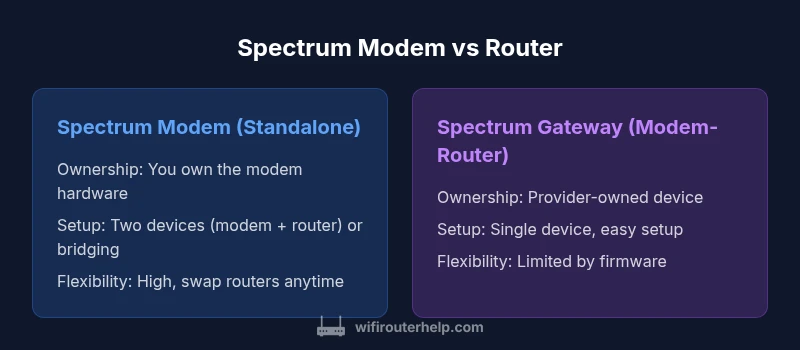
| Feature | Spectrum Modem (standalone) | Spectrum Gateway (modem-router combo) |
|---|---|---|
| Ownership | You own the modem hardware and can pair with a router of your choice | Provider‑owned device; ownership tied to service agreement |
| Setup complexity | Requires configuring two devices (modem and router) or bridging | Single device, typically plug‑and‑play with guided setup |
| Upgrade path | Easy router upgrades; you can change routers independently | Limited by gateway firmware; upgrades may require device replacement |
| Wi‑Fi performance | Dependent on the chosen router; potential for stronger coverage with mesh | Integrated Wi‑Fi; performance constrained by gateway hardware |
| Cost impact | Possible long‑term savings if you avoid rental fees | Often includes rental or higher monthly costs; simpler budgeting |
| Best for | Tech‑savvy users seeking control and expansion | Users who want simplicity and minimal maintenance |
Benefits
- Ownership and control over hardware
- Flexible upgrade paths without rental fees
- Potentially lower long‑term costs when you own devices
- Customizable Wi‑Fi settings with your own router
- Easier to tailor security and QoS for gaming or streaming
The Bad
- Requires more setup and ongoing maintenance
- Higher upfront cost for separate devices
- Potential complexity for users new to networking
- Managing two devices can be more time‑consuming
- Mesh systems add cost and setup steps
Standalone modem plus your own router generally offers better long‑term value and control.
If you value ownership, customization, and future-proofing, choose a standalone modem with your own router. If you want the simplest setup with fewer devices, a Spectrum gateway is a sensible, lower‑hassle option.
People Also Ask
What is the difference between a Spectrum modem and a Spectrum router?
A modem connects your home to the internet service provider and modulates the signal for your home network. A router distributes that connection to multiple devices, manages traffic, and creates your home network. Spectrum offers both standalone devices and gateway solutions that combine these functions.
A modem connects you to the internet, and a router creates the home network. Spectrum provides both options, including a gateway that combines them.
Can I use my own router with Spectrum’s service?
Yes. You can use your own router with Spectrum’s service, typically by connecting it behind a standalone modem or by using a bridge mode with the gateway. Check compatibility and any bridging steps required from Spectrum’s guidance.
Absolutely—most people pair their own router with a separate Spectrum modem or bridge the gateway as needed.
Is a Spectrum gateway worth it for a small apartment?
For small spaces, a gateway offers a clean, one‑box solution with simple setup. It’s convenient, but you may trade off some advanced features and customization. If you don’t need specialized routing features, a gateway is often the easiest route.
In a small apartment, a gateway can be the simplest choice and still give you solid Wi‑Fi.
Will a standalone modem improve Wi‑Fi speed?
The modem itself doesn’t create Wi‑Fi speed; the router does. A standalone modem paired with a capable router or mesh system can improve overall network performance by ensuring the router handles traffic efficiently and supports your plan’s speed tier.
Speed comes from the router and network design more than the modem alone.
How do I set up bridge mode with Spectrum gear?
Bridge mode disables the router function on a gateway, turning the device into a pure modem. This lets you use your own router for all routing features. Follow Spectrum’s official steps to enable bridge mode and avoid double NAT conflicts.
Bridge mode lets your own router handle routing while the gateway acts as a modem.
What should I consider when upgrading?
Consider your internet speed, device count, and the Wi‑Fi standards you need (Wi‑Fi 6/6E/7). Compare total cost of ownership for standalone devices versus gateway rentals, and think about future compatibility with your devices and smart home ecosystem.
Think about speed, coverage, and future needs before upgrading.
What to Remember
- Ownership often saves money in the long run
- Choose two devices if you crave customization and future upgrades
- Gateway devices favor simplicity and compact desks
- Mesh networking improves coverage for large homes
- Always verify compatibility with Spectrum before buying