Router vs Modem Spectrum: A Practical Side-by-Side Guide
A comprehensive, data-driven comparison of router vs modem Spectrum setups. Learn when to rent Spectrum's gateway, bridge mode, or bring your own gear for optimal speed, coverage, and security.


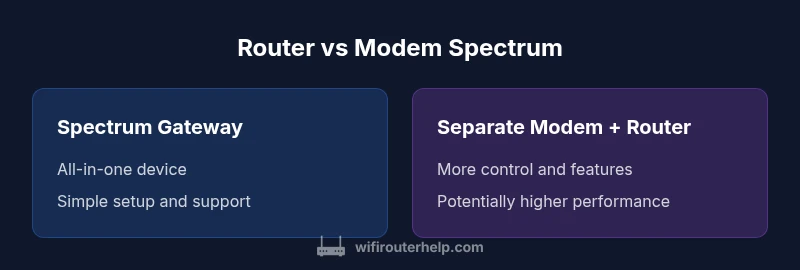
Router vs modem spectrum decisions hinge on two roles: a modem connects your home to Spectrum, while a router distributes that connection to devices. Spectrum often offers a gateway that blends both functions for convenience, but you can gain more control, better performance, and longer-term savings by using separate modem and router hardware or by enabling bridge mode. This quick comparison helps you decide which setup fits your home network.
Why the distinction matters for a Spectrum-based home network
Understanding the router vs modem spectrum distinction matters because it determines who controls features, security, and performance in your home network. According to WiFi Router Help, how Spectrum configures your gateway affects everything from basic connectivity to advanced settings like QoS and guest networks. The WiFi Router Help team found that many households unknowingly run into double NAT, inconsistent Wi-Fi coverage, or unnecessary rental fees when they rely solely on an ISP-provided gateway. In practice, identifying the roles helps you decide whether to adopt Spectrum's gateway, use a separate modem, or deploy a full router system with bridge mode. This choice influences speed, reliability, and network management for both small apartments and larger homes.
Key roles: Modem, Router, and Gateway
A modem is the device that establishes the connection to your internet service provider and takes the line from Spectrum to a usable signal. A router creates the local network in your home, assigns IP addresses, and manages traffic between devices. A gateway combines both functions in a single box. In a typical Spectrum setup, you can use the gateway for plug-and-play convenience or opt for a separate modem and router to gain more control. For many homes, a dedicated router offers stronger coverage, more reliable guest networks, and advanced security features, while the modem manages the external connection with less risk of misconfiguration.
Spectrum-specific considerations
Spectrum often provides a gateway as part of the service, with rental fees and firmware managed by the provider. When you use Spectrum equipment, you may benefit from streamlined support and simpler setup, but you trade away some customization options. If you own your modem and router, you decide on firmware versions and feature sets, which can improve security and performance but may require more active maintenance. In areas with high device density or 4K streaming, the ability to swap in a higher-performance router or a DOCSIS 3.1 modem can translate into noticeable gains in speed and reliability.
When to use Spectrum's gateway vs third-party equipment
Choose Spectrum's gateway if you want a simple, all-in-one solution, minimal setup hassles, and unified support. Opt for separate modem and router when you need advanced features (QoS rules, port forwarding, VPNs), better Wi-Fi coverage, or frequent device changes in the home. Bridge mode can help avoid double NAT when you want to use a separate router, but enabling it may require steps or support from Spectrum. In general, larger homes, homes with many smart devices, or households with gaming or streaming priorities benefit from a dedicated router and a compatible modem.
How to optimize speed and reliability
Regardless of setup, optimize by placing the router centrally, away from interference, and using a modern, password-protected network. Enable WPA3 if available, update firmware regularly, and tailor QoS to prioritize essential traffic. If using Spectrum's gateway, keep the device in a location with clear signal paths, and consider a mesh system if coverage gaps persist. For separate gear, ensure the modem and router are certified for DOCSIS standards compatible with Spectrum’s service tier and consider upgrading to a higher-performance router for spatial efficiency and better client load handling.
Network architecture: bridge mode, double NAT, and mesh
Bridge mode turns off router functionality in the gateway so your own router handles routing, which can eliminate double NAT and improve performance. If you cannot enable bridge mode, double NAT may cause issues with port forwarding or gaming. Mesh systems can solve dead zones without manual port mapping, but ensure the backbone device (modem or gateway) supports the chosen mesh protocol. A thoughtful mix of bridge mode and mesh often yields the most reliable coverage in multi-story homes.
Security, privacy, and firmware updates
Security benefits hinge on timely firmware updates and robust router settings. When you own equipment, you control updates, but you must monitor for vulnerabilities and patch releases. Spectrum’s gateway provides automatic updates, but you may rely on the provider’s schedule. Use strong passwords, disable remote management when not needed, and review connected devices regularly. Regardless of setup, a security-focused approach reduces exposure to threats across your home network.
Setup paths: renting, buying, or bridging
Renting Spectrum’s gateway offers convenience and support at a predictable cost, with less DIY troubleshooting. Buying separate modem and router can provide long-term savings and higher performance, but requires an initial investment and occasional maintenance. Bridging a gateway with a personal router combines simplicity with customization, best suited for users who want control without dropping support. Start by verifying compatibility with Spectrum’s service tier and assess your household’s internet usage to pick a path that minimizes friction and maximizes value.
Troubleshooting common issues
Common problems include double NAT, weak Wi-Fi in certain rooms, and devices failing to obtain an IP address. Check for firmware updates, verify bridge mode status, and test the network with wired connections to isolate the issue. If you’re using a Spectrum gateway, ensure you’re on a supported plan and that the gateway’s settings align with your router. For advanced setups, consult the router’s logs and Spectrum’s customer support to confirm compatibility and configuration.
Real-world scenarios: small apartment vs large home
In a compact space with light usage, Spectrum’s gateway may suffice for streaming and casual gaming. In larger homes with multiple floors and heavy device load, a separate modem and high-performance router often deliver more consistent throughput and coverage. For renters or landlords seeking flexibility, a bridging approach can be a middle ground. Each scenario benefits from a plan that prioritizes coverage, stability, and ease of management.
Step-by-step decision checklist
- Identify home size and device count; 2) Decide on control vs convenience; 3) Check Spectrum compatibility; 4) Compare gateway vs separate gear; 5) Plan for future upgrades; 6) Test speed and coverage after setup.
Final considerations before buying or renting
Evaluate the total cost of ownership, including potential rental fees, warranty terms, and upgrade paths. Consider the long-term value of investing in a solid router that supports newer standards (e.g., Wi‑Fi 6/6E) and a modem that remains compatible with Spectrum across plan changes. The right mix balances performance, control, and maintenance with your budget.
Comparison
| Feature | Spectrum Gateway (ISP-provided) | Separate Modem + Router (Own Equipment) |
|---|---|---|
| Setup simplicity | Very simple, all-in-one solution | Moderate, requires coordinating two devices |
| Performance potential | Limited by gateway hardware | Often higher with a capable modem and router |
| Control and features | Restricted settings, fewer customization options | Full control over firmware, QoS, and advanced features |
| Cost implications | Ongoing rental/fees | Up-front hardware costs, potential long-term savings |
| Future-proofing | Tied to ISP hardware cycles | Flexible: upgrade components as needed |
| Bridge mode availability | Bridge mode sometimes available on gateways | Typically straightforward with own router; may require support |
Benefits
- Access to simple, all-in-one setup with ISP support
- Greater control over network features and firmware updates
- Easier to upgrade individual components as needs grow
- Bridge mode can simplify network topology when pairing devices
The Bad
- Higher upfront cost with multiple devices
- Potential double NAT or configuration challenges if not set up correctly
- ISP rental gateways may limit firmware control and raise recurring fees
- Bridging or switching can require extra steps and support requests
Separate modem and router is generally the better long-term choice for performance and control.
If you value customization, speed, and future-proofing, bring your own gear and bridge as needed. Use Spectrum gateway when you want simplicity and direct support for basic setups.
People Also Ask
What is the difference between a modem and a router?
A modem connects your home to the internet service provider and handles the external signal. A router creates your home network, assigns IP addresses, and manages traffic between devices. Together, they enable a clean, efficient home network.
A modem talks to the internet, and a router talks to your devices. They work together to keep your home connected.
Can I use Spectrum's gateway and still use my own router?
Yes, you can use Spectrum’s gateway and add your own router in many cases. You may need to enable bridge mode on the gateway to avoid double NAT and ensure full control over the local network.
Yes—just bridge the gateway so your own router handles the network.
Do I need a separate router if I have Spectrum Internet?
Not always. If you value simple setup and official support, the gateway may suffice. For better performance and control, a separate router is often worth the investment, especially in larger homes.
Not always, but often worth it for performance and control.
What is bridge mode and when should I use it?
Bridge mode disables the routing functions on the gateway so your own router can handle routing. Use it when you want to avoid double NAT and maximize control over your network.
Bridge mode lets your own router run the show.
How can I improve Wi‑Fi performance with Spectrum?
Place the router centrally, reduce interference, update firmware, and consider a mesh system for larger homes. If you’re using Spectrum gear, adjust settings like channel width and QoS for better results.
Center the router, keep firmware updated, and consider mesh for big homes.
Is there a security difference between gateways and routers?
Both can be secure if properly configured. Owning your gear lets you push updates timely and enable advanced protections, while gateways from ISPs simplify updates but may limit some settings.
Security depends on updates and settings, not the device type alone.
What to Remember
- Assess home size and device count before choosing gear
- Prioritize compatibility with Spectrum and bridging options
- Keep security up to date with firmware and strong passwords
- Consider future-proofing by investing in a quality router
- Test coverage and speeds after installation to verify performance