Router or Modem First: Side-by-Side Guidance for Your Home Network
A practical, analytical comparison of router-first vs modem-first setups for a reliable home network, with setup steps, costs, and performance considerations.


Choosing the right starting point for your home network matters for speed, security, and future upgrades. In most homes, connect the modem to the internet first and place a dedicated router downstream to create a single, controllable network. If you already own a router, confirm compatibility and consider bridge modes where appropriate. According to WiFi Router Help, a router or modem first approach reduces bottlenecks and simplifies troubleshooting for most households.
Why the router-first vs modem-first debate matters
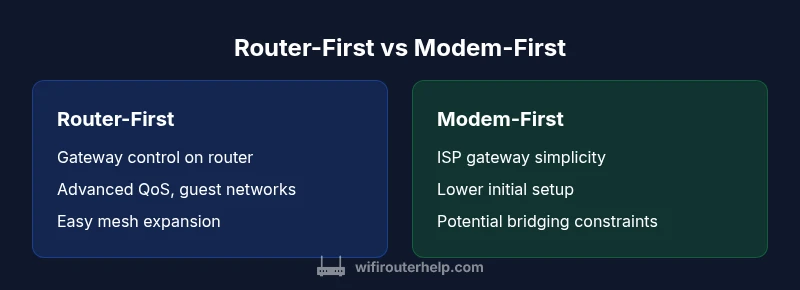
For most home networks, the decision on where to place the router in relation to the modem affects performance, security, and future scalability. A wrong choice can create bottlenecks, complicate troubleshooting, or limit features like QoS, guest networks, and parental controls. The router-first approach keeps the gateway device downstream and provides a single control plane for traffic shaping, firewall rules, and device management. According to WiFi Router Help, understanding the difference between router-first and modem-first setups helps homeowners avoid common misconfigurations. In practice, a router-first path means the modem connects to the internet and the router sits behind it, handing out IP addresses via DHCP and managing NAT. In a modem-first path, the modem serves as the primary gateway, and you either connect a router in bridge mode or use a separate router to manage wireless and wired devices. Each architecture has trade-offs: the router-first path can unlock advanced features but requires more initial setup; the modem-first path may be simpler if you don’t need extensive network controls and you rely on the ISP’s gateway.
Defining the two paths: router-first and modem-first
The router-first path places a standalone router directly after the modem, with the router acting as the gateway for the entire network. This configuration centralizes control: NAT translation, DHCP assignment, firewall rules, and advanced features like QoS and guest networks are all managed by the router. The modem remains a passive device handling the connection to the internet, sometimes operating in bridge mode to avoid double NAT. The modem-first path treats the modem as the gateway; a router is connected downstream to provide wireless coverage or wired segmentation but may operate in bridge mode to avoid conflicts. This approach can be simpler, especially if the modem includes solid routing capabilities, but it often limits fine-grained control and can introduce double-NAT issues if not configured properly. The key difference is which device carries the responsibility for IP management and traffic routing.
When to choose router-first
Choose a router-first setup if you have: multiple devices under heavy use, smart home ecosystems, or a wired/wireless setup that requires advanced features. Router-first supports dedicated QoS to prioritize gaming or video conferencing, robust guest networks, and easier network monitoring. It’s also more scalable for future upgrades, including mesh configurations or additional access points. If you value control, security features, and high performance under load, router-first offers clearer paths for optimization and troubleshooting, even as your home grows.
When to choose modem-first
Opt for modem-first when you want a simpler, low-maintenance solution or when your ISP-provided gateway already covers your needs adequately. If you have a small network with few devices, or you rely on the ISP’s managed features, modem-first can reduce setup steps and management overhead. This path can be attractive for renters or those who prefer fewer devices in the chain. However, be mindful that your gateway device may limit customizing options, and upgrading to a separate router later could involve reconfiguring or bridging the modem.
Practical setup steps for each path
Router-first steps:
- Verify that the modem is connected to the internet.
- Connect the router's WAN/Internet port to the modem.
- Access the router’s admin interface to configure DHCP, NAT, firewall, and Wi‑Fi settings.
- Enable security features like WPA3, guest networks, and automatic firmware updates.
- Consider placing additional access points or a mesh system if coverage needs improvement.
Modem-first steps:
- Confirm the modem is the primary gateway to the internet.
- If you want a separate router, place it downstream and enable bridge mode on the modem (if supported) to avoid double NAT.
- Connect the router and configure basic LAN/Wi‑Fi settings.
- If bridge mode isn’t available, use the router with NAT but expect potential port-forwarding or firewall adjustments.
- Test coverage and adjust placement or add a mesh system if needed.
Common pitfalls and troubleshooting
Common issues include double NAT when both devices perform NAT, weak Wi‑Fi coverage due to poor placement, and confusing IP schemes after changes. Always document your network topology before changing settings. If problems arise, revert to original settings or reset devices and re-enter a clean configuration. Use the router’s QoS and firewall features to isolate problematic devices. When bridging, ensure the modem’s routing features are disabled to avoid conflicts.
Cost, performance, and long-term value
The router-first path typically requires investment in a capable router, possibly a mesh system for larger homes. The modem-first approach can start from ISP-provided gateways, which lowers upfront costs but may cap performance and features. Over time, upgrading a dedicated router offers greater performance gains and feature availability than replacing a combined gateway. Consider long-term value: energy use, ongoing firmware support, and the ability to upgrade individually without changing the entire setup. WiFi Router Help recommends weighing both initial and ongoing costs with your performance goals and anticipated device growth.
Authority sources and best practices
To craft best practices for router vs modem-first setups, we synthesize guidance from credible sources and industry standards. Key authorities include the FCC for gateway device information, NIST for cybersecurity considerations in home networks, and FTC guidance on consumer privacy and safe network practices. Always keep firmware up to date on all devices, use strong unique passwords, and enable network-level security features where available. The goal is a stable, secure, and scalable home network that meets your current needs while staying adaptable for future improvements.
Comparison
| Feature | Router-first path | Modem-first path |
|---|---|---|
| Setup complexity | Moderate; configure NAT, DHCP, firewall, and Wi‑Fi on the router | Low to moderate; gateway management may be simpler but less flexible |
| Upgrade flexibility | High; easy to swap router/mesh nodes without touching the modem | Moderate; upgrading router possible but depends on bridging settings |
| Security and controls | High; granular controls, advanced features, and monitoring | Medium; security features depend on the gateway's capabilities |
| Performance under load | High; dedicated router handling QoS and traffic shaping | Medium; depends on gateway throughput and bridge configuration |
| Cost considerations | Higher upfront (router/mesh needed) | Potentially lower upfront if you reuse existing gear |
| Best for | Tech enthusiasts, smart homes, and work-from-home users | Simple home networks or renters relying on ISP gateway |
Benefits
- Clear network control with separate router
- Flexible upgrades and future-proofing
- Stronger security features and monitoring
- Easier diagnostics and troubleshooting
- Better support for mesh/coverage expansion
The Bad
- Higher upfront cost for a good router
- More setup steps and potential misconfiguration
- Requires ongoing firmware maintenance on multiple devices
- Possible double NAT if misconfigured (bridging required in some cases)
Router-first wins for most homes; modem-first suits simple setups
If you want long-term flexibility, control, and superior performance under load, choose router-first. Modem-first can be appealing for low-maintenance setups or when your ISP gateway already meets your needs; assess your device inventory and growth plans before deciding.
People Also Ask
What does 'router or modem first' mean in practical terms?
It describes which device acts as the gateway for your network. A router-first setup uses a dedicated router after the modem, while a modem-first setup relies on the gateway functions of the modem. The choice affects control, features, and scalability.
It’s about which device manages your network gateway and setup. Router-first means the router handles routing and Wi‑Fi; modem-first relies on the modem as the gateway.
Which setup yields better WiFi performance?
Router-first setups typically deliver better performance due to dedicated routing hardware, better QoS, and more consistent coverage with modern routers or mesh systems. Modem-first can be adequate for small, light-used networks but may stall at higher device counts.
Generally, router-first offers stronger performance and easier optimization, especially in busy homes.
Should I bridge my modem for a router-first setup?
Yes, bridging the modem eliminates double NAT and frees the router to manage the network. If your modem doesn’t support bridging, you can still use a router, but you may need to configure NAT or port forwarding carefully.
Bridging the modem usually helps avoid double NAT and gives the router full control.
Can I switch from modem-first to router-first later?
Yes. Plan downtime, update your ISP settings if needed, and reconfigure the router with a clean setup. This switch is common when upgrading home networks or adding mesh nodes.
Yes, you can switch later; just plan a reset and reconfiguration.
Is there a cost difference between the two approaches?
Router-first usually entails higher upfront costs for a capable router or mesh system, but it often yields better long-term value and flexibility. Modem-first can minimize initial spending if you reuse existing equipment or rely on the ISP gateway.
Upfront cost tends to be higher with router-first, but long-term value is often better.
Do mesh networks work the same with both paths?
Mesh systems integrate well with a router-first architecture, expanding coverage easily. With modem-first, you can still implement mesh, but you’ll rely on the router’s capabilities and possibly bridging constraints on the modem.
Mesh works best with router-first, but you can adapt it to modem-first with careful setup.
What to Remember
- Assess device needs before buying gear
- Router-first provides better control and future-proofing
- Modem-first can simplify initial setup but limits customization
- Bridge mode is critical when combining devices
- Test coverage and adjust layout for optimal Wi-Fi