Buying a Modem and Router vs Renting: An Objective Comparison
An analytical comparison of buying a modem and router versus renting from an ISP, covering upfront vs ongoing costs, ownership, performance, and long-term value for homeowners and tech enthusiasts.


Buying a modem and router typically yields lower long-term costs and greater customization, but requires up-front investment and ongoing responsibility for updates. Renting from your ISP offers a hands-off setup and straightforward support, yet monthly fees add up over time and limit control over features. According to WiFi Router Help, the decision hinges on long-term ownership and tolerance for maintenance.
The Core Question: Buy or Rent?
For many households, the choice between purchasing a modem and router or renting from an Internet service provider (ISP) is not a one-size-fits-all decision. It hinges on personal priorities: cost discipline, tech comfort, and how much control you want over firmware and network features. The WiFi Router Help team emphasizes that the decision should align with how you value long-term ownership versus convenience and minimal hands-on maintenance. In practice, most homeowners weigh upfront expenditure against ongoing monthly costs, while renters may favor a turnkey solution with minimal setup. This section sets up the framework for evaluating the two paths side by side, so you can apply it to your own home network setup and service plan.
Cost Dynamics: Upfront vs Ongoing
The most obvious difference is cash flow. Buying a modem and router involves a larger immediate outlay, but it yields ongoing savings if you stay put for several years. Renting spreads the cost over time, turning a capital expense into a predictable monthly bill. From a budgeting perspective, evaluating a two to three-year horizon can reveal whether ownership pays for itself. WiFi Router Help’s analyses show that, in many typical scenarios, the cumulative rental fees over a few years exceed the purchase price of a solid modem-router pair. However, the break-even point depends on device quality, your usage, and how long you plan to keep the equipment. If you anticipate frequent moves or service-plan changes, renting may feel more palatable in the short term.
What You Gain When You Buy
Owning a modem and router means full control. You choose hardware that matches your network needs, negotiate one-time purchases, and avoid recurring rental contracts. Firmware updates come from you or third-party communities, so you can decide when and what to install. You can upgrade specific components without waiting for ISP cycles, tailor advanced features like QoS, parental controls, and guest networks, and avoid rental lock-ins. Long-term ownership often improves total cost of ownership for users who value customization and independence from provider policies.
What You Gain When You Rent
Renting from an ISP simplifies life. The operator handles firmware updates, device replacements, and basic technical support. There’s no upfront hardware expense to manage, and installation tends to be quick. For households with limited technical confidence or in transitional housing, renting offers predictability and a straightforward repair workflow. However, monthly fees accumulate and you’ll operate within the ISP’s hardware constraints, potentially sacrificing advanced features or optimal performance when you need it most. WiFi Router Help notes that the convenience is real, but the long-term financial difference can be meaningful for power users or those who expect to stay in one home for several years.
Hidden Costs and Risks
Total cost of ownership isn’t just the sticker price or monthly rental; it includes maintenance, potential outages, and the risk of obsolete hardware. When you own, you’re responsible for choosing reliable equipment, applying firmware updates, and troubleshooting. If you delay updates or pick incompatible gear, performance can suffer. Renting can shield you from those responsibilities, but you’re subject to ISP policies, rental price escalations, and vendor lock-in. Another factor is depreciation: third-party ownership may not retain value if you resell or repurpose devices. WiFi Router Help cautions to factor installation time, potential network downtime during hardware swaps, and compatibility with your internet tier when calculating true costs.
How to Evaluate Based on Your Home Network
Before choosing, map your actual needs. Consider speed tier, number of devices, and peak usage times (gaming, streaming, or work-from-home tasks). If you value customizability (e.g., you run a home lab or require advanced QoS rules), ownership tends to pay off. If your home has a simple setup and you prefer minimal tinkering, renting offers convenience. Evaluate not just the price but the value you receive—are you paying for features you’ll use or simply a name on a box? WiFi Router Help recommends creating a simple checklist: device capability, firmware control, warranty terms, and service responsiveness.
How to Choose Between All-in-One vs Separate Modem + Router
An all-in-one gateway is convenient and space-saving, but it can compromise performance and customization. If your network needs are modest, a single device may suffice. For higher performance or gaming, separate modem and router components typically deliver better throughput, stability, and upgrade paths. If you’re buying, choose a router with robust wireless coverage, modern security features, and excellent firmware support; pair it with a compatible modem that matches your ISP’s standards. If you’re renting, verify that the rental device supports your speed tier and offers reliable coverage in your home. WiFi Router Help highlights the value of modular setups for future upgrades and flexible placement throughout larger floors.
Setup, Maintenance, and Support Considerations
Owning requires a basic comfort level with setup and ongoing maintenance. You’ll manage firmware updates, reboot schedules, and potential compatibility checks with ISP infrastructure. A well-chosen modem and router can be updated gradually as your needs evolve, avoiding large upgrade cycles. Renting shifts those responsibilities to the provider; you’ll typically receive automatic updates and replacements, but you’ll inherit their pace of progress and price policies. In either path, invest time in securing your network, updating passwords, enabling WPA3 if available, and enabling guest networks to protect your primary devices. WiFi Router Help emphasizes that security hygiene is central to any home network plan.
Scenarios by Household Type
Different household contexts tilt the decision. A tech-savvy homeowner who wants control over features and privacy will likely prefer ownership, especially if the local market or service plans are favorable. A renter in a rental property, or a family prioritizing low maintenance and rapid setup, may benefit from renting, particularly if they expect moves within a few years. For households with high device density or gaming rigs, owning often provides better performance customization. In many cases, a hybrid approach—owning the modem while renting a high-performance router or vice versa—can offer a balanced compromise. WiFi Router Help suggests evaluating both upfront cost and ongoing price trajectories over your expected stay in the home.
Total Cost of Ownership: A Practical Framework
To estimate total cost, project upfront hardware costs, annual maintenance, potential replacements, and ISP rental fees over a chosen horizon (e.g., 3 years). If the purchase price plus maintenance stays below the cumulative rental costs within that horizon, ownership usually wins. If not, renting may yield a predictable budget and fewer headaches. Remember to factor additional expenses like warranty extensions, electricity usage, and potential speed upgrades. Use a simple spreadsheet to compare scenarios, and review your plan at least annually to adjust for changes in usage, ISP policies, or device failures.
Quick Steps to Decide Today
- List your long-term stay plan and technical comfort level.
- Compare upfront hardware costs against two to three years of rental fees.
- Check if your chosen devices support your speed tier and security needs.
- Consider the value of advanced features (QoS, parental controls, guest networks).
- Factor in reliability, support, and potential service interruptions. WiFi Router Help advises that a disciplined approach, plus a reality check on your own network requirements, will lead to a robust decision.
Common Myths About Modem Renting vs Owning
Myth 1: Renting is always cheaper in the long run. Reality: The math depends on your stay duration and the hardware you buy. Myth 2: All-in-one gateways are always best. Reality: For many homes, separate modem and router deliver superior performance and future-proofing. Myth 3: ISP updates always improve performance. Reality: ISP-provided gear may lag behind the latest standards. WiFi Router Help encourages testing and comparing real-world impact rather than relying on generalizations.
Comparison
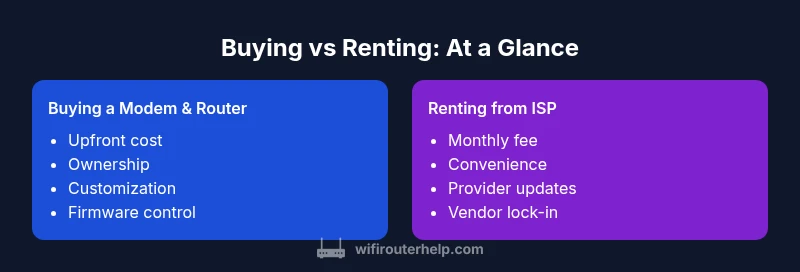
| Feature | Buying a modem and router | Renting from ISP |
|---|---|---|
| Upfront cost | High upfront purchase | Low upfront (often zero cash) |
| Monthly/ongoing cost | Low or none after purchase | Regular rental fee every month |
| Total cost over 2-3 years | Often lower total ownership cost | Often higher cumulative expense |
| Control over features | Full control over firmware and settings | Limited by ISP firmware and policies |
| Firmware updates | User-initiated or community-driven | ISP-controlled updates |
| Hardware flexibility | Upgrade components as needed | Depends on rental terms and device revision cycles |
| Best for | Homeowners seeking long-term savings and customization | Renters or busy households valuing convenience and support |
Benefits
- Potential long-term savings with ownership
- Full control over firmware, security, and QoS
- Ability to upgrade selectively without replacing everything
- No ongoing rental contracts or price escalations
The Bad
- Higher upfront cost
- Requires ongoing maintenance and troubleshooting
- Requires time to research compatibility and setup
Ownership generally wins for long-term value; renting wins for simplicity.
If you stay in one home for several years and want control over security and performance, buying a modem and router is usually the better financial choice. If you prioritize ease, predictable costs, and minimal setup, renting offers compelling convenience. Your situation—including stay duration, tech comfort, and service options—will determine the best path.
People Also Ask
What is the typical cost comparison over three years between buying and renting?
Costs vary by region and hardware quality, but a standard approach shows ownership often saving money over a multi-year period if you plan to stay long enough. Renting may be cheaper initially but cumulative fees typically exceed the purchase price after a few years. The exact numbers depend on the speed tier and device choices.
For three years, ownership usually saves money, but it depends on your speed needs and devices.
Can I buy a modem and rent a router separately?
Yes. You can buy a modem and rent a separate router from your ISP or another retailer. This hybrid approach offers flexibility and can optimize performance while keeping maintenance expectations reasonable.
You can mix and match to balance control and convenience.
Will owning a separate modem and router improve my internet speed?
Performance improvements come from hardware quality, not ownership alone. A capable router with modern features (Wi-Fi 6/6E, QoS) paired with a compatible modem can enhance throughput and reliability, especially in busy homes.
Better hardware and settings usually help, not ownership by itself.
Are all ISPs compatible with third-party modems?
Compatibility varies by ISP and plan. Some ISPs require their own equipment or provide compatibility lists. Check your service terms and confirm modem compatibility before purchasing.
Check the provider’s policy before buying third-party gear.
What should I do if my hardware fails?
If you own, you’re responsible for replacement decisions but have control over the shopping path. If you rent, the ISP usually handles replacements under the rental terms and warranty.
If it fails, you’ll handle it, or the provider fixes it under your plan.
Is a gateway device better for most homes?
A gateway device (all-in-one) is convenient but may limit performance compared to separate modem and router, especially in larger homes or with demanding workloads. For many users, a well-chosen combo or separate devices offer better balance.
Gateways are handy, but separate gear can outperform in busy homes.
What to Remember
- owners should compare total cost over a realistic horizon
- consider firmware control and security needs
- factor in rental price trends and device lifecycles
- separate modem+router often outperforms all-in-one for advanced users
- assess your own stay duration before committing to ownership