How Much Does a WiFi Router Cost Per Month?
Learn how much a wifi router costs per month, comparing ISP rental vs buying, hidden fees, upfront costs, and how to estimate your true monthly WiFi expenses in 2026.


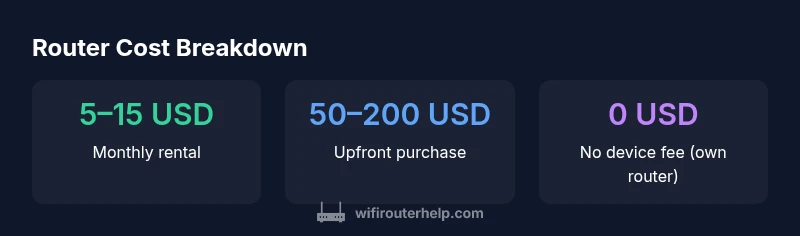
How much does a wifi router cost per month? The answer depends on whether you rent from an internet provider or buy your own device. ISP device rental typically costs about 5–15 USD per month, while buying a router involves a one-time upfront payment (roughly 50–200 USD) and no monthly device fee. Your ongoing cost then mainly reflects your service plan and any optional support fees.
How monthly costs break down
If you’re asking how much does a wifi router cost per month, the answer depends on whether you rent from an ISP or buy your own device. The cost to rent a router from an ISP is usually a fixed monthly fee, while owning a router shifts the monthly burden to your internet plan rather than the device. According to WiFi Router Help, the decision typically comes down to upfront vs ongoing costs and your tolerance for retailer constraints. The WiFi Router Help team found that most homeowners evaluate three elements: the device fee (or lack thereof), the service plan price, and any optional add-ons such as extended warranties or security features. For many households, the monthly outlay is driven primarily by the plan you choose and whether your provider requires a rental device or allows you to bring your own. If you already own a router, your monthly cost can be near zero for device charges, but you still pay for the internet service itself and any value-added services you enable. Conversely, renting from a provider bundles the cost of the device with your monthly service, simplifying budgeting but increasing the total over time. This section details typical ranges and how to compare apples-to-apples.
Renting from an ISP: what you pay and what you get
Most providers offer monthly device rentals in a fixed range. This convenience can be attractive if you dislike tech setup or potential outages from third-party equipment. But the recurring fee adds to your monthly bill and can complicate long-term budgeting. When comparing plans, look for the total monthly price, not just the base service rate, since some providers compound taxes, modem fees, and insurance into one line item. If you’re unsure about your current arrangement, contact customer service to verify whether renting is mandatory or if you can BYOD (bring your own device). The goal is to understand the true monthly expense and to consider whether a future upgrade path is included in the cost.
Buying your own router: upfront costs and long-term savings
Purchasing a router upfront typically requires a one-time investment in the 50–200 USD range, depending on speed, range, and features. After the purchase, there are no ongoing device charges, so your monthly expense reduces to the internet service plan alone. Savings accumulate as you avoid recurring rental fees over time, but you should account for potential firmware updates, warranty extensions, and occasional replacements if hardware ages or standards evolve. For tech enthusiasts, owning a router can yield better performance and customization, from QoS settings to guest networks. Remember to factor in the cost of occasional upgrades to keep up with new Wi-Fi standards.
Hidden costs to watch for
Some ISPs charge extra for advanced features like security services, antivirus bundles, or professional setup. If you rent, you may also encounter equipment replacement fees if the device is damaged or not returned after cancellation. When buying, extended warranties or paid support can add to upfront costs, and some models may require firmware updates that aren’t included in base warranties. To avoid surprises, read the fine print on any plan and confirm what’s included in the monthly price, how long the price holds, and whether there are penalties for early termination.
How to choose between renting and buying
Start with a simple calculator: estimate your monthly service price, add any device rental fees if applicable, and compare it to the upfront purchase cost. If you expect to stay in your home for more than 12–24 months, owning often pays off, especially when you plan to upgrade to faster internet or new Wi-Fi standards. If you move frequently or prefer a managed setup, renting can offer predictable costs and easier tech support. Also consider long-term benefits like better network control, improved security, and the ability to customize features.
Authority sources
For further clarity on pricing structures and costs, you can consult official guidance and reputable sources:
- FCC: https://www.fcc.gov
- FTC consumer guidance: https://www.ftc.gov
- Consumer Reports on internet equipment and services: https://www.consumerreports.org
Comparison of router cost paths (rental vs ownership)
| Option | Typical Monthly Cost | Upfront Cost | Notes |
|---|---|---|---|
| ISP device rental | 5–15 USD | 0 | Includes device; service plan price includes some support |
| Buy your own router | 0 USD (monthly device fee) + service | 50–200 USD | One-time hardware purchase; no monthly device charges |
People Also Ask
What is the typical monthly cost to rent a router from an ISP?
Most ISPs charge a monthly device rental fee, commonly in the five to fifteen USD range, bundled with your service. Always check the total monthly price, including any taxes or added fees.
Many providers bill a monthly device rental fee, usually between five and fifteen dollars, so check the final total when comparing plans.
Can I avoid any monthly fees by owning my own router?
Yes. Owning a router means no ongoing device fee, but you still pay for your internet service. Upfront hardware costs can pay off if you stay put for 1–2 years or more.
If you buy, you avoid monthly device fees, but you still pay for internet service.
Do costs vary by speed tier or data plan?
Yes. Higher speed plans can require faster routers, which may increase upfront costs or rental fees. Your monthly price can change with tiers due to higher service costs and potential device requirements.
Fast plans can mean higher costs if your equipment is not adequate.
Are there long-term savings from buying vs renting?
Generally, buying saves monthly rental fees over time, especially if you stay in the same home for more than a year. Factor in the life span of the router and potential upgrade costs.
Buying often saves money over time if you stay long-term.
What other costs should I consider beyond device fees?
Consider installation fees, warranty extensions, security add-ons, and potential upgrade costs for future Wi-Fi standards. These can affect total ownership costs.
Look for extra fees like installation, warranties, and upgrades.
“Device price is only part of the budget; total cost of ownership must include service plans, potential upgrades, and support options.”
What to Remember
- Renting often adds a predictable monthly line item
- Buying lowers long-term monthly costs but requires upfront investment
- Total cost hinges on plan length and hardware quality
- Always compare total monthly price (fees included) rather than base rate
- Factor in potential upgrades and support when budgeting