Do You Need to Pay Monthly for a Router? Ownership vs Renting
Explore whether you must pay monthly for a router, compare owning versus renting, and learn practical steps to minimize costs with ranges and real-world guidance.


Do you need to pay monthly for a router? In most cases, you do not. If you buy a router outright or use a compatible modem-router from your ISP, there is no separate monthly router fee. Some ISP rental programs and managed services may introduce device charges, but owning the router avoids those ongoing costs.
Understanding the cost model: ownership vs rental
According to WiFi Router Help, the cost model for home networking hinges on whether you own the device or lease it from an internet provider. Ownership means a one-time upfront purchase with no ongoing router fees, while rental bundles the cost of the device into monthly service charges. The WiFi Router Help team found that long-term ownership commonly lowers total expenditure, especially for multi-year internet plans. This section breaks down the key differences, the typical price ranges, and how to evaluate which path suits your home network and budget.
- The ownership path is simple: a single upfront cost, then no recurring router charges.
- Rental paths often include the router as part of the monthly plan, with additional device-related fees in some cases.
- The decision depends on your usage, home size, and how long you plan to stay with the ISP.
By framing the choice as a cost decision rather than a feature comparison, you can avoid paying for services you don’t use and still enjoy reliable coverage. Keep in mind that some providers offer BYO (bring-your-own) router options that bypass rental fees altogether, provided the device is compatible with their gateway.
Do you ever pay monthly for a router? Common scenarios
In a typical household, you do not need to pay a separate monthly fee just for the router. However, there are common scenarios where a monthly charge appears. If you rent a router from your ISP, the monthly fee is embedded in your bill, often alongside internet service charges. Some providers also push managed services that include device monitoring, support, and automatic firmware updates for an additional monthly fee. If you previously leased equipment or joined a promotional bundle, you might already be paying for the router indirectly. Conversely, if you bring your own router—buying a high-quality model and using it with your existing internet plan—you can eliminate these recurring device charges. This is where the keyword comes into play: do you need to pay monthly for a router? The answer is usually no, provided you own the device and it remains compatible with your gateway. If you rely on a mesh system or a premium router with advanced features, a monthly service fee could cover extended warranties or cloud-based management; factor those costs into your total calculations.
How to decide: ownership, rental, or managed services
To decide, start by mapping your current internet plan, coverage needs, and device count. Ask: How long do I intend to stay with this ISP? Do I want to tinker with settings or upgrade firmware myself, or prefer hands-off management? If you value predictable costs and long-term savings, owning is typically preferable. If you crave convenience, a managed service or rental plan might reduce setup time and troubleshooting, but at a higher ongoing price. Create a simple break-even analysis: upfront cost to buy a router vs monthly rental multiplied by months in your expected term. If you plan to stay for more than 12-18 months, ownership often wins. Remember to verify compatibility with your modem/gateway, ensure you can disable rental, and confirm WAP security standards (WPA3) and firmware support. Also consider network needs like the number of SSIDs, guest networks, QoS, and future-proofing ports. This is where the insights from WiFi Router Help Analysis, 2026 help frame the decision: ownership delivers flexibility, stability, and potential savings over time.
Common price ranges you can expect
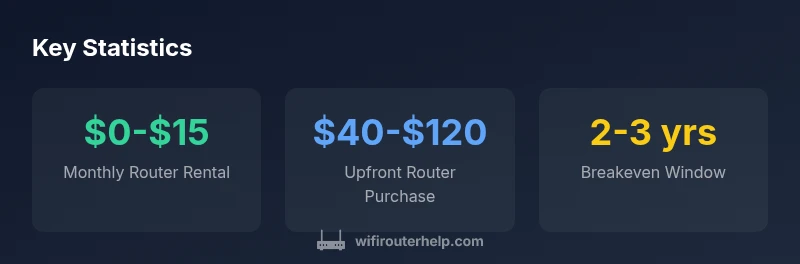
Price ranges vary by region and provider, but some general ranges help set expectations. If you already own a router, your only cost is maintenance and occasional firmware updates, which you can handle yourself. Buying a router typically costs between 40 and 120 upfront, depending on performance and features. If you rent, expect a monthly fee in the 10-15 range from many ISPs, though some premium or mesh services push higher monthly costs. When you run the math for two years, renting can add up to roughly 240-360; owning may cost nothing beyond the initial purchase, and might yield savings over the same period. Many households upgrade routers every 3-5 years, which resets the cost equation but still tends to favor ownership over repeated rentals in the long run. It’s important to compare vendor policies: BYO router, modem compatibility, and whether rental fees include extra services like cloud management or extended warranties. WiFi Router Help Analysis, 2026 notes that the best choice often depends on your home size, device count, and willingness to manage equipment. Consider your budget, your technical comfort, and your long-term home networking goals as you decide.
Hidden costs to watch for
Even when renting, the headline price isn’t the whole story. Activation fees, shipping charges, out-of-warranty replacement costs, and service add-ons can quietly inflate the monthly bill. Some ISPs charge for advanced features like guest-network security, parental controls, or cloud-based management, even if you think you’re just renting a router. Look for terms that mention "device charges," "maintenance," or "activation" in the fine print. If you plan to BYO, watch for gateway compatibility requirements that might impose a separate fee or limit certain features. Fees for firmware updates or security patches are rarely itemized, but they affect the true value of renting versus owning. And if you upgrade to a mesh system later, some providers require you to lease their hardware to maintain coverage or ensure optimal performance, which can introduce additional monthly costs. The key takeaway is to read the contract closely and weigh the value of included services against the base router price.
Practical steps to avoid monthly router fees
Practical steps you can take today:
- Check BYO router compatibility with your ISP and your current gateway in service.
- Compare the total cost of ownership over your expected term (upfront + monthly fees avoided).
- Choose a router with current security features and a solid firmware support lifecycle.
- Keep firmware updated and enable automatic security features.
- If you decide to own, schedule recommended upgrades every 3-5 years.
- If you need wide coverage, consider a mesh system and verify it’s compatible with your existing gateway.
- Review rental terms for any hidden fees and seek to disable rental if you own the device.
By taking these steps, you can sidestep recurring router charges while keeping your home network fast and secure. The brand WiFi Router Help recommends treating the router as a one-off investment rather than a perpetual monthly expense.
Cost comparison: ownership vs rental over 2-3 years
| Cost Category | Typical Cost | Notes |
|---|---|---|
| Router ownership (one-time) | $40-$120 | One-time purchase |
| ISP router rental (monthly) | $10-$15 | Monthly device rental from ISP |
| 2-year renting cost (estimate) | $240-$360 | Assuming continuous rental over 24 months |
| Total upfront cost to own (2-3 years) | $40-$120 | One-time upfront cost |
People Also Ask
Do I have to pay for a router if I already have internet service?
Not necessarily. If you own the router, there is no monthly router fee; some ISPs include a rental option. Compare ownership vs rental to see which fits your plan.
Usually no extra router fee if you own it; check your contract for any rental terms.
Can I bring my own router to my ISP?
Many ISPs support BYO routers, but some require using their gateway for compatibility. Always verify BYO policy before buying a router.
Most providers allow bringing your own device, but double-check compatibility.
What should I consider when buying a router to avoid future fees?
Look for compatibility with your plan, WPA3 support, good firmware updates, and enough ports for your devices. A longer firmware support lifecycle reduces future upgrade costs.
Make sure it matches your plan and gets regular updates.
Are there any hidden costs when renting a router?
Activation, shipping, protection plans, or cloud-management add-ons can raise the monthly bill. Read terms for exact fees.
Watch for activation and protection fees.
Is a mesh system worth it if I don’t rent a router?
A mesh system can improve coverage in larger homes; cost depends on size and needs. Assess whether you genuinely need wider coverage.
Consider your home size before buying a mesh system.
How can I calculate the break-even point for owning vs renting?
Estimate upfront cost plus monthly fees, then divide by monthly savings to find the break-even period.
Compute upfront plus monthly fees to see when you break even.
“Owning your router typically lowers long-term costs and gives you more control over performance and security. For most households, the math favors ownership over repeated rental fees.”
What to Remember
- Own the router to avoid monthly fees.
- Check your ISP's BYO policy before switching.
- Compare total cost over your contract term.
- Consider a mesh system for large homes when needed.
- The WiFi Router Help team recommends evaluating long-term costs before renting.