Buy vs Rent a Router: Practical Guide for Home Networks
Explore whether you should buy a router or keep renting. This guide weighs upfront cost, long-term value, setup, support, and security to help homeowners decide.


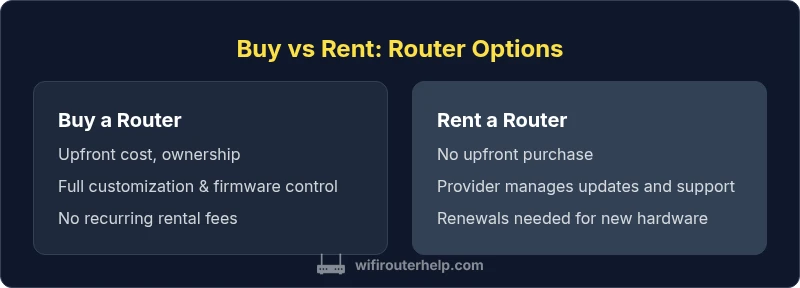
Can you buy a router instead of renting? Yes. Buying usually saves money over time, you own the hardware, and you control firmware, upgrades, and security settings. Renting offers predictable monthly fees and included support. The best choice depends on your budget, how long you’ll stay in the home, and whether you value hands-on control or convenience.
Can You Buy a Router? The Core Decision
If you ask can you buy a router instead of renting, the short answer is yes, and the choice hinges on your long-term goals and willingness to manage hardware. Buying gives you ownership, direct control over firmware, security settings, and the ability to upgrade on your schedule. It also means you’ll shoulder the upfront cost and any future maintenance. WiFi Router Help notes that for many households, a one-time purchase becomes more cost-effective after several months of rental payments, especially if you anticipate staying in the home for several years. On the other hand, renting can simplify the experience: a single monthly fee covers hardware, updates, and support, so you can avoid the day-to-day concerns of managing a device. If your priority is a fast, hands-off setup or you expect frequent changes in service, renting might still be appealing. The decision comes down to how you balance control, cost, and convenience, and whether you prefer to own a device you can re-use or recycle later. According to WiFi Router Help, the right choice often hinges on your situation today and your plans for the next few years.
Upfront Costs vs Long-Term Value
Buying a router involves a noticeable upfront cost, with consumer models typically ranging across a broad spectrum depending on features like Wi-Fi standard, speed, and antenna configuration. The initial price can be higher than renting for a short term, but you gain ownership and can reuse or upgrade the device without recurring rental fees. A practical way to evaluate is to compare the total cost of ownership over the expected device lifespan. If you expect to keep the router for several years, ownership often yields better long-term value. If you move soon or dislike ongoing maintenance, a rental model can feel easier in the short term. WiFi Router Help emphasizes that a careful cost comparison should include potential accessory purchases, extended warranties, and expected performance needs for your home network.
How Renting Works Today
ISP router rental programs bundle hardware, software updates, and customer support into a predictable monthly expense. This approach minimizes upfront cash outlay and provides a plug-and-play experience, which can be attractive for renters or users who want minimal setup. However, rental agreements can limit upgrade options, and you’re subject to the service provider’s hardware lifecycle and policy changes. If your internet plan evolves or you need more advanced features, you may face constraints or renewal costs. The WiFi Router Help team notes that while renting reduces hands-on responsibilities, it can lock you into a specific device with shorter upgrade cycles and sometimes slower adoption of new standards.
Feature and Performance Considerations
When deciding between buying and renting, compare key performance attributes: Wi‑Fi standard (Wi‑Fi 5/6/6E/7), speed tiers, number of bands, MU‑MIMO, beamforming, and support for features like guest networks, QoS, and parental controls. A personal router gives you control over firmware updates, security settings, and firewall configurations. An ISP-provided unit might receive updates on a schedule set by the provider, which can affect feature availability. If you have a high-demand home for gaming, streaming, or smart devices, investing in a capable router with robust hardware and up-to-date security practices often pays off. Consider also the long-term lifecycle: a future-proof model today could save you from frequent replacements later.
Warranty, Support, and Firmware Updates
Owning a router typically includes a manufacturer warranty and access to independent technical support or community forums. You also control when and how to apply firmware updates, a critical factor for security and stability. In contrast, renting usually bundles support with the service plan, and firmware management is done by the provider. This can be convenient, but it also means you’re reliant on someone else to patch vulnerabilities or add features. If you value autonomy and the ability to customize security settings, ownership generally offers a clearer path. WiFi Router Help suggests checking warranty length, what it covers, and whether you can extend protection beyond the base period when evaluating purchase options.
Real-World Scenarios and Decision Rules
Consider your household’s device count, usage patterns, and future plans. A family with multiple streaming devices, work-from-home needs, and smart-home gadgets often benefits from a high-performance router you own. If you anticipate frequent network upgrades, changing service tiers, or moving houses soon, renting may provide a lower-friction route to stay connected without committing to hardware ownership. Also assess environmental factors—dispose or repurpose old hardware responsibly if you own. The decision rules are: (1) long-term residence with consistent needs favors ownership, (2) frequent moves or reluctance to DIY favors renting, (3) security and privacy priorities push toward buying a device you directly manage, (4) budget cycles and cash flow matter for upfront costs versus ongoing fees.
Step-By-Step Path to Buy a Router
- Define your needs: number of devices, coverage area, and required features. 2) Research routers that meet current standards (Wi‑Fi 6/6E at minimum). 3) Compare price bands, performance, and warranty options across brands. 4) Check for ongoing software support and firmware update policies. 5) Read reviews focusing on reliability and security. 6) Decide on a model and retailer, and plan for future upgrades. 7) Set up with an area survey to verify coverage and adjust placement. 8) Secure the device with a strong password and enable essential protections. 9) Budget for accessory purchases or future expansions. 10) Create a maintenance plan to keep firmware current. 11) Recycle or repurpose old hardware responsibly when upgrading.
Common Pitfalls and Myths to Avoid
One common pitfall is assuming all routers are equal; the market includes many models with vastly different performance capabilities. Another myth is that newer is always better; sometimes a solid mid-range model meets needs at a lower cost. Don’t overlook warranty and support quality, as a cheap router with poor after-sales service can cost more in the long run. Finally, be cautious about promotional offers that seem too good to be true; check return policies and ensure the device supports current security standards. By focusing on real-world use, you’ll pick a router that remains effective for years to come with proper maintenance.
Comparison
| Feature | Buy a Router | Rent a Router |
|---|---|---|
| Upfront cost | Medium upfront cost (varies by model) | No upfront cost; included in monthly fee |
| Monthly cost | 0 ongoing fees after purchase (except electricity) | Ongoing monthly rental fee |
| Ownership | Full ownership and ability to repurpose | Leased by provider; ownership remains with provider |
| Firmware updates | User-controlled updates; frequent customization possible | Provider-controlled updates; limited user control |
| Warranty/Support | Manufacturer warranty; independent support options | Included support within rental plan; provider-assisted |
| Upgrade path | Easier to upgrade to newer tech on your schedule | Upgrades tied to lease term or renewal |
| Setup time | Initial setup may take longer but is customizable | Typically quick and turnkey with provider guidance |
| Security control | Full control over security settings; custom rules possible | Security settings capped by provider defaults |
Benefits
- Potential long-term cost savings
- Full ownership and customization
- No recurring lease obligations
- Reuse or repurpose hardware later
- Greater control over security and firmware
The Bad
- Higher upfront cost
- Requires maintenance and troubleshooting
- Responsible for updates and hardware failures
- Upgrading hardware may be necessary sooner to stay current
Owning is generally the better long-term choice for most homes
Buying a router tends to yield better long-term value, assuming you can handle setup and maintenance. Renting suits those who prioritize convenience and predictability or who move frequently. Assess your plans, budget, and comfort with tech before deciding.
People Also Ask
Is it cheaper to buy a router than rent from an ISP?
In many cases, buying is cheaper in the long run if you stay in the same home for several years. A purchase avoids ongoing rental fees and can be repurposed later. However, the upfront cost is higher and you’ll be responsible for maintenance.
Buying can save money in the long run if you stay put for years; rentals are simpler but can add up over time.
What features should I look for when buying a router to replace rental?
Look for a current Wi‑Fi standard (6 or 6E), solid CPU, adequate RAM, MU‑MIMO, beamforming, tri-band support if possible, and robust security features like automatic updates and a strong firewall.
prioritize newer standards, strong performance, and good security features.
Do I need technical knowledge to set up my own router?
A basic setup is achievable with clear instructions from the manufacturer, plus your ISP login details. Advanced features may require more familiarity with networking concepts.
It helps to be comfortable with basic network settings, but many routers offer guided setups.
Are there risks buying a router from general retailers?
Risks include selecting a model that doesn’t meet your needs, limited vendor support, and potential security concerns if you delay updates. Stick to reputable brands and enable automatic updates.
Choose trusted brands and keep firmware up to date.
How long does it typically take to set up a new router?
A basic setup can take 15–45 minutes, depending on your network complexity and the number of devices. Advanced configurations may take longer.
Plan about an hour for a comfortable setup, including testing and optimization.
What to Remember
- Evaluate total cost of ownership over several years
- Own for full control of firmware and security
- Rent for simplicity and predictable expenses
- Plan upgrades around device lifecycle and usage patterns