Spectrum Router Fees: What Spectrum Charges for a Router
Discover Spectrum's router costs, including monthly rental ranges, purchase options, and long-term savings. A practical guide from WiFi Router Help to help homeowners decide renting vs. buying.


Spectrum typically charges a monthly rental fee for its gateway devices, which combine a modem and router. The price commonly ranges from about $8-$15 per month, depending on plan and region. If you own your own router and use bridge or passthrough mode, you can often avoid ongoing rental costs, though some plans may still apply a small equipment fee or activation charge.
Understanding Spectrum's Equipment Fees
Spectrum's equipment fees cover the gateway device (modem + router), maintenance, and updates. If you rent, you’ll see a monthly charge that varies by region and plan. In many markets, a typical range is roughly $8-$15 per month. Using your own router and enabling bridge mode can help you avoid ongoing rental costs, though you must confirm compatibility with Spectrum. Some plans also include activation charges or one-time setup fees. The decision often boils down to convenience versus control: the fully managed gateway is simplest, while owning your gear can save money over time. WiFi Router Help often notes that the cost dynamics hinge on your home size, device count, and desired features like advanced QoS or guest networks. Consider the coverage needs of your space and whether Spectrum’s Wi‑Fi is enough or if a separate router would deliver better performance.
How Spectrum Router Fees Compare to the Market
Equipment rental charges exist across major providers, but the exact price depends on location, promotions, and whether you rent a modem-only device or a gateway. Spectrum’s approach is broadly similar to other big providers: you can pay monthly for a gateway, or opt to own your hardware and connect it in bridge mode. Over the lifetime of a contract, owning gear tends to be cheaper if you plan to stay long-term and rely heavily on features like robust parental controls, advanced QoS, or higher Wi‑Fi speeds. Always tally up the total cost: monthly hardware fee plus plan price, taxes, and any activation fees. WiFi Router Help’s analysis shows that a 12- to 24-month window is a practical frame for evaluating buy vs rent.
Calculating Your Total Cost: Renting vs Buying
To decide whether renting or buying is best, compare the monthly rental cost to the upfront purchase price. If the gateway rental is R per month and the upfront router cost is P, the break-even point is P/R months (rounded up). For example, if Spectrum charges $12 per month for a gateway rental and you buy a router for $180, you’d break even after about 15 months. If you find a router for $60, break-even occurs after around 5 months. Include any activation fees or annual service charges in your math. The goal is to estimate how long you’ll stay with Spectrum and how long you’ll use the equipment. Use your actual bill to compute precise figures. This framework helps households of different sizes decide wisely.
Practical Scenarios by Plan Type
- Light usage apartment: Renting may be simplest if you don’t require advanced features and plan to move within a year.
- Family home with many devices: Owning a router can deliver better performance, especially if it supports higher speeds and custom QoS rules.
- Gigabit service and mesh: If you have gigabit speeds or a large home, investing in a high-performance router can be financially advantageous over time.
- Promotions and bundles: Sometimes Spectrum runs promos that waive or reduce equipment fees for a period; factor these into your decision. WiFi Router Help suggests modeling your situation around 18 months to capture most scenarios, then reassessing if you move or change plans.
Strategies to Save Money on Spectrum Equipment
- Check for promotions that waive activation or rental fees for a limited time.
- If you own your router, ensure Spectrum supports it and that you can enable bridge mode to avoid double devices.
- Compare total monthly costs across multiple plans, not just the sticker price.
- Consider upgrading your home network with a modern router that supports the latest standards (Wi‑Fi 6/6E) for future-proof performance.
- Keep an eye on taxes and any local fees that can affect the monthly bill. These steps can reduce the total cost of ownership while maintaining reliable home networking.
Step-by-Step: Using Your Own Router with Spectrum
- Confirm compatibility: Check Spectrum’s policy on bridge mode and whether your model is supported.
- Disable or bridge the built-in router: Access the gateway admin page and disable the wireless function if necessary, or enable passthrough/bridge mode.
- Connect your own router: Use an Ethernet connection from the gateway to your router’s WAN port.
- Configure your router: Set up your Wi‑Fi name, password, and security features; adjust QoS and guest networks if desired.
- Test coverage and speeds: Run speed tests from various rooms and adjust placement.
- Monitor for firmware updates on both devices and keep security settings current. This approach can deliver better control and potentially lower long‑term costs, subject to Spectrum’s terms.
Common Pitfalls to Avoid
Beware of hidden fees in your plan, such as activation charges or upgrade fees; always read the fine print. If you cancel the gateway rental, confirm the return process to avoid penalties. Also, don't assume all benefits transfer when you switch routers; you may need to reconfigure or lose certain Spectrum-specific features.
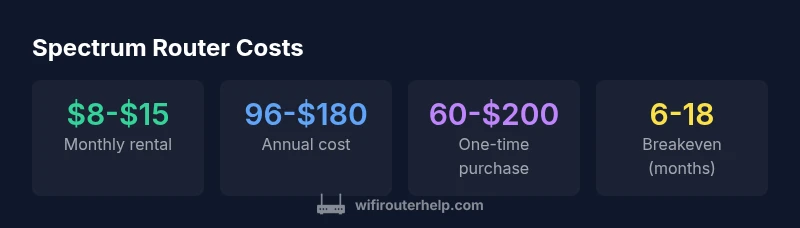
Spectrum router cost comparison
| Cost Factor | Typical Range | Notes |
|---|---|---|
| Monthly gateway rental | 8-15 USD/month | Varies by region and plan |
| Annual rental cost (estimate) | 96-180 USD/year | Based on monthly range |
| One-time router purchase price | 60-200 USD | Model dependent |
| Breakeven (months) | 6-18 months | Depends on upfront vs monthly cost |
People Also Ask
Does Spectrum charge for a router if I already own one?
Yes. If you own a router and use Spectrum's gateway only as a modem, you may still face a separate equipment or activation fee depending on your plan. In many cases you can avoid ongoing rental costs by using bridge mode, but confirm with Spectrum to ensure compatibility.
Spectrum may charge a one-time activation or equipment fee even if you own a router, but you can often avoid ongoing rental by using bridge mode.
Can I switch from renting to buying without penalties?
Usually you can switch from rental to ownership at any time, but you may need to pay the current month's rental and return the gateway if required. Confirm any fees with Spectrum's terms.
You can usually switch anytime, but check for prorated fees or return requirements.
Are there regional price differences for Spectrum router fees?
Yes. Equipment charges can vary by market and promotions. Always verify the exact rate on your current bill or by calling Spectrum's support.
Prices vary by region and promotions.
Will Spectrum help set up my own router?
Spectrum can guide you through basic setup and enable bridge mode, but advanced configuration may require you to rely on your own router's manuals. Some regions offer in-person or phone support.
They can guide you through basic setup, including bridge mode, but for advanced config check your router's manual.
What costs should I expect beyond rental or purchase?
Some plans include activation or upgrade fees, taxes, and potential equipment replacements. Review your bill for line items to avoid surprises.
Watch for activation fees and taxes beyond rental or purchase.
“Owning a router often saves money in the long run, but always confirm Spectrum's gateway capabilities and any fees before buying.”
What to Remember
- Compare rental vs buying using a breakeven calculation.
- Expect regional variation in Spectrum equipment charges.
- Owning your hardware can save money long-term.
- Check for promotions or bundles before deciding.
- Use bridge mode to connect your own router when possible.