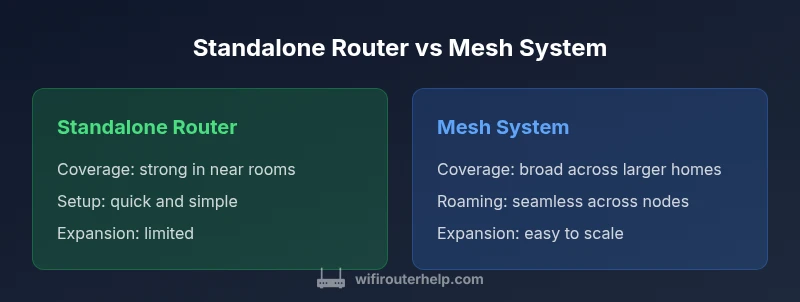
Router Comparison: Standalone Router vs Mesh System (2026)
Explore a thorough router comparison between standalone routers and mesh systems. Learn how coverage, performance, setup, security, and total cost affect home networks in 2026.


According to WiFi Router Help, the router comparison should start with your home size and device demands. In this TL;DR, standalone routers excel at simplicity and lower upfront costs, while mesh systems provide broader coverage and seamless roaming for larger homes. For apartment living or small setups, a solid single router may suffice; for multi-story homes or busy networks, a mesh system is typically the stronger router comparison choice.
Router comparison essentials: standalone vs mesh
In exploring a router comparison, the first decision is choosing between a standalone router and a mesh WiFi system. A standalone router is a single device that emits Wi‑Fi and provides wired ports, best suited for smaller spaces or straightforward setups. A mesh system uses multiple nodes that share the same network name to blanket larger areas with consistent coverage. This article, rooted in WiFi Router Help's expertise, walks through which option fits different homes and device loads. The goal is to give you a clear, evidence-based framework for deciding what to buy and how to place it so you get reliable performance where you need it most.
The core takeaway is simple: the router comparison you perform should map to real-world lifestyle and home layout rather than chasing the newest buzzwords. By the end, you’ll have a practical decision guide that translates your floor plan and device load into a concrete choice between standalone and mesh.
Core performance metrics you should care about
When comparing routers, several metrics matter most. Real-world throughput is often lower than vendor claims; latency can affect gaming and video calls; and network reliability depends on how well the device handles interference and crowded channels. In a router comparison, focus on metrics that map to your use cases: number of simultaneous devices, streaming quality, online gaming, and smart home reliability. WiFi Router Help analysis shows that the balance between peak speed and actual usable speed is usually the critical factor for most households; you should favor devices that maintain steady performance under load rather than raw peak numbers. Different homes will see different bottlenecks, so tailor your expectations to your specific setup and usage pattern.
Coverage, density and real-world ranges
Standalone routers can deliver strong signals in nearby rooms but may struggle at far ends of larger homes or behind thick walls. Mesh systems address this by placing nodes in strategic locations to reduce dead zones, delivering more uniform coverage across multiple floors. The router comparison that matters for you is not only the number of nodes but their placement and backhaul options. For dense environments with many walls or floors, mesh often yields better coverage with fewer dead spots; for open-concept spaces, a capable standalone router with range extenders may suffice. Real-world testing shows that placement, backhaul (wired vs wireless), and interference from neighboring networks can dramatically influence perceived coverage more than the label on the box.
Setup, configuration and daily use
A standalone router typically offers straightforward setup via a single web interface or a mobile app. You can configure guest networks, parental controls, firewall rules, and QoS with less coordination. A mesh system requires pairing multiple nodes and syncing settings across devices; most modern mesh kits provide an app-based experience that makes adding or relocating nodes intuitive. In router comparison terms, ease of management and predictable updates across a mesh network can offset higher upfront costs for some households. For most users, a well-designed router brand’s companion app should guide you through basic setup and ongoing maintenance without needing a network engineer.
Security, updates, and reliability considerations
Security is not optional in a modern home network. Both standalone routers and mesh systems benefit from timely firmware updates, strong default passwords, and enabled WPA3 when possible. However, mesh networks can complicate update schedules if nodes stall or drift out of sync; most reputable mesh kits address this with automatic firmware management. Reliability for both options depends on the quality of the hardware and the stability of your internet connection; a well-chosen device will perform consistently when kept up to date and configured correctly. Regularly reviewing your security settings, enabling automatic updates where possible, and using unique credentials for your admin interface are sound practices across any router configuration.
Financial and ownership considerations
From a financial perspective, a standalone router generally costs less upfront and requires fewer components. Mesh systems, while more expensive at purchase, yield benefits in coverage and seamless roaming that can justify the investment for larger homes or high device counts. Ownership decisions depend on your space, future-proofing needs, and tolerance for complexity. WiFi Router Help recommends weighing not only the sticker price but also ongoing costs like extended warranties, replacement parts, and firmware support life cycles. In many cases, the total cost of ownership favors a mesh system only when you truly require broad, reliable coverage across a large area with multiple users and devices.
Practical decision guidelines by home scenario
To make a confident router comparison, map your home layout and device load to the option that best fits your reality. If you live in a small apartment or a single-story space with modest traffic, a high-quality standalone router can meet your needs with excellent reliability. If you have three or more bedrooms, multiple occupants streaming 4K video, or a home office with video calls, a mesh system often reduces buffering and improves signal uniformity. For mixed spaces, a hybrid approach—one strong router with a couple of strategically placed access points—can sometimes offer a sweet spot. In all cases, prioritize devices with robust security features, good antenna design, and an active firmware update policy. WiFi Router Help’s framework emphasizes planning around space, not just specs.
Authority sources and further reading
For rigorous guidance on wireless networking and standardization, consult established sources. The FCC provides consumer guidance on Wi‑Fi usage and router placement, while NIST offers general cybersecurity considerations for home networks. IEEE also publishes standards and articles on Wi‑Fi technology that inform practical decisions in a router comparison. These sources help frame a practical, evidence-based approach to choosing between a standalone router and a mesh system. By aligning vendor claims with these authoritative references, you can reduce misinterpretations and make a smarter choice.
Comparison
| Feature | Standalone Router | Mesh WiFi System |
|---|---|---|
| Coverage across space | Localized coverage, good for single-story or compact spaces | Expansive coverage with multiple nodes for large homes |
| Roaming and handoff | Manual roaming; device stays on one access point | Seamless roaming between nodes with unified SSID |
| Setup complexity | Straightforward setup with a single device | Multi-node setup with app-based configuration |
| Scalability | Limited scalability; may require extenders | Highly scalable by adding nodes as needed |
| Maintenance and updates | Independent updates per device | Unified updates across mesh network |
| Cost (upfront) | Lower upfront cost for a single router | Higher upfront cost for a mesh kit |
Benefits
- Better coverage for smaller homes with a single device
- Simplified management and consistent SSID in mesh setups
- Easier expansion by adding nodes rather than replacing equipment
- Improved streaming and reduced dead zones in larger spaces
- Unified update mechanism in many modern mesh systems
The Bad
- Higher upfront cost for mesh systems
- Potential complexity in setup and maintenance for multi-node kits
- Possible longer troubleshooting when nodes drift apart from main router
- Some gaming optimizations may rely on advanced configuration
Mesh systems generally provide better whole-home coverage; standalone routers suit smaller spaces and budgets
Choose a standalone router for small homes and simple setups. Opt for a mesh system if you need reliable coverage across a large space and seamless roaming for multiple devices.
People Also Ask
What is the main difference between a standalone router and a mesh WiFi system?
A standalone router is a single device that provides Wi‑Fi and routing, suitable for smaller spaces. A mesh system uses multiple nodes to blanket larger areas with consistent coverage and seamless roaming. Each option has trade-offs in setup, scalability, and cost.
The main difference is one device versus multiple nodes that work together to cover a bigger area.
When should I upgrade to a mesh network?
Consider a mesh network when you experience dead zones, a multi-story layout, or heavy device usage across rooms. If your current router struggles with range or streaming in several rooms, a mesh system can improve reliability.
If you have dead zones or a large home, a mesh system is usually worth considering.
Can I reuse my existing router with a mesh system?
Yes, in many cases you can connect your existing router to act as a gateway and use the mesh system as access points. However, some mesh kits require you to replace your router entirely for full feature use.
You can often pair mesh nodes with your current router, but check compatibility.
Are mesh systems better for gaming?
Mesh can improve roaming and consistency, but performance depends on backhaul quality, node placement, and your internet plan. A high-quality standalone router with optimized QoS may outperform entry-level mesh kits for gaming.
For gaming, performance depends heavily on backhaul and setup; a strong single router can still perform well.
Do both options support guest networks and parental controls?
Most modern standalone routers and mesh systems support guest networks and parental controls, but feature availability varies by model. Verify support and app quality before purchasing.
Yes, but verify features in the exact model and app you choose.
What to Remember
- Assess home size and layout before buying
- Prioritize seamless roaming for multi-room setups
- Weigh upfront cost against long-term coverage needs
- Check firmware update policies and security features
- Consider a hybrid approach for mixed spaces