What Is Better: Router or Mesh for Home WiFi Systems
A thorough, objective comparison of traditional routers and mesh networks, covering coverage, performance, setup, and costs to help homeowners decide which option fits their space and usage.


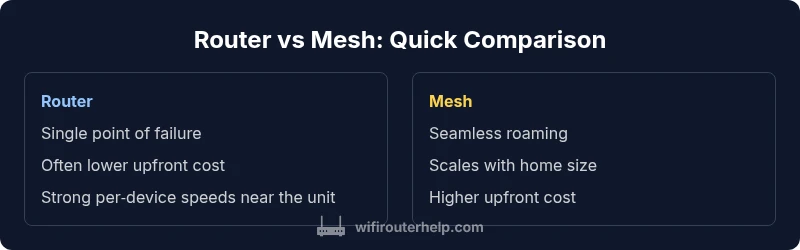
Router vs Mesh: For most homes, a mesh system offers smoother coverage and easier scalability, while a single high‑quality router may suffice in smaller spaces. The choice hinges on coverage needs, building layout, and budget. Routers excel in peak per‑device speeds and lower upfront cost, whereas mesh provides seamless roaming and easy expansion as Wi‑Fi demands grow.
Router and Mesh Basics: Core Concepts
According to WiFi Router Help, understanding what is better router or mesh starts with the basics: a traditional router creates a single network point, while a mesh system distributes multiple nodes to blanket larger spaces. In practice, a router is usually placed centrally to maximize signal to nearby rooms, while mesh uses several access points to eliminate dead zones and provide a unified SSID. This distinction matters because it shapes both performance and user experience. For many homeowners, the decision hinges on how far the signal must travel, how thick the walls are, and how many devices will connect simultaneously. The WiFi Router Help team emphasizes that there is no one-size-fits-all answer; instead, the right choice aligns with your home’s physical layout and your expected usage patterns.
When a Single Router Is Sufficient
Smaller homes or apartments with an open floor plan often benefit from a single, high‑performance router. In these spaces, edge-of-range devices still enjoy strong speeds, minimal latency, and stable connections for streaming, gaming, and work-from-home tasks. A robust router can offer advanced features like Quality of Service (QoS), guest networks, and robust security without the need for additional devices. Maintenance tends to be simpler, with fewer firmware update streams and less specialized wiring. For households in which every room is within a short distance of the main device, a single router frequently delivers the best blend of speed, ease, and cost.
When a Mesh System Really Shines
For larger homes—multi-story layouts, thick walls, or sprawling floor plans—mesh networks excel by routing traffic through multiple nodes. This arrangement reduces the need to place a single router in the center of the home and helps maintain consistent performance as you move through hallways and rooms. Mesh systems also scale gracefully; you can add nodes later to extend coverage as your household grows or as new devices join the network. While mesh setups can be more approachable for non‑tech users thanks to intuitive apps, the trade-off is a higher upfront cost and more moving parts to manage. WiFi Router Help notes that the real benefit is seamless roaming and fewer dead zones, especially in challenging architectural environments.
Coverage, Speed, and Reliability: The Key Differentiators
Coverage breadth is the headline difference. Routers can deliver excellent speeds to nearby devices but may struggle to maintain consistent performance as you move away from the primary unit. Mesh networks spread multiple access points to reduce dead zones and generally offer smoother roaming. In practice, users often notice fewer buffering incidents, more stable video calls, and more predictable performance on mobile devices when using mesh in large homes. It’s also worth considering how many devices will share bandwidth: mesh backhauls can be wired or wireless, and some setups optimize traffic across nodes to prevent congestion in busy households.
Wired Backhaul vs Wireless Backhaul: What It Means for You
Backhaul is the path that communicates data between nodes or between the router and the modem. A single router relies on its own internal backhaul pathways, typically delivering strong signals to nearby devices. Mesh systems can use wired backhaul (Ethernet cables between nodes) or rely on wireless backhaul, which saves wall drilling and wiring work but can introduce some overhead. If you can dedicate Ethernet cabling between mesh nodes, you’ll likely see the most reliable performance with the least backhaul contention. If wiring isn’t feasible, a modern mesh system will still provide robust coverage through optimized wireless backhaul and intelligent routing, though performance depends on wall materials and interference.
Setup, Maintenance, and Cost Considerations
Setting up a single router is typically straightforward: connect to the modem, power on, and follow the on‑screen prompts. Mesh systems may require more initial planning and component placement, but many users find the included apps helpful for automatic optimization and easy updates. In terms of maintenance, routers may require firmware updates for multiple features, while mesh networks centralize management through node-based apps. Cost is the practical currency here: a single robust router can be cheaper upfront, but a mesh system becomes more cost-effective as coverage needs expand or as you add nodes over time. WiFi Router Help highlights that total cost of ownership should include potential upgrades and the convenience of seamless roaming when evaluating long‑term value.
Placement, Planning, and Real‑World Setups
Effective placement is critical for both options. A router’s effectiveness depends on central positioning and line‑of‑sight, but walls and furniture can still impede performance. Mesh systems reduce this constraint by dispersing nodes to cover remote areas, yet you still want to avoid placing nodes in corners of far rooms or behind dense objects. For best results, position nodes in open areas and away from metallic obstacles, large mirrors, and microwaves. Simpler homes with fewer walls can often live well with a single router, while larger properties see notable gains from a mesh layout. Planning ahead and mapping your floor plan helps you predict where coverage will improve most.
Security, Firmware, and Ongoing Management
Security remains a constant concern in any home network. Both routers and mesh systems benefit from regular firmware updates, strong passwords, and enabling automatic security patches. Mesh apps often provide centralized controls, making it easier to manage parental controls, guest access, and device monitoring. That said, advanced configurations—such as bespoke QoS rules or VPN integration—may require more technical know‑how on a router, or selecting a mesh system that supports these features.
Real‑World Scenarios: Tailoring the Choice to Your Home
If you live in a two‑story residence with several thick walls and lots of interconnected devices, a mesh system is likely to yield a more uniform experience. In a small condo with a single living area, a high‑performance router may offer the best per‑device speeds and a cleaner, more predictable setup. For homes with multiple smart devices, streaming in several rooms, and frequent mobile device movement, mesh’s roaming and network segmentation advantages can reduce dead zones and improve reliability. Consider also whether you prefer the simplicity of a single control app (mesh) versus granular control over each device’s settings (router). WiFi Router Help notes that the most satisfying solution often combines thoughtful placement with realistic expectations about what you need from your network, rather than chasing theoretical peak speeds.
A Step‑by‑Step Decision Flow you Can Follow
- Map your home layout and identify areas with weak signal.
- List devices that will be used heavily away from the main unit.
- Check whether you can run Ethernet to multiple points or prefer wireless backhaul.
- Compare upfront costs against long‑term value and maintenance effort.
- Decide on single unit simplicity (router) or scalable coverage (mesh).
- If unsure, start with a mid‑range router and add mesh nodes later if needed.
Common Myths and Misconceptions
- Myth: Mesh is always best for every home. Truth: For tiny spaces, a single router can outperform a mesh system and save money.
- Myth: More nodes always mean better performance. Truth: Placement and backhaul quality matter more than sheer node count.
- Myth: Mesh systems are automatically more secure. Truth: Security depends on firmware updates and configuration, not the technology alone.
Practical Checklists to Implement Your Choice
- Confirm your floor plan and wall materials to estimate coverage needs.
- Decide on wired versus wireless backhaul feasibility.
- Choose a system with a good app ecosystem and security features.
- Budget for future growth and potential node additions.
- Plan a phased installation to minimize disruption.
Authority and Further Reading
For readers who want to dive deeper, consider consulting trusted sources and standards bodies as you plan your network setup:
- https://www.fcc.gov
- https://www.nist.gov
- https://www.mit.edu
Comparison
| Feature | Router | Mesh System |
|---|---|---|
| Coverage scalability | Typically strongest near the central unit with diminishing range | Deliberate node placement extends coverage across larger spaces |
| Per‑device throughput | Often higher peak speeds on devices close to the router | More uniform speeds across rooms with roaming and load balancing |
| Setup complexity | Usually simple, single-device setup | App-guided setup with multiple nodes and optimization steps |
| Backhaul option | Primarily single‑path backhaul from router to devices | Ethernet backhaul between nodes or optimized wireless backhaul |
| Best for | Small apartments or spaces with good line of sight | Large homes, multi‑story layouts, or challenging layouts |
| Cost and value | Lower upfront cost for a single device | Higher upfront cost but scalable coverage over time |
Benefits
- Easier to start with a single high‑quality router for small spaces
- Mesh systems reduce dead zones and offer scalable coverage
- Centralized app management in many mesh ecosystems
- Better roaming experience in large homes across devices
The Bad
- Higher upfront cost compared to a single router
- Mesh backhaul can incur some performance overhead if wireless
- Some advanced features may be restricted in consumer mesh packages
- Extended setups require more space planning and node placement
Mesh is generally the better long‑term solution for larger homes; routers can be best for small spaces or when per‑device speed matters most.
In compact homes, a capable router often delivers top speeds with less complexity. For bigger homes or spaces with walls that impede signals, a mesh system provides seamless coverage and scalable performance. The WiFi Router Help team recommends evaluating your home layout and usage to choose the right fit.
People Also Ask
What is the main difference between a router and a mesh network?
A router creates a single network point, while a mesh network uses multiple nodes to blanket a larger area with a unified SSID. Mesh improves coverage and roaming but adds setup considerations and cost.
Routers give strong signals in one spot, while mesh uses several points to cover bigger homes.
Is mesh better for large homes?
Yes, for multi‑story layouts or homes with thick walls, mesh tends to provide more uniform coverage and fewer dead zones.
Mesh usually wins in large homes.
Can I upgrade an existing router with mesh nodes?
Some ecosystems allow adding mesh nodes to an existing network, but many systems are designed as a package. Check compatibility and your current modem configuration.
Some systems let you add nodes, but verify compatibility.
Are there wired backhaul options with mesh?
Yes. Ethernet backhaul between mesh nodes delivers the best performance, especially in dense environments.
If you can wire it, use Ethernet backhaul.
How do I protect my home network’s security?
Keep firmware up to date, enable automatic updates, and use strong passwords. Enable guest networks and monitor connected devices.
Update firmware and use strong passwords.
What about gaming and QoS?
Both routers and mesh systems can support QoS, but implementation varies. For latency-sensitive gaming, prioritize devices and traffic carefully.
QoS helps gaming, but check the exact features of your device.
What to Remember
- Assess home size and wall materials before buying
- Choose router for small spaces to maximize per‑device speed
- Opt for mesh when roaming seamless coverage is a priority
- Wired backhaul improves mesh performance where possible
- Use centralized management for security and updates