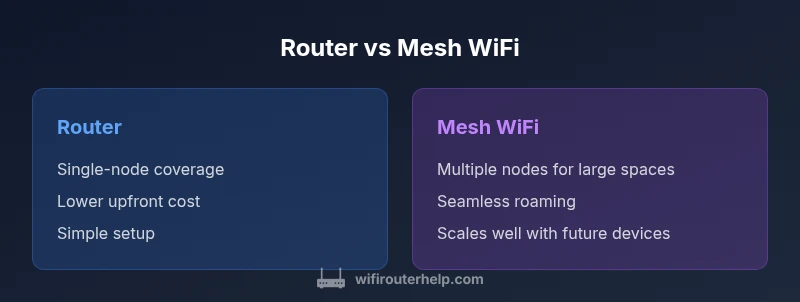
Router vs Mesh WiFi: A Practical Comparison
An in-depth, practical comparison of router vs mesh wifi to help homeowners choose the right coverage, performance, and budget path for their home network.


According to WiFi Router Help, choosing between router vs mesh wifi depends on your home layout. A single strong router can cover small homes or apartments, but multi-story houses with thick walls often suffer dead zones. Mesh WiFi systems distribute multiple nodes to blanket large spaces with consistent speed. For most homes, assess footprint, device count, and budget to decide which path fits best.
The core question: router vs mesh wifi
When people start designing a home network, the central question often reduces to whether to deploy a single, powerful router or to adopt a mesh WiFi system. At its core, a traditional router provides a single point of control and relatively strong signal in close proximity to the device, but signal degrades with distance, walls, and interference. A mesh wifi setup uses multiple nodes that communicate with each other to blanket larger spaces with coverage. The WiFi Router Help team emphasizes that the decision is rarely about one device and more about how you use the space. For many homeowners, the practical difference comes down to coverage uniformity, ease of expansion, and the movement of devices as you move through rooms. If your home is a compact condo or small apartment, a sturdy router with good placement can deliver consistent speeds without extra hardware. If your home spans multiple floors or has thick exterior walls, mesh nodes can eliminate dead zones and provide a single network name that your devices move between without manual reconnects. Finally, consider future needs: streaming, gaming, smart home devices, and guest networks all factor into your final choice.
What matters: the decision criteria
Before choosing between router and mesh wifi, map your living space and device needs. Key criteria include coverage area and layout, roaming quality, and how you plan to grow your network. Coverage area matters: single stories 1-2 bedrooms may be well served by a strong router, while large homes with multiple floors or thick walls typically require additional nodes. Roaming quality matters: with mesh, devices should switch between nodes without manual reconnects; with a single router you may notice more pronounced handoffs as you move through rooms. Backhaul options influence performance: wired backhaul can unlock higher stability for mesh nodes, while wireless backhaul is more flexible but sometimes susceptible to interference. Device density matters: more devices simultaneously streaming, gaming, or working from home stresses wireless networks; mesh generally scales better when many devices are online at once. Finally, consider ease of management and security: look for features like guest networks, parental controls, firmware updates, and remote management in the vendor app.
How routers work vs mesh wifi: architecture and performance
A traditional router forms a single network with a single control plane. It routes traffic between devices and the internet and handles security, QoS, and basic features. Its performance depends on radio strength, antenna design, and firmware efficiency. A mesh wifi system, by contrast, distributes the workload across multiple nodes that talk to each other and to the primary router. The result is a single SSID, dynamic backhaul, and seamless roaming as you move through spaces. In practice, mesh backhaul can be wired or wireless, and some systems use tri-band designs to isolate backhaul data from user traffic. WiFi Router Help analysis, 2026, suggests that the architecture and backhaul strategy matter more than nominal speed ratings; stable backhaul and smart routing between nodes often determine real-world performance more than the number of bands alone. For decision making, evaluate how each option handles peaks in demand, interference from neighboring networks, and compatibility with existing devices.
Real-world layouts and which approach fits
Small apartment or single-story homes: a high quality single router with reliable placement and a strong antenna setup may provide excellent coverage with minimal complexity. Multi-story homes: mesh wifi shines here, especially if you have long hallways, dense walls, or if you frequently move between floors with multiple devices. Homes with many smart devices or performance-sensitive tasks: mesh may be preferred because it tends to deliver more consistent coverage, but a high-end router with QoS and a wired backhaul for nodes can also work well. Homes with basements or detached structures: consider placing a node in or near the basement or garage to improve signal propagation. Finally, consider future growth: if you plan to add security cameras, smart lighting, or gaming consoles across the home, mesh’s ability to place nodes where needed becomes valuable.
Performance considerations and typical tradeoffs
Speed and latency depend on multiple factors, including internet plan, device capability, and wireless environment. Routers can deliver excellent performance in close-range scenarios, particularly when paired with high performance antennas and firmware optimization. Mesh systems excel in delivering uniform coverage and reducing dead zones, especially in larger homes, but their per-device throughput can drop if backhaul shares bandwidth with user data on crowded networks. In practice, many households experience smoother streaming and gaming with mesh due to fewer dropouts, even if peak theoretical speeds appear slightly lower than a top end single router. The choice often comes down to layout and use pattern: if you have extended living spaces and move around with several devices online at once, mesh offers more reliable, consistent performance. If you rely on a compact network and prefer minimal management, a capable router + targeted extenders or a wired backhaul can be a better value.
Setup, maintenance, and security considerations
Setting up a router is usually straightforward: connect to the modem, configure SSID and password, update firmware, and enable essential security features. Mesh systems require a few more steps to pair nodes and define backhaul, but modern apps guide the process and help you optimize placement. Regular maintenance includes firmware updates, monitoring connected devices, and adjusting parental controls or guest networks as needed. Security is a shared concern; ensure you enable WPA3 where available, disable remote admin unless needed, and keep firmware current. Both approaches can benefit from standardized features like QoS, device prioritization, and robust guest network options. If privacy is important, review how the vendor handles cloud dependencies, local control options, and the ability to disable telemetry.
Cost value and upgrading strategies
Cost varies with brand, features, and the size of your home. A mid range router with solid performance may cost less upfront than a multi node mesh kit, but the mesh offers scalable coverage as you grow or if you add more devices. For many homeowners, the value equation favors mesh when the home layout creates dead zones or requires seamless roaming across floors. If you choose a router, pair it with selective range extenders or a wired backhaul to extend coverage cost effectively. When budgeting, consider not only the purchase price but also ongoing costs for firmware updates and potential professional support if you rely on a mission critical network for work or security devices. In all cases, plan for future needs like smart home devices, gaming, and remote work to ensure your network remains sufficient for years to come.
Decision checklist and planning steps
- Measure your home footprint and floor plan to gauge coverage needs.
- List critical use cases such as gaming, video conferencing, and smart home devices.
- Evaluate whether wired backhaul is feasible in your space.
- Compare total cost of ownership including future expansion.
- Read product reviews focusing on real world performance rather than marketing speeds.
- Outline a staged rollout plan to avoid overbuying and to minimize downtime.
- Decide whether you prefer a single network name or the flexibility of multiple networks for guest access.
Bottom line: planning and final advice
By now you should be able to identify whether a router or mesh wifi is the better fit for your home. The decision hinges on layout, device density, and your willingness to manage multiple nodes. If you want maximum coverage with minimal friction and anticipate growth, mesh is the safer bet. If your home is compact and you value simplicity and cost, a strong router with smart placement is often the best choice. The WiFi Router Help team recommends starting with a clear map of your space and a phased plan that lets you test one option before fully committing.
Comparison
| Feature | Traditional Router | Mesh WiFi System |
|---|---|---|
| Coverage area | Best for small spaces or single-story layouts | Excellent for large, multi-story homes with several walls or level changes |
| Roaming / network name | Single network name; handoffs may require app or manual reconnects | Single network name with seamless roaming as you move through spaces |
| Setup complexity | One device, straightforward setup | Multiple nodes; setup increases with number of units |
| Scalability | Add-on extenders possible but may complicate control | Easily expandable by adding mesh nodes for targeted zones |
| Backhaul | Usually wired or wireless depending on model | Often wireless backhaul; wired is possible in some kits |
| Cost range | Lower upfront cost for basic models | Higher upfront cost for multi-node kits |
Benefits
- Lower upfront cost for simple homes
- Simplicity of a single device setup
- Fewer network components to manage for small spaces
- Quicker initial deployment
- Clear upgrade path with a single powerful router if expansion needs are minimal
The Bad
- Coverage gaps in larger or multi-story homes
- Roaming can be less seamless on some setups
- Limited scalability without additional hardware
- Potential dead zones if not optimally placed
Mesh generally offers better coverage for larger homes; routers with a strong single node are simpler and cheaper for small spaces
Choose mesh when you have multi-story layouts or thick walls. Choose a single high-quality router for compact spaces and minimal management.
People Also Ask
What is the key difference between router and mesh wifi
A router provides a single central device for routing and security, while mesh wifi uses multiple interconnected nodes to blanket a larger area. Mesh provides seamless roaming and fewer dead zones but at higher upfront cost.
A router is one central device for your network. Mesh uses several nodes to cover more space smoothly.
Is mesh wifi worth it for small apartments?
For small spaces, a strong router with good placement may suffice. Mesh becomes attractive if you anticipate future expansion or want flawless roaming across a larger footprint.
If you live in a small apartment, a solid router can be enough, unless you plan to grow or want flawless roaming across more space.
Can I convert my existing router to mesh networking?
Most traditional routers do not become mesh systems by themselves. To get a mesh experience, you typically need mesh-compatible nodes or a dedicated mesh router system that creates a unified network.
Older routers generally aren’t mesh by themselves; you’ll need mesh nodes or a mesh kit for seamless roaming.
What factors affect mesh performance?
Backhaul type (wired vs wireless), node placement, interference from neighbors, and the number of connected devices all influence mesh performance. Proper configuration and placement are key.
Backhaul, placement, and interference are what really impact mesh performance.
Should I buy a single high-end router or a consumer-grade mesh kit?
If your space is compact and you value simplicity, a high-end router is often the best value. For larger homes with multiple floors, mesh provides better coverage and ease of expansion.
For small spaces, go with a great single router; for larger homes, mesh tends to be the smarter buy.
What to Remember
- Map your home layout before buying
- Prioritize seamless roaming for multi-room use
- Plan for future growth with backhaul options
- Budget for total ownership, not just purchase price
- Test one option in stages to avoid overbuying