WiFi Mesh vs Router: Which Is Best for Your Home Network in 2026
A thorough, analytical comparison of wifi mesh vs router, covering coverage, performance, setup, costs, and security to help homeowners pick the right home network solution.


In the wifi mesh vs router debate, the best choice depends on your home size, device count, and performance needs. According to WiFi Router Help, mesh systems excel in wide coverage and seamless roaming, while traditional routers can deliver solid performance at a lower upfront cost. This quick comparison flags the core differences, so you can decide which approach fits your home network strategy.
What wifi mesh vs router really means
The phrase wifi mesh vs router describes two common ways to build a home network. A traditional router is a single device that distributes internet to your devices, sometimes supported by range extenders. A mesh system is a coordinated set of nodes that share a single network name and coordinate to blanket large spaces with Wi‑Fi. In practice, the difference comes down to coverage strategy, backhaul options, and how the network manages connections for roaming devices. For homeowners, this means deciding whether you value seamless coverage for every room over a lower initial expense. Throughout this guide, we’ll use practical terms and examples so you can compare apples to apples when you evaluate options for your home. The WiFi Router Help team emphasizes practical decision-making, especially for households with multiple floors, thick walls, or a growing number of smart devices. The keyword wifi mesh vs router captures the central tradeoff: scale and convenience versus simplicity and cost.
How mesh networks and traditional routers differ in architecture
At a high level, a traditional router creates a single broadcast domain. Some homes compensate with one or more extenders or a separate access point, but this often results in multiple networks or weak handoffs. A mesh system deploys multiple nodes that form a unified fabric. Each node can act as a router, an access point, or a repeater depending on the topology. The crucial concept is backhaul: a mesh may use wired Ethernet backhaul to connect nodes for peak performance, but it can also work with wireless backhaul if Ethernet isn’t practical. Mesh designs optimize handoffs so devices transition between nodes without dropping connections, which is especially helpful for streaming, video calls, and gaming. For the average homeowner, the architectural difference translates into a smoother experience in larger homes or spaces with signal-blocking obstacles. The WiFi Router Help team notes that the choice isn’t simply “more radios equal better Wi‑Fi”; it's about how those radios cooperate to serve your devices.
Coverage patterns: when to expect full coverage vs dead zones
Coverage is the most visible difference between mesh and a traditional router setup. In practice, large homes with multiple floors, thick walls, or metal obstacles often suffer from dead zones when relying on a single router. A mesh system distributes multiple nodes strategically to cover every corner, including stairwells, basements, and attics. If you work from a home office, stream 4K video, or run smart devices across several rooms, mesh can substantially reduce the chances of dead zones. However, in small apartments or rooms close to the main router, a single robust router with a strong antenna array may provide more than enough coverage at a lower cost. While the mesh approach targets broad, easily scalable coverage, the router-centric approach emphasizes targeted performance in a defined space. The decision should align with your floorplan, building materials, and long-term expansion goals.
Performance and latency: internet speed through the home
Performance in wifi mesh vs router scenarios is influenced by backhaul quality, network design, and client behavior. A well-implemented mesh system can deliver uniform performance across large spaces, with roaming optimized so devices don’t linger on suboptimal nodes. Latency remains important for gaming and real-time applications, so consider whether your mesh supports high-speed backhaul (10 Gbps wired on future kits) or relies on wireless links subject to interference. Traditional routers equipped with high-end CPUs, fast wireless standards (such as Wi‑Fi 6/6E), and multi-antenna designs can offer excellent throughput in close-range scenarios. The key nuance is that mesh tends to stabilize performance over distance and across walls, while a single capable router may excel where distance is modest and interference is minimal. For heavy multi-device households, a mesh network can minimize congestion by load-balancing clients across nodes, reducing bottlenecks.
Setup, maintenance, and day-to-day management
Setup complexity differs notably. A single router typically requires a straightforward setup: connect to the modem, power on, and configure SSID/password with a mobile app. A mesh system requires unboxing nodes, placing them intelligently, and configuring a unified network. Once deployed, mesh nodes can be easier to manage as a single system with automated backhaul optimization, updates, and roaming policies. In contrast, retrofitting a traditional router with extenders may result in complicated roaming experiences and polluting multiple network names. From a maintenance perspective, mesh kits often come with centralized firmware updates and security features that propagate across all nodes, potentially simplifying ongoing management. The WiFi Router Help team highlights that ongoing management should be factored into the total ownership experience, including routine checks for node placement and firmware versions.
Security and software updates: staying protected
Security considerations in wifi mesh vs router discussions cover automatic updates, encryption defaults, and feature sets. Mesh systems frequently provide centralized management that pushes updates to all nodes, helping maintain a consistent security baseline. Routers with strong security practices can also deliver timely updates, but the burden may fall on the user to manage multiple devices—especially if there are extenders or access points involved. A careful review of each product’s firmware support, automatic patch cadence, and vendor timely responses to vulnerabilities can reduce risk. In practice, a mesh network that receives regular, automatic updates can offer a smoother security experience for households with many devices. The WiFi Router Help team recommends prioritizing devices that receive routine updates and enabling features like automatic firmware checks and strong WPA3 encryption where possible.
Cost and total value: upfront vs long-term costs
Cost analysis for wifi mesh vs router must consider upfront purchase price, potential expansion costs, and long-term worth. Mesh systems typically have a higher initial price due to multiple nodes but can reduce the need for separate extenders and may improve coverage with fewer dead zones. A traditional router is often cheaper upfront but may require additional devices (extenders, access points, or Wi‑Fi range boosters) as your home grows. Total cost of ownership also includes energy consumption, ease of use, and the time spent troubleshooting dead zones or roaming inconsistencies. In many cases, households find a mid-range mesh kit provides a strong return on investment by delivering reliable coverage throughout the home without frequent upgrades. The WiFi Router Help team advises weighing your floorplan, device count, and long-term expansion plans when estimating true value.
Real-world scenarios: picking the right solution
Scenario planning helps translate abstract differences into practical choices. For multi-story homes with basements and thick walls, a mesh network often meaningfully improves coverage and reduces manual reconfiguration. For smaller spaces, a single high-quality router with good antennas may suffice, especially if you don’t anticipate many devices or heavy streaming. For households that anticipate future growth or frequent guest usage, mesh provides scalable coverage with a simpler management experience. When evaluating options, consider factors such as body layout, wall materials, window placement, and whether you need guest networks or parental controls. WiFi Router Help emphasizes a methodical approach: map your space, estimate device density, and identify the critical performance requirements before selecting a path.
Quick decision framework: a practical checklist
- Measure your home layout and find signal gaps with a phone app in the areas where you work or stream most.
- List your devices and typical usage hours (gaming, conferencing, streaming).
- Decide whether you prefer a single strong hub (router) or scalable coverage (mesh).
- Check compatibility with existing internet service and hardware, including backhaul options.
- Compare total cost of ownership, including potential future room additions or upgrades.
- Review security features and updates; enable automatic patches where possible.
- Consider the future resale value: a mesh-friendly home network is generally more flexible for upgrades.
This framework helps homeowners translate space and usage needs into a concrete recommendation, aligning with the goal of a reliable home network.
Common myths and misconceptions about mesh and routers
Many myths surround wifi mesh vs router discussions. A persistent belief is that mesh networks are always faster than a single router; in reality, speed depends on the backhaul and device load. Another misconception is that more nodes automatically mean better performance; improper placement can actually degrade performance. Some people assume cheaper solutions always save money, but the long-term costs of extenders and inconsistent roaming can offset initial savings. Finally, some think mesh systems require a cloud connection to work; most modern systems still function locally with internet access only affecting updates and remote management. Clarifying these points helps homeowners set realistic expectations and choose a solution that matches their space and tech comfort level.
Comparison
| Feature | Mesh System | Traditional Router |
|---|---|---|
| Coverage | Wide, uniform coverage across large homes (nodes extend reach) | Strong coverage near the router; gaps may require extenders |
| Setup Difficulty | Moderate; place nodes for even coverage and run app-guided setup | Low to moderate; basic setup, additional extenders if needed |
| Device Capacity | Designed to support many devices with roaming across rooms | Depends on router hardware; may bottleneck with many devices |
| Wi-Fi Standards | Typically Wi‑Fi 6/6E with integrated mesh optimizations | Varies by model; newer models offer Wi‑Fi 6/6E or earlier standards |
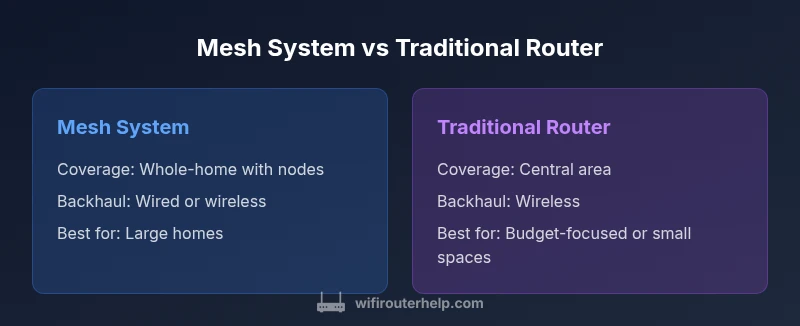
| Backhaul | Ethernet or wireless backhaul between nodes | Primarily wireless backhaul; some models support wired backhaul |
| Security & Updates | Centralized updates; consistent security across nodes | Security updates depend on each device; potential fragmentation |
| Price Range | $150-$600 (mesh kits with multiple nodes) | $60-$300 (single router; extenders can add cost) |
| Best For | Large homes, multi-floor layouts, roaming devices | Smaller homes/apartments, budget-conscious buyers |
Benefits
- Easy to expand coverage without dead zones
- Unified network name and seamless roaming for devices
- Centralized management and automatic updates in many kits
- Improved reliability in multi-story homes with thick walls
The Bad
- Higher upfront cost compared to a single router
- Performance depends on node placement and backhaul quality
- More complex setup and potential ongoing maintenance for larger systems
- Some models may introduce vendor lock-in and require specific apps
Mesh wins for large, complex homes; routers win for budget-conscious, smaller spaces
Choose mesh if you have coverage gaps or frequent device handoffs. Choose a traditional router if you want simplicity, cost savings, and strong performance in a compact space.
People Also Ask
What is the basic difference between a mesh system and a traditional router?
A mesh system uses multiple nodes to create a single seamless network, optimizing coverage and roaming. A traditional router operates as a single device (often with extenders) to distribute Wi‑Fi, which may lead to dead zones if not properly planned. Both can support modern Wi‑Fi standards, but the user experience varies with layout and device count.
Mesh uses multiple nodes for wide coverage, while a single router covers a smaller footprint unless extended. Think of mesh as a blanket over your home, and a router as a single hotspot.
Is mesh always the best choice for large homes?
In most cases, yes, especially if the home has multiple floors or thick walls. Mesh minimizes dead zones and provides smoother roaming. However, if the home is open with good existing coverage and a strong single router is available, a traditional setup can be cost-effective.
For large homes, mesh usually offers better coverage and roaming, but it depends on your layout and budget.
Can I mix mesh nodes with a regular router?
Some systems allow adding nodes to a primary router, but compatibility varies by brand. Mixing can create roaming or network name inconsistencies. If you want a cohesive experience, pick a system designed to work together.
Some brands let you mix, but you’ll generally get the best experience sticking to one ecosystem.
Do mesh systems handle gaming well?
Many mesh systems offer low-latency modes and prioritization features that help gaming. The key is ensuring the backhaul is solid and that there are enough nodes to avoid congestion. Wired backhaul improves consistency for gaming.
Yes, many mesh systems work well for gaming, especially if backhaul is wired or there are enough nodes to reduce congestion.
Are mesh systems secure and easy to update?
Most modern mesh systems include automatic firmware updates, WPA3 encryption, and guest network options. This helps maintain a uniform security baseline across all nodes. Always enable automatic updates when available.
Yes. They usually offer automatic updates and strong encryption, which keeps your network safer with less manual work.
What should I consider about cost when choosing?
Look beyond the sticker price. Mesh kits can be pricier upfront but may save money on extenders and configuration time. Traditional routers are cheaper upfront but may require additional devices over time if your space grows.
Think long-term: mesh is often more cost-effective for larger spaces, while a basic router may suit smaller homes on a budget.
What to Remember
- Evaluate home size and layout before choosing
- Mesh is best for wide coverage and roaming devices
- Routers can be sufficient for small homes with fewer devices
- Consider long-term costs and maintenance when budgeting
- Security and updates should be a priority in any choice