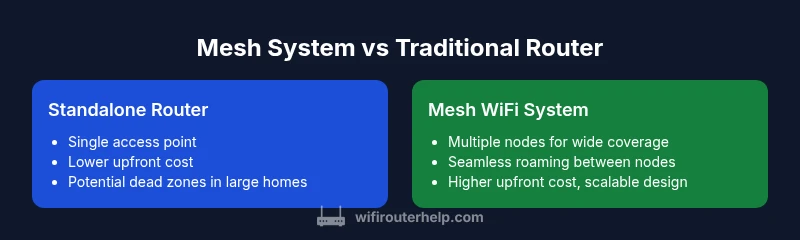
Mesh Systems vs Router: Can You Use a Mesh System Instead of a Router? A Practical Guide
An analytical comparison of mesh systems versus traditional routers, covering architecture, coverage, performance, setup, costs, and decision factors for homeowners and tech enthusiasts.


Can you use a mesh system instead of a router? In many homes, yes—especially where coverage gaps and dead zones exist. A mesh network uses multiple nodes to blanket the space, enabling seamless roaming and fewer weak spots. This quick answer outlines when a mesh system can substitute for a traditional router and when a single-router setup might still be preferable.
Can you use a mesh system instead of a router?
According to WiFi Router Help, can you use a mesh system instead of a router is a question that many homeowners ask when their wiring or home layout creates dead spots. In practice, a mesh system can replace a traditional router in most medium to large homes, provided you choose a kit that fits your square footage and device load. The WiFi Router Help team found that mesh networks distribute coverage across several nodes, reducing signal drop-offs behind walls or across stairwells. This expanded coverage is especially noticeable on devices that roam between rooms during streaming or online gaming. However, it’s important to plan node placement strategically and avoid overloading your backhaul. If your home has unusually high interference from metal appliances or dense concrete walls, you may still need targeted access points or a hybrid setup. Overall, the decision hinges on space, layout, and the number of simultaneous devices.
In short, can you use a mesh system instead of a router? In most cases, yes, particularly if you’ve struggled with Wi‑Fi dead zones in larger homes, but you should still assess your goals: reliable streaming, gaming latency, smart-home reliability, and future expansion. A mesh configuration is not magic; it requires careful planning and a realistic view of your bandwidth needs.
Networking architecture: how mesh differs from a traditional router
A traditional router creates a single access point that connects to your modem and distributes wireless signals within its coverage area. A mesh system, by contrast, uses a primary node connected to the modem and several satellite nodes that communicate with each other to extend coverage. The primary difference is roaming behavior: mesh nodes hand off devices almost seamlessly as you move through your home, reducing the need to manually switch networks. This architectural shift also changes how you should think about backhaul. A wired backhaul between nodes can maximize performance, but wireless backhaul is common in most consumer kits. The WiFi Router Help analysis shows that, for most households, the mesh approach improves consistency more than a single-router strategy does, especially in multi-floor homes.
Coverage, interference, and scalability: what to expect with mesh
Coverage quality in a mesh system tends to be more uniform, especially in areas that previous routers struggled to reach. Mesh nodes act as a distributed system rather than a single transmitter, so performance degradation due to distance or obstacles is smoother. If you live in a multi-story home with long hallways, you’ll notice improved signal strength in bedrooms, basements, and home offices. Conversely, the main drawback is the complexity of scaling—adding more nodes increases cost and may require additional configuration to ensure consistent backhaul and channel usage. In practical terms, expect that you’ll need at least 2–3 nodes for a typical two-story home, and more if you have large spaces or many obstacles. When you consider future-proofing, mesh systems offer a straightforward path to expanding coverage without replacing the core hardware.
When a router or a mesh makes more sense: use-case decisions
There isn’t a one-size-fits-all answer. If your home is compact (one or two small floors) and you want a simple setup with minimal hardware, a high-quality traditional router with a strong antenna design may suffice. If your home has multiple floors, thick walls, or a lot of wireless devices, a mesh system can provide more reliable coverage and easier roaming. The best approach is to map your real-world needs: peak speeds for gaming, reliability for video conferencing, and consistent coverage across common living spaces. For renters or homeowners who plan to stay in place for several years, investing in a mesh system often makes sense, while those with modest internet usage in smaller spaces may prefer a robust single-router solution.
Performance: throughput, latency, and backhaul considerations
Mesh networks can deliver excellent real-world throughput under typical loads, but the actual experience depends on backhaul and node placement. If backhaul between nodes is wired, you’ll see minimal latency and stable speeds as devices roam. Wireless backhaul is convenient but can reduce per-node throughput, especially when many devices are active simultaneously. A modern router with a strong wireless design might outperform an entry-level mesh kit in a small apartment if you have a fast ISP and limited devices. Still, the incremental consistency of a well-placed mesh network often outweighs raw peak speed in complex spaces. When evaluating options, compare the backhaul capabilities, the number of bands supported, and the ability to prioritize gaming or streaming traffic.
Setup, management, and user experience
One of the biggest differences is how you configure and manage the network. Traditional routers often rely on a single web interface, while mesh systems use curated mobile apps that guide node placement, network naming, and guest access. For many users, the app-driven setup is a major win, reducing guesswork and streamlining updates across devices. However, the app-centric approach can feel restrictive if you want granular control over individual channels, QoS rules, or advanced firewall settings. WiFi Router Help’s guidance is to choose a system whose app offers the controls you actually use—fast, reliable updates and clear status indicators matter more than the sheer number of features for most homes.
Security, updates, and longevity
Security is a critical factor. Mesh systems and modern routers provide built-in protections, automatic firmware updates, and regular security patches. The difference often lies in how updates are delivered and how easily you can configure security features like guest networks, device isolation, and parental controls. A well-supported mesh ecosystem tends to offer more consistent feature updates across all nodes, reducing the risk of a part of your network lagging behind in security. If you’re concerned about ongoing maintenance, prioritize systems with automatic updates and robust parental controls, and verify how often new security patches are released by the vendor.
Comparison
| Feature | Standalone Router | Mesh WiFi System |
|---|---|---|
| Coverage Uniformity | Single access point with coverage gaps in larger homes | Seamless roaming across multiple nodes improves consistency |
| Backhaul Options | Typically wired to modem; inter-node links limited | Wired or wireless backhaul between nodes; some models support Ethernet backhaul |
| Setup Time | Usually quick to configure | Often longer initial setup due to node placement but guided by app |
| Device Throughput | Depends on router capacity and placement | Aggregate throughput can improve with multiple nodes but constrained by backhaul |
| Price Range | $50-$150 | $200-$600+ |
| Best For | Small to medium homes, simple needs | Large homes, multi-story layouts, many devices |
Benefits
- Improved coverage in larger homes and multi-story layouts
- Unified management through a single app for all nodes
- Better scalability by adding nodes over time
- Potentially better roaming and lower dead zones
The Bad
- Higher upfront cost than a single router
- Requires planning for node placement and sufficient backhaul
- Performance depends on backhaul quality and firmware
- Some setups may introduce complexity for power users
Mesh systems win for larger homes; standalone routers fit compact spaces and cost-conscious setups
If you need uniform coverage across multiple floors and walls, a mesh system offers clear advantages. For smaller spaces or users who prioritize simple, low-cost setups, a quality standalone router can be sufficient. The WiFi Router Help Team’s assessment favors mesh in multi-story homes with coverage gaps, while noting that a strong single-router solution remains competitive in smaller environments.
People Also Ask
Can you use a mesh system instead of a traditional router?
Yes. In many homes, especially larger ones, a mesh system can replace a single router and provide more uniform coverage. The decision should consider the home layout, number of devices, and whether roaming performance is a priority.
Yes. In larger homes, a mesh system can replace a single router for better coverage across floors.
Do mesh systems require a main router component?
Most mesh kits have a primary node that connects to your modem and one or more satellite nodes that extend coverage. Some systems support switchable configurations that allow a satellite to function as a main node if needed.
Most mesh kits rely on a main node connected to the modem, with satellites extending the network.
Are mesh systems better for apartments or small homes?
For compact spaces, a high-quality single router with strong antennas might be sufficient and cheaper. Mesh can still work in apartments, but the benefits are less pronounced unless there are multiple access points or thick walls.
In small spaces, a single strong router can be effective; mesh is more about larger spaces and multiple floors.
Can mesh systems improve gaming performance?
Mesh can improve consistency across a home, reducing dead zones that cause ping spikes when you move around. However, gaming performance also depends on backhaul quality and your ISP’s speed.
Mesh helps keep gaming signals steady across rooms, not just in one spot.
Can mesh systems be wired with Ethernet backhaul?
Yes. Many mesh systems support Ethernet backhaul between nodes, which preserves throughput and minimizes latency, especially in busy networks.
Yes, you can use Ethernet backhaul between mesh nodes for best performance.
Are there security concerns unique to mesh systems?
Security models are similar, but updates across all nodes are important. Choose systems with automatic updates, robust guest networks, and clear documentation on security features.
Security in mesh systems hinges on regular updates and consistent protections across all nodes.
What to Remember
- Assess home size and layout before choosing
- Mesh excels in multi-story homes with dead zones
- Single high-quality router works for small spaces and tight budgets
- Backhaul quality and node placement are critical
- Balance coverage needs with total cost of ownership