Mesh vs Router: A Practical Guide for 2026
A thorough, objective comparison of mesh networks and traditional routers to help homeowners choose the right WiFi setup for 2026. Learn about coverage, roaming, cost, and setup considerations to make an informed decision.


Mesh networks generally deliver broader, more reliable coverage across multi-story homes, reducing dead zones compared with a single router. A traditional router can be sufficient in compact spaces or where budget is tight. This article compares mesh systems to a standard router to help you choose the right setup for 2026.
What the phrase "mesh vs router" means in practice
When homeowners talk about mesh vs router, they’re comparing two approaches to distributing Wi‑Fi throughout a home. A mesh network uses multiple connected nodes that share one SSID and coordinate to blanket every room with signal. A traditional router relies on a single main device, optionally boosted by a few extenders or access points. For readers of WiFi Router Help, understanding the practical differences helps you map your space, devices, and ISP plan to an approach that minimizes dead zones and maximizes consistent speeds. According to WiFi Router Help, mesh systems are increasingly common for multi-story homes, large open floor plans, and properties with thick walls. The goal is to deliver reliable coverage wherever you go indoors, not just near the router. This section sets the stage for a deeper, data-driven comparison and a decision framework you can apply in real life.
Core differences: coverage, roaming, and scalability
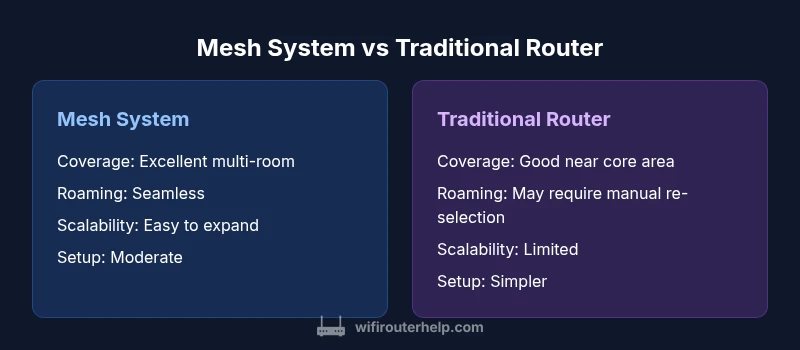
The core distinction between mesh networks and traditional routers is how coverage is delivered and managed. A mesh setup subdivides the home into multiple cells, with each node acting as both a receiver and a transmitter. Roaming—your device switching seamlessly from one node to another without dropping the connection—is a hallmark of properly implemented mesh systems. In contrast, a traditional router creates a single signal footprint, and coverage often relies on placement, power, and optional extenders. Mesh systems tend to scale more gracefully because you can add nodes to expand coverage methodically. WiFi Router Help notes that this scalability is particularly valuable in homes with unusual layouts or expanding tech ecosystems, where devices multiply and require stable, consistent access across spaces.
When a mesh network makes sense
A mesh network shines in homes with multiple floors, thick walls, or rooms far from the basement or attic. If you frequently work from different rooms, stream 4K video, or support a smart home with numerous IoT devices, mesh can reduce dead zones and improve reliability. For families with ongoing device additions, mesh systems offer a straightforward path to increase capacity without reconfiguring the entire network. From WiFi Router Help’s perspective, the decision often comes down to space and future-proofing: if you anticipate more zones, more devices, or more demanding use cases, mesh is worth considering.
When a traditional router is sufficient
Small apartments or single-story homes with good natural radio coverage can often be served well by a single, well-placed router. In this scenario, a modern high-performance router may deliver the speeds you need without the extra hardware expense. If you already have a robust ISP modem/router combo, you might opt to upgrade the main router alone rather than deploying a mesh system. The cost-to-benefit balance tends to favor traditional routers for compact spaces or tight budgets, especially when the space boundaries do not create dead zones that require multiple access points.
How mesh systems actually work
Mesh networks rely on multiple nodes communicating on the same network fabric. The primary node connects to your modem and acts as the control point, while satellite nodes fill coverage gaps. Some mesh systems utilize a dedicated wireless backhaul—meaning the backchannel traffic doesn’t compete with client data—while others share backhaul bandwidth with client devices. This distinction matters because it can influence overall speeds in crowded networks. Mesh systems also simplify management through a single app, which is valuable for less technical users but can also offer granular controls for power users.
Buying considerations: how to choose between options
Choose mesh vs router based on home size, expected device density, and willingness to manage a connected ecosystem. Consider how many rooms you want to cover, whether you have thick walls, and whether you expect to add more smart devices. Assess the maintenance cycle: firmware updates, app reliability, and vendor support influence long‑term performance. Also evaluate compatibility with your ISP and existing equipment, the ease of expansion, and whether you value a single unified management interface across all nodes.
Setup and optimization tips for mesh and router
Begin with a clear floor plan of your home to identify dead zones. For mesh, place the main node centrally near the modem, and position satellites at even intervals away from interference sources like microwaves or metal appliances. Keep nodes within a strong wireless range of each other to ensure consistent backhaul. For traditional routers, optimize placement high on a shelf away from walls and interference, enable QoS for latency-sensitive devices, and update firmware. Periodic site surveys—using a mobile device to test signal strength in key rooms—help validate coverage after setup.
Real-world scenarios and decision framework
In a two-story home with a wide living area and multiple bedrooms, a mesh setup is often the most robust solution to ensure consistent speeds and reliable video streaming. In a compact urban apartment with a single doorway separation between living spaces, a single capable router or a router with a couple of extenders can be sufficient. For unusually shaped spaces like long corridors or odd floor plans, mesh enables flexible placement to preserve coverage. The framework is simple: map your space, list devices, estimate growth, and compare projected scalability and total cost over several years.
Common myths and misconceptions
Myth: More devices always mean better coverage. Reality: placement, backhaul, and interference matter more than the sheer number of devices. Myth: Mesh eliminates the need for network configuration. Reality: you still benefit from thoughtful placement, firmware updates, and security settings. Myth: A mesh system is automatically faster than a single router. Reality: real-world speeds depend on backhaul, device capabilities, and network load. Understanding these nuances helps you avoid overpaying for features you won’t use.
Comparison
| Feature | Mesh System | Traditional Router |
|---|---|---|
| Coverage area | Excellent multi-room, multi-story coverage | Good coverage near main area, limited at edges |
| Roaming experience | Seamless roaming across nodes | Manual re-selection of strongest signal in some setups |
| Scalability | Easy expansion with additional nodes | Limited expansion without extenders or new router |
| Setup complexity | Initial setup more involved, intuitive app | Usually simpler, fewer components to manage |
| Backhaul | Often supports dedicated backhaul | Backhaul shared with client traffic |
| Best for | Large homes, multi-device IoT, dead zones | Smaller homes, straightforward needs |
| Price context | Higher upfront cost, scalable long-term value | Lower upfront cost, traditional budgeting |
Benefits
- Provides broad, reliable coverage for large homes
- Seamless roaming reduces transitional dead zones
- Easy expansion with additional nodes
- Unified management across the network
The Bad
- Higher upfront cost compared to a single router
- Setup and ongoing maintenance can be more complex
- Requires compatible hardware and ongoing updates
Mesh networks are generally the better long-term solution for large homes; traditional routers suit small spaces and budget-minded setups.
Choose mesh if you need wide, reliable coverage and easy expansion. Opt for a traditional router when space is compact, budget is tight, and you don’t foresee major growth.
People Also Ask
What is mesh networking and how does it differ from a traditional router?
Mesh networking uses multiple interconnected nodes to blanket a space with Wi‑Fi, providing seamless roaming. A traditional router relies on a single device, possibly extended by extenders, which can create coverage gaps. The choice depends on space, devices, and willingness to manage multiple devices.
Mesh uses multiple nodes for seamless coverage, while a single router may have dead zones without extensions.
Can I mix mesh nodes with a single router?
In most cases, mesh ecosystems are designed to work as a single cohesive network. Mixing a dedicated mesh system with a separate router can complicate management and may not yield optimal roaming. Check vendor guidance for compatibility before mixing.
Most mesh systems work best as a complete network—avoid mixing unless the vendor confirms compatibility.
Do mesh systems require internet service to function?
Mesh systems can distribute local network access even if your internet connection is down. However, many features like firmware updates and cloud-based management require internet access. Expect some core functionality without internet, but not all features.
You’ll still get local network coverage without internet, but updates and cloud features need connectivity.
Are mesh networks more secure than traditional routers?
Security quality depends on the device, firmware updates, and configuration. Mesh systems often include centralized security features and easier management, but they are not inherently more secure without proper setup and updates.
Security depends on updates and setup; mesh can offer centralized controls, but you must configure it correctly.
Is mesh worth it for small apartments?
For small apartments with a couple of rooms, a strong single router is often sufficient. Mesh can still help if walls or layout create dead zones, but the cost and complexity may not be justified for very compact spaces.
In small spaces, a good router may be enough, unless you truly have dead zones that require expansion.
How should I budget for a mesh network?
Budgets vary with the number of nodes and features. Plan for the main router plus at least one satellite on the higher end, and consider future expansion. Compare total cost of ownership over several years rather than upfront price alone.
Think about the initial cost and future node additions to estimate long-term value.
What to Remember
- Assess your home size and layout before choosing.
- Plan for future device growth to justify mesh.
- Evaluate total cost of ownership beyond upfront price.
- Ensure compatibility with your ISP and devices.
- Test coverage after setup and adjust placements accordingly.