Is Router Better Than Mesh? A Practical Comparison
Explore when a traditional router beats a mesh system and when mesh coverage makes sense, with actionable guidance for home networks and future-proofing.


Is router better than mesh? In many homes, a single high-quality router can outperform a basic mesh for raw speed and straightforward setup, while mesh shines in large or multi-story spaces with coverage gaps. The best choice depends on home size, device density, backhaul options, and whether you prioritize speed or seamless roaming. For most readers, start with a strong router, then consider mesh if you need whole-home coverage.
Defining the Debate: is router better than mesh in modern homes
According to WiFi Router Help, the question 'is router better than mesh' is best understood as a choice between coverage goals and network management. A traditional, single router can deliver excellent speeds for many households when you choose a capable model, place it strategically, and ensure a solid wired backbone where possible. The WiFi Router Help team emphasizes that the real decision centers on coverage quality, reliability, and management overhead, not just raw speed. In practice, most readers want simple, stable WiFi for video streaming, gaming, and smart devices. If your home is small or the layout is open, a high-performance router may suffice. If you have thick walls, multiple floors, or many IoT devices, a mesh system often provides more uniform coverage. The key is to define your top priorities: speed, roaming, and future-proofing.
Core differences you should care about
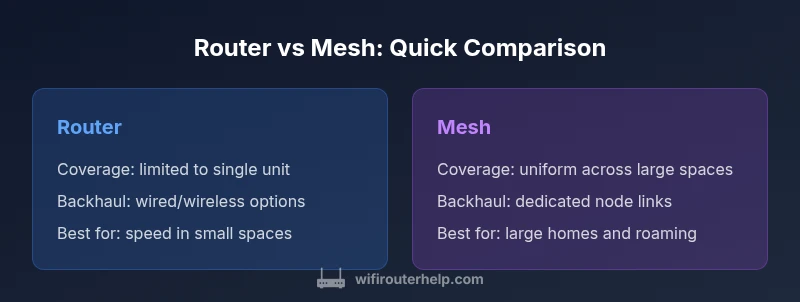
Here are the fundamental distinctions between a traditional router and a mesh system, framed around the factors most homeowners care about: coverage, management, scalability, and cost. Coverage describes how well the network reaches every room; management covers how easy it is to set up and control the network; scalability refers to growth as your home and devices expand; cost looks at upfront and ongoing expenses. A router-centric setup usually relies on one strong device and, sometimes, wired access points; a mesh setup uses multiple nodes to blanket large or obstructed spaces. The question "is router better than mesh" often boils down to whether you need tight control and higher peak speeds in a smaller area, or uniform coverage and fault tolerance across a larger home.
Performance: speed, coverage, and backhaul considerations
Performance is not a single number: it is how speed, stability, and coverage interact. In a router-first environment, peak wireless speed can be high when client devices are near the router, and wired backhaul can boost performance for stationary devices. Mesh systems distribute the workload across nodes, which helps avoid dead spots, but performance can vary depending on node placement, backhaul type, and interference. Wired backhaul between mesh nodes typically yields the best results for large homes, reducing wireless contention on the main network. WiFi Router Help notes that in many real-world scenarios, the practical difference hinges on layout and device density, not just advertised speeds. Consider your home floor plan, wall materials, and where your devices congregate when evaluating options.
Setup, management, and user experience
A single router usually means a simpler setup: connect the device, run the app, and configure basic security. Mesh systems, by contrast, require additional nodes and a tailored placement plan; however, many users appreciate roaming, consistent SSID, and automatic handoff as they move around the house. Management features like parental controls, guest networks, device prioritization, and firmware updates are commonly accessible through a single dashboard in either approach, but mesh networks often expose node-by-node controls and path optimization. The tactical decision should weigh how comfortable you are with maintaining multiple devices, updating firmware across nodes, and troubleshooting connectivity handoffs. In short, a future-proofed approach often involves starting with a capable router and adding mesh nodes only where coverage is lacking.
Cost, scalability, and upgrade paths
Cost is rarely a single number. A standalone router can be inexpensive to start but may require additional access points or powerline adapters to reach far rooms. Mesh systems typically come in kits that scale as you expand: you can add nodes to fill gaps, which makes them attractive for larger homes. However, the added hardware and subscription-like features can push up the total cost over time. When evaluating 'is router better than mesh' from a financial perspective, consider not just upfront price but total cost of ownership, including potential replacements, support, and the need for wired infrastructure. WiFi Router Help analysis shows that the cost-benefit balance often depends on the size of the home and future expansion plans.
Security and privacy considerations
Security is a constant concern for any home network. A well-configured router brings robust firewall options, updated firmware, and strong password hygiene; many devices support WPA3 and guest networks. Mesh systems also provide strong security features, with automatic updates and per-node access controls, but their distributed nature can complicate patch management if you forget to update all nodes. For best results, keep firmware updated on both routers and nodes, disable WPS if possible, and use unique, strong passwords. If you have a complex IoT setup, segment networks to limit exposure in case of a compromise. The underlying principle remains: regular maintenance and adherence to best practices matter more than the hardware choice.
Real-world scenario: small apartment or single-story home
In a small apartment or single-story home with a straightforward layout, a single high-quality router often delivers exceptional speed and reliability. Position the router in a central, elevated location away from thick walls or large metal appliances. Use a quality Ethernet switch or wired access points only if you have specific devices that demand wired connections. If you still notice dead zones (for example, in a back room or a kitchen), a single wireless extender or a compact mesh node can fill the gaps without overhauling the network. The key is to balance cost with coverage goals, not to overspecify your network for a space that doesn’t demand it.
Real-world scenario: large multi-story homes and active smart homes
For larger homes with multiple floors and many devices, mesh networking often shines. A mesh kit placed thoughtfully can provide uniform coverage across basements and attics, reducing dead zones. However, not all mesh systems perform equally: consider wired backhaul between nodes to maximize reliability, especially if you have thick walls or interference. If you prefer a simpler footprint, you can start with a robust router and a couple of access points in strategic locations to create a quasi-mesh, though this setup may lack the elegance and roaming simplicity of a true mesh. In very dense IoT environments, ensure your network supports QoS and proper device prioritization to prevent congestion.
Choosing your path: a practical decision framework
Start by mapping your home layout and device needs. If your space is under 2,000 square feet and you don’t require seamless roaming in every room, a high-end router with solid wired backhaul may be the most cost-effective. If you have multiple floors, thick walls, or a growing number of smart devices, a mesh system can offer better coverage and ease of management. Next, consider your cabling options: wired backhaul is ideal for mesh and can also improve extensions to a traditional router. Finally, weigh future needs: gaming, streaming, and smart home expansion will influence whether you upgrade the router, add more nodes, or both. Your goal is predictable, stable performance without constant fiddling.
Practical tips for a router-first setup
To maximize a router-first approach, start with a high-performance unit from a reputable brand, and place it centrally on a shelf or stand. Use a wired backbone to connect any access points or rooms where you need strong performance. Enable QoS for gaming and video conferencing, and configure a guest network to protect your main devices. Regularly update firmware and monitor connected devices for unusual activity. If your coverage is still lacking in distant rooms, add a compact extender or one more AP to fill the gap without switching to a mesh system.
Practical tips for a mesh-first setup
When you choose mesh, place nodes to optimize coverage while avoiding excessive node proximity that can cause interference. Use wired backhaul where possible to maximize performance, and assign a dedicated backhaul channel if supported. Ensure the primary node is connected to the modem with a reliable Ethernet link, and enable roaming features so devices switch gracefully between nodes. Keep firmware up to date, and use the mesh app to monitor network health, bandwidth allocation, and security settings. Consider adding a compact third node only if coverage gaps persist.
Final guidance and best practices
Whether you pick a router-first or a mesh-first strategy, the key is a deliberate plan. Start with clear coverage goals, map your floors and walls, and test speed from primary living spaces. Document your configuration: SSIDs, passwords, QoS rules, and guest networks. Then monitor performance over a few days and adjust placement, channel selection, and security settings as needed. The WiFi Router Help team recommends keeping a return-to-basics approach: optimize placement, prioritize wired backhaul when available, and update firmware on a regular schedule to maintain stability and security.
Comparison
| Feature | Router (Single Unit) | Mesh System (Multiple Nodes) |
|---|---|---|
| Coverage | Limited to a single device footprint; performance depends on placement | Uniform coverage across large or multi-story homes with multiple nodes |
| Backhaul options | Primarily wireless; wired backhaul optional on some models | Dedicated wireless backhaul between nodes; wired backhaul common in high-end kits |
| Setup & maintenance | Simpler setup with one device to configure | More complex setup but centralized roaming across nodes |
| Roaming & handoff | Roaming depends on device compatibility; handoff can be imperfect | True seamless roaming across nodes with most modern devices |
| Cost | Lower upfront cost for small spaces | Higher upfront cost with scalable expansion |
| Best use case | Small to mid-sized homes with straightforward layouts | Large homes with coverage gaps and many devices |
| Upgrade path | Upgrade single router; add access points as needed | Expand by adding nodes; straightforward scalability |
| Reliability in interference | Can be sensitive to placement and interference | Mesh configuration mitigates dead zones with multiple paths |
Benefits
- Potentially higher peak speeds with a strong single router
- Lower upfront cost for small spaces
- Simpler setup and fewer devices to manage
- Fewer points of failure and simpler troubleshooting
- Faster firmware updates for a single device
The Bad
- Limited coverage in large or multi-story homes
- Roaming handoff may be imperfect if not using modern hardware
- Less scalability for many devices or smart home setups
- Single point of failure if the main router fails
Both approaches have a place; choose based on space, device density, and budget
For small spaces, start with a capable router; for large homes or growing IoT, a mesh system often delivers more reliable coverage and easier management.
People Also Ask
Is a mesh system always better for large homes?
In very large or multi-story homes, a mesh system often provides more uniform coverage and reduces dead zones. The effectiveness, however, depends on node placement, backhaul quality, and overall network design.
In large homes, mesh often helps avoid dead zones, especially when nodes are well placed.
Can I mix a router with a mesh system?
Yes. You can use a router as the primary gateway and add mesh nodes to extend coverage. Ensure the router supports bridge or AP mode, and configure the mesh nodes to operate in the intended mode.
Yes, you can mix a router with mesh nodes if you configure them correctly.
What is wired backhaul, and why does it matter?
Wired backhaul uses Ethernet cables to connect nodes or a router to the network, reducing wireless contention and increasing reliability. It is especially beneficial in large homes or areas with thick walls.
Wired backhaul can make a big difference in stability, especially in big homes.
Do routers support seamless roaming?
Many modern routers offer client steering and AP roaming, but truly seamless roaming is most reliable with mesh systems or newer Wi‑Fi standards and compatible devices.
Roaming depends on hardware and standards; mesh tends to be smoother.
Are mesh systems more secure by default?
Mesh systems provide strong security features and automatic updates, but any system depends on regular maintenance, updates, and good password practices.
Security comes from good upkeep, not just the hardware.
How much should I budget for router vs mesh?
Budgeting varies with space and future plans. Routers can start affordable and scale up, while mesh kits require higher upfront costs but grow with added nodes.
Budget depends on space and future expansion; plan for growth.
What to Remember
- Map your space before choosing a solution
- Prioritize wired backhaul when possible for best stability
- Roaming quality matters for mobility; test in key rooms
- Total cost of ownership matters more than upfront price
- Test coverage in living rooms, bedrooms, and the basement after setup