Router vs Switch: What Sets Them Apart in Home Networks
An analytical, side-by-side comparison of routers and switches for home networks. Learn core roles, use cases, and practical guidance to choose and configure the right devices.


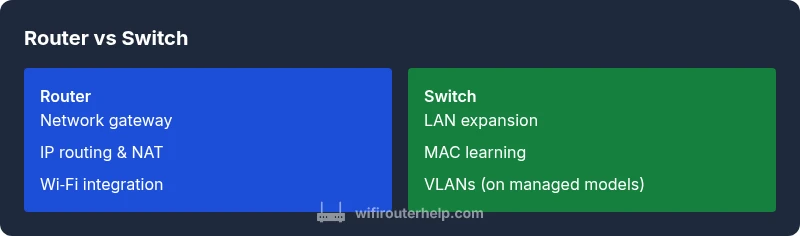
Router vs switch is a fundamental distinction in home networks. A router connects your local network to the Internet, assigns IP addresses, and often includes firewall and NAT capabilities. A switch, by contrast, expands the number of devices you can connect locally, forwarding frames based on MAC addresses without routing between networks. This quick contrast sets the stage for a deeper, section-by-section comparison.
Core Roles: Routing vs Switching
In any modern home network, two devices play distinct but complementary roles: the router and the switch. The central question for many homeowners is how is router different from a switch in practical terms. A router acts as the gateway to the Internet, routing traffic between your local network and an external network, typically the ISP. It assigns IP addresses, translates them with NAT, and enforces basic firewall rules. A switch, on the other hand, serves as a boundary extender within the local network, connecting multiple devices and forwarding frames based on MAC addresses. In simple terms, routing compares networks; switching moves data within a network. Understanding these roles helps plan a reliable, scalable home network. According to WiFi Router Help, recognizing the distinct purposes prevents misconfigurations that waste bandwidth and complicate management. In this article we’ll unpack the differences with practical examples and concrete guidance for typical household setups.
How Routers Work
A router sits at the edge of your network, connecting the private LAN to the wide-area network (the Internet). It uses routing tables or simple default routes to decide where to send packets, and it typically performs Network Address Translation (NAT) so multiple devices share a single public IP address. Most home routers also include a DHCP server to assign private IPs to devices and a basic firewall to filter unwanted traffic. WAN ports receive the Internet signal from the modem, while LAN ports (and often wireless radios) deliver connectivity to devices inside the home. While advanced users may tweak routing protocols or enable VPNs, the general rule is: routers manage traffic between networks and provide gateway services.
How Switches Work
Switches focus on moving data inside the local network. They learn the MAC addresses of devices and build a forwarding table, which allows efficient delivery of frames to the correct destination. Unmanaged switches offer plug-and-play simplicity, while managed switches provide VLANs, QoS, and more granular control over traffic and security. Switches do not typically route between networks and they don’t assign IP addresses; their job is to keep local devices talking to each other quickly and reliably. Some switches support PoE (Power over Ethernet), which can simplify device placement for access points or IP cameras.
The Key Differences That Matter
The most visible difference is the OSI layer at which each device operates: routers primarily operate at Layer 3 (network layer) by routing between IP networks, while switches operate at Layer 2 (data link layer) by forwarding frames based on MAC addresses. This distinction drives several practical outcomes:
- Addressing and routing vs MAC-based forwarding
- NAT, firewall features, and DHCP integration on routers vs pure forwarding on switches
- Network design implications, such as gateway roles vs internal segmentation with VLANs
- Security responsibilities: routers often enforce edge security; switches can segment traffic with VLANs but require configuration
- Port density and speed: routers emphasize WAN interfaces; switches emphasize scalable LAN port counts and PoE options These factors shape what you need in a home network. When considering how is router different from a switch, the context matters: for Internet access and security, you rely on a router; for expanding a wired footprint or building a dedicated internal network, you layer a switch on top.
Common Use Cases by Homeowners
Most households benefit from a gateway router that provides Internet access, IP addressing, and a first line of defense. A switch is then layered in to extend the number of wired devices, support room-by-room connectivity, or create a dedicated network for smart devices or a home office. For small offices and power users, a managed switch can offer VLANs to separate devices and optimize bandwidth, while a router handles WAN access and security. If you’re unsure where to start, a single modern router with several LAN ports and built-in Wi-Fi covers most needs; add a switch only when you run out of ports or want to segment traffic for performance or security reasons.
Misconceptions That Cause Confusion
A common misconception is that a router can replace a switch entirely, which is true for basic needs but insufficient for large or segmented networks. Another myth is that all switches are the same; unmanaged switches are simple and cheap, while managed switches provide features necessary for advanced setups. Some users believe NAT is exclusive to routers; while NAT is a router function, certain Layer 3 switches can perform routing in enterprise environments. Finally, many homeowners assume more features on a single device mean better performance; in practice, the right balance of router and switch components delivers predictable, scalable results.
How to Choose: Scenarios and Buyer Guidance
Choosing between a router and a switch starts with your use case. If you need secure Internet access and simple home networking, prioritize a router with solid firewall rules, UPnP control, and reliable Wi-Fi. If you anticipate needing more wired devices, plan for a switch with enough ports and, for future growth, consider a managed switch with VLANs. Budget matters, but so does future-proofing; a slightly more capable router with a quality switch can save time and reduce compatibility issues later. For small homes, a router with integrated switches is often sufficient, but larger homes or offices benefit from separate, scalable switches and a robust gateway that can handle QoS, VLANs, and multiple subnets.
Integrating Routers and Switches in a Home Network
A practical topology is a single gateway router at the network edge, connected to a switch that fans out to desktops, printers, cameras, and IoT devices. If you need segmentation, place a managed switch behind the router and configure VLANs for guest networks, IoT, and work devices. QoS settings on the router can prioritize videoconferencing or gaming traffic, while the switch can enforce fast, predictable LAN performance. For most users, this two-device approach balances simplicity and control; for larger or more complex setups, you can expand with additional switches and more advanced routing rules.
Troubleshooting Basics: When Things Don’t Play Nice
Problems often stem from misconfigured NAT or DHCP boundaries, IP address conflicts, or faulty cables. Start by verifying that the router is the gateway and that a single DHCP scope serves the LAN. Check that the switch is not creating a separate, unmanaged network. If devices cannot reach the Internet, inspect the WAN link, DNS settings, and firewall rules. For persistent issues, isolate segments by temporarily disabling VLANs, then reintroduce them to identify misconfigurations. Regular firmware updates for both router and switch are essential for security and performance.
Comparison
| Feature | Router | Switch |
|---|---|---|
| Layer of operation | Network Layer (Layer 3) | Data Link Layer (Layer 2) |
| Primary function | Gateway to Internet, IP routing, NAT, firewall | Local device interconnection, frame forwarding, MAC learning |
| Addressing | IP addresses, DHCP, NAT | MAC addresses; VLANs on managed switches |
| Traffic management | Routing decisions, NAT, security rules | Forwarding by MAC with possible QoS/VLAN controls |
| Typical ports/speeds | WAN + multiple LAN ports; Wi‑Fi often built-in | Multiple LAN ports; PoE on some models; 1 Gbps+ |
| Best for | Home/SMB gateway with Internet access | Expanding the wired footprint; network segmentation |
| NAT/Firewall | Commonly includes NAT and firewall functions | Typically lacks NAT; focus is on switching; some offer limited Layer 3 |
| Power over Ethernet | Usually no (depends on model) | Often yes on managed switches |
Benefits
- Consolidates gateway duties (Internet access, security, DHCP) in one device for simplicity
- Reduces cable clutter by combining routing and basic switching in a single unit
- Eases setup for most homes with plug-and-play configurations
- Built-in Wi-Fi (on many models) provides convenient wireless coverage
The Bad
- Can become a single point of failure if the device fails
- Limited specialization compared to dedicated, high-end switches or routers
- Advanced features may require extra configuration skills
- Upgrading performance often means replacing the entire unit rather than just expanding ports
Routers act as the Internet gateway while switches extend the local network; use the router for gateway functions and a switch for local expansion.
For most homes, a capable router provides Internet access, IP management, and edge security. Add a switch when you need more wired ports or network segmentation. The two-device approach offers clarity and scalability, with a balanced cost and complexity.
People Also Ask
Do I need a router if I have a modem with built-in routing?
In most home setups, a modem with built-in routing can replace a standalone router for basic needs. However, adding a dedicated router can improve security, feature set, and Wi‑Fi performance, especially in larger homes.
Usually you want a dedicated router for better security and performance.
Can a switch provide Internet access without a router?
No. A switch cannot route traffic between networks or provide Internet access by itself. It operates within a single network segment. You still need a router to reach the Internet and assign IP addresses.
A switch alone can’t connect you to the Internet.
What is NAT and why does it matter in home networks?
NAT translates private IP addresses to a public address, allowing multiple devices to share a single Internet connection. It provides basic security by masking internal addresses and enables simple port routing for services.
NAT lets many devices share one Internet address.
Are home switches smart enough to handle VLANs?
Some managed switches support VLANs for traffic segmentation; unmanaged switches do not. If you need guests, IoT, or work-device separation, consider a managed switch.
Only managed switches usually offer VLANs.
Is a separate router always better than a router with an integrated switch?
It depends on scale and needs. A combined device is convenient; a separate switch can offer more ports and advanced features for larger networks.
Not always—depends on your network size and features you want.
What to Remember
- Start with a gateway router for Internet access and security
- Add a switch to expand wired devices and enable VLANs if needed
- Plan for future growth with scalable port counts and manageability
- Keep firmware updated on both devices for stability and security