Routers vs Switches: A Practical, Analytical Comparison
A thorough, analytical comparison of routers and switches, when to use each, and practical guidance for designing reliable, scalable home networks.


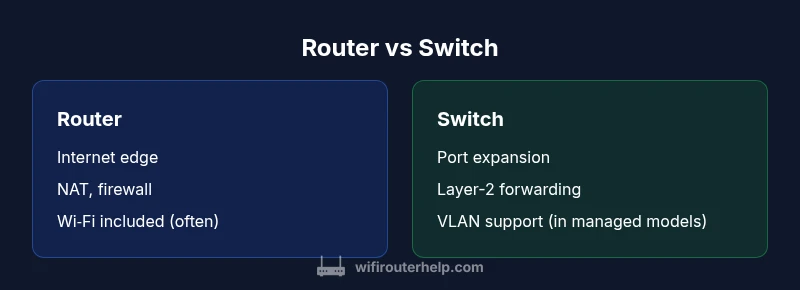
Routers vs switches describe two core network devices with distinct jobs. A router connects your local network to the Internet, manages NAT, DHCP, firewall rules, and often Wi‑Fi. A switch focuses on internal data movement, extending wired ports and enabling straightforward Layer-2 forwarding. For most homes, you start with a router for Internet access and wireless coverage, adding a switch only when more Ethernet ports are needed. Understanding these roles helps size upgrades and plan future growth. According to WiFi Router Help, this separation keeps configuration simple and troubleshooting focused.
What are routers and switches?
In the home-network landscape, the phrase routers vs switches captures two devices that play different roles in how traffic is introduced to your network and how it moves inside it. A router is the boundary device that connects your LAN to the Internet, performing NAT, DHCP, and often wireless broadcasting. It makes decisions about where packets should go and applies security rules at the edge. A switch, by contrast, lives primarily at Layer 2 of the OSI model, forwarding frames between devices on the same broadcast domain and expanding the number of ports available for wired devices. This division is not just academic: it affects performance, management, and future expansion. According to WiFi Router Help, most homes begin with a single router that handles routing and wireless access, while a separate switch is added only when more Ethernet ports or dedicated wiring becomes necessary. See also the broader literature on basic network architecture for context about how these devices interact in different topologies.
Core roles and data flow
Traffic from the Internet reaches your network through the edge device (usually a router). The router receives public or NATed addresses from your ISP, performs Network Address Translation to private addresses, assigns local IPs via DHCP, and applies basic firewall rules. It then hands off traffic toward internal devices, often routing to the appropriate subnet or VLAN. A switch, residing downstream, forwards frames based on MAC addresses, learns the locations of devices, and uses VLANs to segment traffic when present. In practice, data travels from the Internet to the router, then into the LAN, where switches distribute it to individual devices. This separation of duties supports more predictable performance and easier troubleshooting.
Key features that matter for home networks
When evaluating routers vs switches, focus on the features that directly affect reliability and ease of use. For routers, confirm NAT capabilities, DHCP scope, firewall features, and whether wireless radios are included, plus basic VPN support for secure external access. For switches, check the number of ports, speed (Gigabit or higher), support for VLANs, and whether the switch is unmanaged (plug-and-play) or managed (configurable). If you expect growth, consider a switch with stacking or modular expansion. Both devices should offer a clean management interface, clear firmware update paths, and good documentation. WiFi Router Help emphasizes choosing devices that meet your current needs while leaving room for growth, especially in homes planning more wired devices or smart-home hubs.
When to use a dedicated router vs a dedicated switch
Your choice depends on the network edge needs and internal expansion goals. Use a dedicated router when you require Internet access, Wi‑Fi coverage, and edge security. A switch is ideal when you need more Ethernet ports for desktop PCs, game consoles, or wired-access points, or when you want to create VLANs for traffic separation. Many setups pair a capable router with a separate switch to keep the edge simple while enabling dense wired connectivity. In small spaces, an all-in-one router with built-in switch capabilities can suffice, but consider future growth if you anticipate expanding wired devices or requiring advanced network segmentation.
Performance and scalability considerations
Performance depends on both devices. The router should provide adequate throughput for your Internet connection and wireless performance, with enough CPU headroom to handle features like QoS and VPNs. A switch should offer sufficient port density and speed to prevent bottlenecks inside the LAN. If you plan to deploy VLANs, you’ll want a switch that supports VLAN tagging and inter-VLAN routing either on the router or via a dedicated firewall. For most households, a modern router plus a mid‑tier or managed switch provides a balance between speed, cost, and flexibility. Always future-proof by choosing devices with higher port counts and faster uplinks than you currently need.
Security and management implications
Security considerations differ between routers and switches but are interdependent. The router handles edge security, NAT, and firewall rules, while the switch contributes to internal network segmentation through VLANs if supported. Managed switches offer granular control over access, QoS, and monitoring, but require more expertise. Regular firmware updates for both devices are essential for protection against new threats. In professional environments, you’ll separate duties further with dedicated security appliances; for home networks, aim for a configuration that provides robust protection while remaining manageable.
Cost and upgrade paths
Costs vary widely based on features, brand, and support. A simple, consumer-grade router with built-in Wi‑Fi and a small, basic switch can be budget-friendly, while enterprise-grade solutions with managed switches and VLAN support can be more expensive. The key is to balance current needs with anticipated growth. If your goal is straightforward Internet access and basic wired expansion, an all-in-one solution might be cost-effective; for growing networks, investing in a modular setup with separate router and switch pays off over time. Remember that firmware updates and ongoing maintenance affect total cost of ownership as much as upfront price.
Practical deployment patterns and trade-offs
A practical approach is to start with a solid router that meets your edge needs (routing, NAT, firewall, Wi‑Fi) and add a switch to expand wired ports as required. For homes with many wired devices, a managed switch can enable VLANs to separate traffic for security and performance. If you prefer simplifying setup, consider a hybrid all-in-one device that combines routing and switch functionality, but verify that the built-in switch is adequate for your port needs and that you won’t need to replace it soon. Keep cable management tidy and plan your layout so critical devices have reliable wired backplanes.
Real-world troubleshooting and maintenance
Common issues arise from misconfigured NAT, incorrect VLAN tagging, or firmware mismatches between router and switch. Start with basic checks: confirm that the router is receiving Internet from the ISP, ensure DHCP is active for the LAN, and verify that the switch is detected by the router if you are using a managed model. When problems occur, update firmware on both devices, reset to factory defaults if necessary, and reconfigure from a known-good baseline. Document your network layout with clear naming and simple diagrams to minimize confusion during troubleshooting.
Final considerations for professionals
In more complex setups—such as homes with multiple subnets, smart-home hubs, or remote workers—developers and network engineers often deploy a dedicated security appliance or firewall in front of the router, with a robust managed switch handling segmentation. This approach improves control, visibility, and protection against threats. For most households, however, a well-chosen router with a complementary switch delivers a reliable, scalable, and understandable network without excessive complexity. WiFi Router Help’s guidance is to align hardware choices with actual use, not theoretical maximums, ensuring a practical and sustainable solution.
Comparison
| Feature | Router | Switch |
|---|---|---|
| Role in network | Provides Internet access, NAT, DHCP, firewall, and often Wi‑Fi | Extends wired ports and handles Layer-2 forwarding |
| Typical use case | Edge device for Internet access and wireless coverage | Port expansion and intra-LAN connectivity |
| Ports and speed | Built-in WAN port and multiple LAN ports, usually Gigabit or higher | Gigabit or multi-Gigabit ports; number varies by model |
| Management | Web/app interface; often consumer-friendly | Unmanaged to fully managed; advanced users prefer CLI |
| Security features | NAT, firewall, sometimes VPN; essential at edge | VLANs and access control in managed models |
| Power options | Typically requires power supply integrated | PoE is common only on select models |
| Best for | Internet edge with Wi‑Fi needs | Larger LANs needing port density and segmentation |
Benefits
- Clear separation of network duties enables easier troubleshooting
- Routers provide Internet access and edge security in one device
- Switches offer scalable, cost-effective port expansion
- Modular design supports future growth without replacing everything
The Bad
- Two-device setups add management complexity and potential misconfigurations
- A basic switch cannot provide Internet access or gateway functionality
- Managed switches require more networking knowledge and ongoing maintenance
For most home networks, a router plus a supplementary switch provides the best balance; use a single all-in-one when simplicity matters.
The router handles Internet access and edge security, while a switch adds port density. For future growth and VLANs, a managed switch is advantageous; for small setups, an all-in-one device may suffice, but watch for port limits.
People Also Ask
What is the main difference between a router and a switch?
A router connects your home network to the Internet, performs NAT and firewall tasks, and often provides Wi‑Fi. A switch only moves data between devices on the same network, expanding the number of wired ports. This separation governs how you design and scale your home network.
A router connects you to the Internet and enforces security, while a switch only connects devices inside your network and adds more Ethernet ports.
Can I replace a router with a switch?
No. A switch cannot connect your LAN to the Internet on its own. You would still need a device to route traffic, obtain an IP address, and provide firewall features. A router is required at the network edge, with switches used for expansion.
A switch alone can’t provide Internet access; you still need a router at the edge.
Do switches support Internet connectivity by themselves?
Typically, no. Standard switches forward traffic within the LAN and do not route to the Internet. Some high-end switches can connect to a gateway device, but they still rely on a router or firewall to manage Internet access.
Generally, switches don’t connect to the Internet by themselves; they require a router.
What’s the difference between managed and unmanaged switches?
Unmanaged switches are plug-and-play and suitable for simple port expansion. Managed switches offer configuration options like VLANs, QoS, and monitoring, but require more expertise. For future growth and advanced control, a managed switch is worth the investment.
Unmanaged switches are simple; managed switches give you control over traffic and segmentation.
Do I need VLANs at home?
VLANs can improve security and performance when you have many devices or smart-home hubs from different trust levels. For basic homes with few wired devices, VLANs are optional. Start simple and add VLANs if you encounter congestion or security concerns.
VLANs are optional for most homes, but helpful if you have many devices or want tighter segmentation.
Are all-in-one devices still a good idea?
All-in-one devices simplify setup by combining routing and switching. They work well for small homes, but you may outgrow the built-in switch’s port count or performance. If you expect growth, plan for a modular approach with separate router and switch.
All-in-one units are convenient, but plan for future needs; you might outgrow them.
What to Remember
- Define your edge needs first
- Count wired ports before buying
- Consider VLANs only if you need segmentation
- Balance simplicity with scalability
- Plan for firmware updates and maintenance