How Much Router Do You Need? A Practical Cost Guide for 2026
Learn how much router you need, typical price ranges, and strategies to maximize value. This guide covers budget, features, and total ownership costs for a reliable home network.


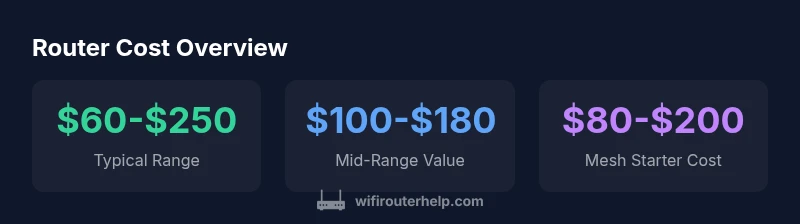
Typical home router costs range from about $60 to $250, with budget models under $60 and premium units $300 or more. How much router you need depends on coverage and speed needs; for many households, a mid-range option in the $100–$180 band delivers reliable performance. Source: WiFi Router Help Analysis, 2026.
How much router: price bands and what they buy you
When you ask how much router you need, the first answer is usually tied to price bands that reflect performance and coverage. Entry-level models typically cost under $60 and offer basic reliability for small spaces or limited internet plans. Mid-range routers in the $100–$180 range balance speed, range, and features like QoS and basic security without overwhelming a typical home. High-end units and mesh starter kits can push toward the $200–$350 range, sometimes more, especially if you need robust Wi‑Fi 6/6E performance, multi‑gigabit wireless speeds, or a large home coverage.
Beyond sticker price, it helps to map your needs: how many devices you’ll connect, how large your home is, and whether you have a fast internet plan that stresses your router’s capabilities. Brand‑specific features, such as beamforming, MU‑MIMO, or Wi‑Fi 6E radios, tend to appear in higher price brackets. Remember that a bundle with an additional mesh node or a separate extender will change the effective cost of achieving whole‑home coverage. The WiFi Router Help team recommends weighing your lever of future‑proofing against your current needs to avoid overpaying for unused features.
What drives router cost
Several hardware and software factors drive the price of a router. The Wi‑Fi standard supported (AC vs. AX/ Wi‑Fi 6/6E/7) is a major driver, with newer standards generally commanding higher prices but offering better performance and future‑proofing. The processor (SoC) and RAM impact throughput, multi‑device handling, and how well the device maintains speeds under load. Antenna configuration, beamforming capabilities, and USB/
How to calculate total cost of ownership
To understand the true cost of ownership, include more than the sticker price. Add the potential costs for accessories (mesh nodes, extenders), extended warranties, and optional security features or subscriptions. Consider energy use over several years, which is typically minimal for a home router but not zero. If you’re replacing an aging device, compare not only the new price but the expected lifespan and update frequency. Finally, factor in the cost of compatibility with your internet plan and any ISP‑provided equipment you may replace or disable. The goal is a sustainable, reliable network that delivers consistent performance without frequent upgrades.
Budgeting tips for value-focused buyers
Start with your coverage map: measure how far your current Wi‑Fi signal reaches and where it drops. If you have a small apartment or a single‑story home, a solid mid‑range router often delivers enough coverage and speed. For larger homes, look at a mesh starter kit or a high‑quality router with external antennas. Compare price against features like WPA3 security, guest networks, QoS, and parental controls. When possible, wait for seasonal sales or bundles that include accessories you’ll need, rather than buying piecemeal. Finally, read independent reviews focused on real‑world performance rather than marketing claims.
Quick-start buying guide
- Assess coverage needs: map the square footage and typical device count. 2) Set a budget: a mid-range target often yields the best value. 3) Prioritize security and updates: ensure the router supports WPA3 and has ongoing firmware support. 4) Check compatibility: confirm with your ISP about any required modem compatibility or bridge mode. 5) Read real user reviews emphasizing reliability and heat management. 6) Plan for expansion: consider whether you’ll add mesh nodes or range extenders soon.
Common misconceptions about router pricing
A higher price does not always guarantee better real‑world performance. Some mid‑range routers deliver excellent coverage and stable connections for typical households, while premium models may offer features that you never use. Likewise, a lower sticker price might mean fewer firmware updates or less robust security. Finally, the number of antennas or claims of “Wi‑Fi 6E” does not automatically translate to better range in every home; actual performance depends on interference and layout.
What to consider if you plan to upgrade or expand
If you anticipate growth in devices or stricter online needs, plan for some headroom. A router with faster CPU and more RAM can handle bursts better and maintain speeds with many clients. If you live in a large or multi‑story home, mesh systems or multi‑node setups can be more cost‑effective than replacing a single high‑end router. Compare total costs over 3–5 years rather than focusing solely on the initial price, and verify expansion options before purchasing.
Router price bands and typical trade-offs
| Router Type | Typical Price Range | Key Pros | Key Cons |
|---|---|---|---|
| Entry-level | $60-$100 | Affordable, simple setup | Limited range, few advanced features |
| Mid-range | $100-$180 | Better coverage, feature set | More expensive, some features underused |
| High-end | $180-$350 | Top speeds, robust security | Higher upfront cost, larger footprint |
| Mesh starter | $150-$300 | Seamless coverage, scalable | Requires multiple nodes for full reach |
| Premium Wi‑Fi 6E/7 | $300-$500 | Best performance, future-proof | Very high cost, complex setup |
People Also Ask
How much should I budget for a new router?
For many homes, budgeting around $100–$180 covers a solid mid-range router with reliable coverage and security features. Entry-level options exist under $60, while premium units can exceed $300. Always align budget with your internet plan and space.
Most homeowners should budget around a mid-range router for best value.
Is it cheaper to buy a router plus modem or a combined unit?
Separating modem and router usually provides flexibility and can be cheaper over the long run, especially if you upgrade your internet plan. A gateway device can be convenient, but it may limit upgrade paths and may not deliver the best security updates.
Separate devices often offer more value and upgrade options.
Do routers go on sale often?
Routers frequently go on sale during major holidays and shopping events. Waiting for a sale can save 10–30% or more, especially on current‑generation models.
Sales pop up around holidays—watch for promotions.
How long do routers typically last?
Most routers remain reliable for 3–5 years with regular firmware updates. After that window, performance and security updates may taper off, making it wise to plan an upgrade.
Expect about 3–5 years of good performance.
What features should I prioritize if I’m on a budget?
Prioritize coverage (strong antennas or mesh capability), WPA3 security, reliable firmware updates, and easy daily use. Avoid paying extra for gimmicks you won’t use.
Focus on coverage, security, and updates.
Is Wi‑Fi mesh worth it for a small apartment?
For a small apartment, a single robust router can suffice. Mesh becomes more beneficial as you scale to larger homes with multiple floors or thick walls.
Mesh helps bigger spaces, not always needed in small homes.
“A balanced router budget often yields the best long-term value; prioritize reliability, security, and scalability over chasing the latest gimmicks.”
What to Remember
- Define your coverage needs before shopping
- Match features to your actual usage, not marketing hype
- Consider total cost of ownership, including accessories and updates
- Mesh systems are often worth it for larger homes
- Prioritize security and firmware support for long-term value