How Much Does a Router Cost? A Practical Guide
Discover how much routers cost, what drives price ranges, and practical budgeting tips with a data-informed guide from WiFi Router Help.


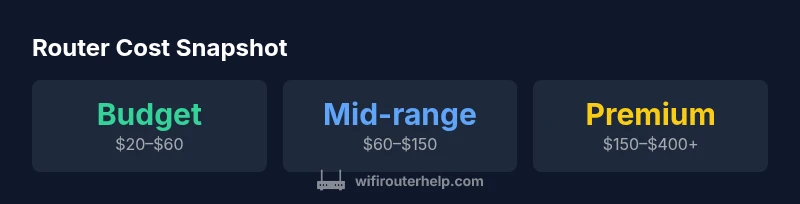
The typical price range for a consumer router spans roughly $20 to $400, with most households spending about $60–$150 for solid performance. Entry-level models start cheap, mid-range routers offer better coverage, and mesh systems or high-end gaming routers can approach $200–$400. These ranges reflect features, standards, and coverage differences.
How pricing is structured across router types
If you're asking how much does a router cost, the answer depends on your needs, home size, and device load. The lowest-priced models often cap at modest speeds and basic security. In contrast, mid-range devices offer faster throughput, better range, and smarter features, while premium routers and mesh systems target larger homes or dense device ecosystems. The price bands reflect not only hardware but the ability to support more simultaneous connections, newer standards, and future-proofing. According to WiFi Router Help, price segmentation is a practical shorthand for buyers: start with your space, then map capabilities to your budget. This approach helps homeowners avoid overspending on features they won’t use while ensuring coverage for modern devices.
Note: This section uses ranges rather than fixed prices to accommodate market fluctuations and regional taxes; refer to current listings for precise figures. -WiFi Router Help analysis, 2026.
What Influences the Cost
A router’s sticker price is driven by several factors beyond brand name. The core standards (Wi‑Fi 5, 6, 6E, and upcoming 7) determine core performance. Antenna design, CPU speed, RAM, and onboard security features can add to the cost. Mesh capabilities, app-based management, parental controls, and QoS features increase convenience but also price. Build quality, warranty length, and included accessories (such as power adapters or extenders) affect perception of value. Retail channels and bundling choices—like vendor promotions or bundle deals with satellite nodes—also shift price. When budgeting, distinguish features you need (coverage and stable speeds) from features you may skip (extra bands or premium branding). WiFi Router Help’s data indicates that buyers often overpay for capabilities they won’t use; focus on essential coverage and device load.
Costs by Use Case
Different use cases justify different price points. A small apartment with a few devices can typically suffice with a basic dual-band router, in the budget to lower mid-range. A family with multiple smart devices, gaming consoles, and 4K streaming benefits from a mid-range device or a mesh system to ensure coverage throughout the home. For home offices or small businesses, prioritize reliability and management features—these often sit in the mid-to-high range. The key is to estimate device count, space, and growth trajectory over 3–5 years. In practice, many households strategically purchase a capable dual-band router and add mesh nodes later if coverage gaps appear.
Hidden and Recurring Costs
Visible price is only part of what you’ll pay. Taxes, shipping, and possible importer fees can tilt the total. Extended warranties or subscription-based security services add ongoing costs. If you upgrade to a mesh system, count additional nodes and setup fees. Lastly, consider energy usage; although routers are efficient, power draw accumulates over time. Planning for these extras helps avoid sticker-shock at checkout. WiFi Router Help data shows that total ownership costs often exceed the sticker price by 10%–30% over a 3-year window.
How to Estimate Your Total Router Cost Over Time
Think beyond the upfront price. A router’s useful life is tied to firmware support, security updates, and compatibility with newer devices. Most households replace or upgrade equipment every 4–6 years, depending on demand and evolving standards. To estimate total cost, project the initial purchase, 3-year ownership cost (including energy and support), and potential upgrade costs for future-proofing. If you expect device loads to grow, incorporate a mid-range plan earlier to avoid another purchase soon. A clear budgeting model helps avoid mid-cycle panic buys.
Strategies to Get More for Less
- Buy on sale seasons (major holidays, back-to-school) to lock in lower prices.
- Consider refurbished or certified pre-owned models with warranties.
- Weigh the long-term value of a mesh system versus upgrading a single router.
- Check for compatibility with your internet tier and future speeds to minimize premature replacement.
- Compare prices across retailers and use price alerts. WiFi Router Help recommends focusing on essential features first, not just the latest branding.
Quick Purchase Guide: What to Look For
- Coverage area and device load: ensure the router supports your home size and anticipated growth.
- Wi‑Fi standard: aim for at least Wi-Fi 6; consider Wi-Fi 6E if you have devices that can benefit from extra spectrum.
- CPU/RAM and USB/eSATA ports for expandability.
- Security features: automatic updates, WPA3, guest networks, and reliable firewall.
- Manageability: intuitive app, parental controls, and QoS.
- Warranty and support: at least 1–3 years and clear return policies.
- Price-to-performance: compare features, not just price.
Setup Without Overspending: A Step-by-Step Cost-Saving Plan
- Define your space and device load; 2) Map essential features; 3) Start with a mid-range router if you’re unsure; 4) Add mesh nodes later if needed; 5) Leverage promotions and bundles; 6) Consider refurbished options with warranty.
Common Mistakes That Inflate Router Costs
- Overbuying: buying premium mesh systems for small spaces.
- Ignoring firmware updates: missing long-term support can force early replacement.
- Focusing on brand prestige over feature relevance.
- Buying unnecessary extra nodes or features like 160 MHz channels when devices don’t support them.
- Not budgeting for taxes, shipping, and accessories.
Router price ranges by category
| Category | Typical price range | Key features |
|---|---|---|
| Entry-level/Basic Router | $20–$60 | Wi-Fi 4/5, basic security, single/dual-band |
| Mid-range / Dual-band Wi-Fi 5/6 | $60–$150 | MU-Mi, QoS, better antennas, better CPU |
| High-end / Mesh or Wi‑Fi 6/6E | $150–$400+ | Wi‑Fi 6/6E, tri-band, advanced security, app control |
People Also Ask
What is the typical price range for a basic router?
Basic routers are usually in the budget range, often starting around $20–$60. They cover small spaces but lack advanced features.
Basic routers typically cost between twenty and sixty dollars.
Is it cheaper to buy a router or a modem-router combo?
Standalone routers are usually cheaper and easier to upgrade. Modem-router combos offer convenience but can limit future upgrades.
Standalone routers are usually cheaper and easier to upgrade.
Do refurbished routers offer good value?
Refurbished units can save money but check warranty and seller reputation. They may have shorter lifespans and older standards.
Refurbished gear can be a bargain if backed by a warranty.
How long should a router last before replacement?
Most households replace routers every 4-6 years, depending on support for newer standards and performance. If it struggles with modern devices, consider earlier replacement.
Many replace every 4 to 6 years.
Are Wi-Fi 6 routers worth it for most homes?
Wi-Fi 6 offers better efficiency and range for many homes; if you have many devices or smart-home gadgets, it's worth considering; Wi-Fi 6E might be overkill for small apartments.
Wi‑Fi 6 is a good bet for most homes with many devices.
What hidden costs should I consider when buying a router?
Tax, shipping, extended warranties, and additional accessories can add to the upfront price.
Don't forget taxes, shipping, and possible add-ons.
“"Price alone won't guarantee coverage; you need to match features to your home size and device load."”
What to Remember
- Set a budget based on coverage needs
- Compare price bands and features
- Consider future-proofing with Wi‑Fi 6/6E and mesh if needed
- Watch for hidden costs like warranties and extenders
- Plan total cost over 3-5 years rather than upfront only