How Much Is a Router? A Practical Guide to Router Pricing in 2026
Curious about router prices? This guide breaks down typical costs, what drives price, and how to pick a router that fits your home network. Learn price ranges for budget to high-end models with practical buying tips for 2026.


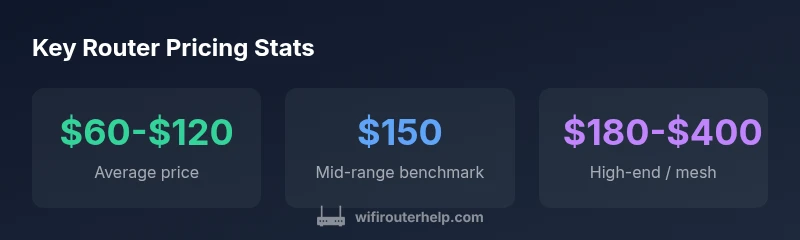
On average, a standalone consumer router costs about $40 to $150, depending on features. Entry-level models cover basic web and streaming for small households, while mid-range options add dual-band performance and better range. For gaming or smart-home setups, expect $180 to $400 for high-end or mesh systems. Prices vary by brand, firmware, and ongoing promotions.
What typically drives router price
Prices at the router level are driven by hardware capabilities, standards support, and the intended user base. A budget model may include basic 802.11ac or 802.11n performance with a modest CPU and limited RAM, adequate for casual web browsing and streaming on a couple of devices. Mid-range routers typically offer dual-band or tri-band configurations, faster CPUs, more RAM, and support for newer features like Wi-Fi 6 (802.11ax) or Wi-Fi 6E, alongside improved range and more Ethernet ports. High-end models push the envelope with multi-gigabit WAN/LAN, advanced QoS, robust security, and superior mesh integration. In practice, homeowners should map price to their internet plan speed, the number of connected devices, and whether they value features like guest networks, VPN support, or smart-home compatibility. According to WiFi Router Help, the most cost-efficient strategy is to upgrade only when your current router can’t handle your network load, and to watch for holiday promotions that commonly drop prices on mid-range models. The WiFi Router Help team found that promotions during major sales events can reduce the price by roughly 10–30% on popular mid-range routers.
Price ranges by router type
Understanding the spectrum of prices helps prevent buyer’s remorse. Here are typical ranges you can expect in 2026:
- Budget / Entry-Level: $20–$60. Great for basic web surfing and light streaming in small apartments or single-device households. They may lack latest standards and advanced features but can handle everyday tasks without breaking the bank.
- Mid-Range / Dual-Band or Early Wi‑Fi 6: $60–$150. These models provide stronger range, more device handling, and support for higher-speed plans. They’re usually a smart balance for most households with several devices and mixed usage.
- High-End / Tri-Band or Gaming/Smart-Home Ready: $180–$400. Expect gaming-optimized features, robust QoS, better security, and more extensive mesh options. This tier is ideal when you have multiple smart devices, 4K streaming, or large homes.
- Mesh Kits: $150–$500 for 2–3 unit kits. Mesh systems simplify large-area coverage and eliminate dead zones, but price scales with the number of nodes and the desired performance. Bundle deals and promotions can tilt the value quickly in favor of the kit when you need reliable whole-home coverage.
As you compare, remember that price often reflects support length, warranty terms, and bundled software features. For many buyers, a mid-range router or 2‑pack mesh kit offers the best value for money, especially when upgrading from older gear.
How to read deals and promotions
Deals can make substantial differences in the final price over time. Learn to read promotions with a critical eye:
- Look for price-per-feature: Compare CPU, RAM, and wireless standard (Wi‑Fi 5 vs Wi‑Fi 6/6E) rather than price alone.
- Check warranty and return windows: A slightly higher upfront price with a longer warranty can save money down the line.
- Watch for refurbished or open-box sales: They can offer significant discounts, but ensure official refurb policies and firmware support are solid.
- Bundle incentives: Some retailers pair routers with extenders or services—weigh whether those extras are necessary for your setup.
- Seasonal sales: Black Friday, back-to-school, and Prime Day promotions regularly cut prices on mid-range and high-end gear. The WiFi Router Help team recommends tracking prices for several weeks and timing purchases around these events to maximize savings.
By evaluating deals through the lens of your home network needs, you’ll avoid overspending while securing a router that will last several years.
Value vs features: Dual-band, tri-band, Wi-Fi 6/6E, AX routers
Price bumps in routers are usually tied to three core decision points: wireless standard, band architecture, and hardware acceleration. Dual-band routers cover 2.4 GHz and 5 GHz bands, suitable for smaller homes with fewer devices. Tri-band routers add an extra 5 GHz band or a dedicated backhaul, improving performance in busier setups or mesh configurations where many devices contend for bandwidth. Wi‑Fi 6/6E brings higher efficiency, better range, and improved performance in dense environments, enabling more devices to work without noticeable slowdowns. AX routers also often include faster processors, more RAM, and better security features. While higher prices come with tangible benefits (lower latency for gaming, smoother 4K streaming, future-proofing), it’s wise to align these features with your actual needs. If you’re operating a modest home network with a handful of devices, a capable Wi‑Fi 6 router in the mid-range is usually enough. For larger households, gaming, or smart-home ecosystems, investing in a mesh-compatible AX router or kit makes more sense. The WiFi Router Help team notes that future-proofing should be weighed against immediate needs and planned ISP speed upgrades.
When to upgrade: signs your router costs and performance
Deciding when to upgrade involves both cost and performance metrics. Consider upgrading if you notice:
- Speed drops on faster internet plans: Even a fast connection can bottleneck at an outdated router.
- Frequent buffering or dead zones: Households with multiple devices in different rooms may benefit from mesh or higher-end routers.
- Increased device count: More smartphones, laptops, streaming devices, and smart home gadgets demand more RAM and better CPU performance.
- Security concerns or lack of firmware updates: Many older routers stop receiving critical security patches and may not support newer encryption standards.
- Inconsistent gaming performance: High-end gaming or latency-sensitive applications often justify a higher price point. If your current router still meets your speed tier and device needs, you may defer upgrade until a sale or until you notice a clear deterioration in performance. The goal is to balance the cost of replacement with tangible performance gains and improved security.
The role of mesh networks in pricing
Mesh networks can simplify coverage for larger homes or multi-story buildings, but they introduce a new pricing dimension. A single router in a traditional setup can cost less than a full mesh, but a complete mesh kit with multiple nodes often costs more upfront. When evaluating mesh, consider:
- Coverage area and floor plan: A larger home or multiple floors benefit most from mesh.
- Number of nodes: More nodes provide better coverage but increase price.
- Backhaul type: Wireless backhaul is convenient but less efficient than wired backhaul; some kits support Ethernet backhaul for higher reliability.
- Management features: Some vendors offer unified apps, guest networks, and security features across all nodes, which can add value. Ultimately, a well-planned mesh kit can offer superior coverage and simpler setup for a rising number of devices, but it should be weighed against the cost of alternative single-router solutions.
Buying guidance for different homes
To pick the right router for your home, follow a simple decision framework:
- Determine your speed tier: Know your ISP plan’s maximum advertised speed and whether you regularly approach it.
- Assess device count: If your home hosts many phones, tablets, laptops, and smart devices, you’ll benefit from higher RAM, faster CPUs, and possibly a mesh system.
- Map your layout: Apartments and small homes often need solid coverage from a single, capable router, while larger homes or multi-story layouts benefit from mesh.
- Prioritize future-proofing: If you’ll upgrade internet speeds soon or add many devices, a Wi‑Fi 6/6E AX router or mesh kit reduces the likelihood of another upgrade soon.
- Check compatibility: Ensure your router supports your modem (or consider a modem-router combo if needed) and has current encryption standards (WPA3 when available).
- Plan for support: Choose brands with robust firmware support and straightforward setup processes. The right model aligns with your budget, performance expectations, and long-term maintenance needs. By following these steps and balancing price against features, homeowners and enthusiasts can select a router that reliably supports their home network for years.
Common misconceptions about router pricing
Many buyers assume higher price always means better value. In reality, the best router for most households is often a mid-range AX router or a 2‑pack mesh kit that delivers the needed coverage and speed without paying for features you won’t use. Another misconception is that newer Wi‑Fi standards alone guarantee dramatic improvements; real-world gains depend on your plan, devices, and home layout. Finally, some buyers equate price with setup simplicity—premium models can come with better software and easier configuration, but entry-level models can still be straightforward to install if you follow the manufacturer’s guide. WiFi Router Help emphasizes evaluating actual home needs, reading promotions, and choosing a model that fits your network’s current and future demands.
Router price ranges by type
| Router Type | Typical Price Range | Best For |
|---|---|---|
| Budget / Entry-Level | $20-$60 | Casual web & streaming |
| Mid-Range / Dual-Band | $60-$150 | Multiple devices, home office |
| High-End / Tri-Band or Gaming | $180-$400 | Power users, large homes |
People Also Ask
What is the typical price range for a new router?
Most new routers cost between $40 and $150 for everyday home use. Higher-end models or mesh systems can reach $180–$400. Always match the price to features you’ll actually use.
Most routers fall in the 40 to 150 dollar range for typical homes; more advanced gear can go higher.
Is it worth buying a gaming router if I only stream 1080p?
If you have several devices or demand very low latency for gaming, a gaming router might help. For basic streaming and browsing, a solid mid-range AX router usually suffices.
If you game a lot or have many devices, a gaming router can help; otherwise a mid-range router is often enough.
How do promotions affect router pricing?
Promotions can reduce prices by 10–30% on mid-range models during major sales events. Watch for bundles and retailer promotions, and compare prices across retailers.
Sales events can cut price significantly; check multiple retailers before buying.
Should I buy refurbished routers?
Refurbished routers can offer good value if they come from reputable sellers and include firmware support and a warranty. Read the warranty terms carefully and ensure the device is reset to factory defaults.
Refurbs can save money, just confirm warranty and seller reliability.
What features justify higher router prices?
Higher prices often reflect Wi‑Fi 6/6E support, multi-band design, better CPUs/RAM, improved security, extended warranties, and mesh-ready software. Prioritize features based on your home network needs.
Higher prices bring better speed, coverage, and future-proofing—choose features that fit your home.
“A well-chosen router balances current needs with future growth. Aim for hardware that can handle your internet plan, plus enough headroom for additional devices over the next few years.”
What to Remember
- Invest based on your home size and device count, not just sticker price
- Wi‑Fi 6/6E AX routers often offer the best balance of speed and future-proofing for most homes
- Mesh kits are ideal for large homes but evaluate total cost vs single-router performance
- Watch for sales and bundles to maximize value without compromising essential features