What Do Routers Cost in 2026: A Practical Buying Guide
Learn what routers cost in 2026, with clear price ranges, feature trade-offs, and practical buying tips to maximize value.


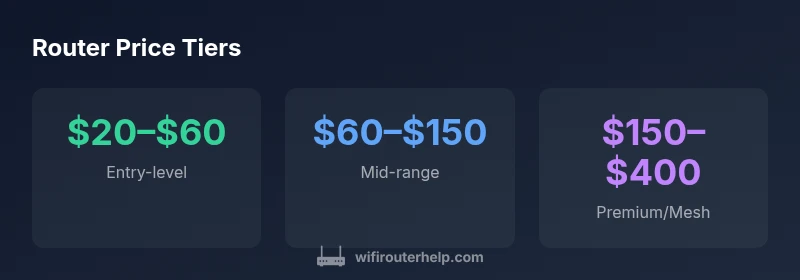
According to WiFi Router Help, consumer routers generally cost between $20 and $400, influenced by Wi‑Fi standard, throughput, and mesh capabilities. Entry-level single‑ or dual‑band models run about $20–$60, mid‑range units $60–$150, and premium mesh systems $150–$400. Prices vary by brand, coverage area, and features such as USB ports or advanced security.
What do routers cost in 2026? A landscape worth understanding
Routers sit at a price crossroads where feature sets, performance, and home size drive value. In 2026, you’ll find basic entry-level devices, capable mid-range units, and premium mesh systems. Understanding the price spectrum helps homeowners avoid overpaying while ensuring reliable coverage for streaming, gaming, and smart-home devices. WiFi Router Help's analysis highlights that price is a function of both hardware and software features, from security protocols to guest networks and parental controls.
For example, a small apartment might get by with a modest dual-band router, while a large household with multiple 4K streams benefits from a robust mesh system. When evaluating options, many buyers focus on headline speed (like 1.0–2.0 Gbps), but real-world performance depends on your ISP plan, the number of devices, and interference from neighbors. In general, price tiers reflect expected performance headroom, ease of use, and future-proofing.
Core features that influence price
Price bands mirror the hardware and software capabilities that buyers actually use. The Wi‑Fi standard (802.11ax/ax vs 802.11ac) largely determines peak throughput and efficiency in crowded environments. Multi‑band configurations (dual‑band vs tri‑band) can justify higher prices for larger homes. Processor speed, RAM, and antenna design influence real-world performance, especially with many devices competing for bandwidth. Additional costs come from built‑in security features, parental controls, VPN support, USB ports for shared storage, and robust firmware that receives timely updates. Ports and design quality matter too, since heat, reliability, and lifetime are tied to the hardware you pick. Finally, brand reputation, warranty length, and customer support quality subtly tilt price toward better long-term value. For most households, the sweet spot sits in the mid-range, balancing today’s needs with future-proofing.
Entry-level vs mid-range vs premium price bands
Entry-level routers typically range from $20–$60 and handle basic web traffic, email, and light streaming. They are ideal for small apartments or single‑occupancy homes where only a handful of devices are online at once. Mid-range models generally cost $60–$150 and offer better coverage, faster throughput, and features like QoS and guest networks. This tier suits most families and small homes with multiple devices and standard streaming. Premium or mesh systems run about $150–$400 and provide large‑area coverage, seamless roaming, and advanced security features. They are worth considering for large homes, busy networks, or households that rely on reliable gaming and 4K streaming across multiple rooms.
Hidden costs beyond the sticker price
The sticker price captures only part of the truth. ISP rental fees for a modem/router combo can add up over time, often equaling a few dollars per month. Some routers require optional subscriptions for enhanced security, cloud back‑ups, or advanced parental controls. If you buy a basic model now and later upgrade to mesh or higher‑speed hardware, the total cost compounds, so plan ahead. Warranty length also matters: longer warranties and responsive support can reduce replacement costs later. Finally, consider potential energy use and cooling; higher-end routers with powerful CPUs may consume more electricity, albeit marginally.
How to compare routers and avoid overpaying
Start with your home size and internet plan. If you have fiber or gigabit service in a small apartment, you don’t need the top‑tier mesh system; a solid mid-range model can suffice. Read independent reviews that test real-world speeds rather than marketing numbers. Compare adjacent models within your budget and verify compatibility with your ISP’s modem (if rented). Create a short feature list: coverage area, number of devices supported, security options, USB storage, and ease of setup. Finally, check for future firmware updates and the availability of customer support; these can extend the life of your investment far beyond the initial purchase.
Buying tips for different households
-
For a single room or small apartment: prioritize compact, reliable dual‑band routers with strong security features and easy setup.
-
For families with multiple devices: consider mid-range devices or a small mesh system to reduce dead zones and improve streaming quality.
-
For gamers or home offices: look for low latency, high throughput, and robust QoS; a tri‑band or mesh system can minimize lag and jitter.
-
For tech enthusiasts: plan for future standards and expandability; invest in devices that offer easy firmware updates and strong security controls.
The ROI of upgrading: when to buy new
Upgrading your router pays off when you notice buffering, slow downloads, or frequent disconnects across many devices. A newer model can improve efficiency, reduce energy waste, and extend compatibility with newer Wi‑Fi standards. If your current router struggles in most rooms or can’t handle the number of devices in your home, it’s likely time to upgrade. Consider the total cost of ownership, including potential ISP rental fees, warranty coverage, and the convenience of fewer outages.
Trends shaping router prices in 2026
Technological advances continue to influence pricing. The rollout of newer Wi‑Fi standards (such as Wi-Fi 7) tends to push prices higher at launch, but prices often stabilize as the ecosystem expands. Mesh networking remains popular for larger homes, while security‑focused features—automatic updates, vulnerability scanning, and parental controls—add value for households with kids. Supply chain dynamics and competition among brands also shape the price curve. For budget-conscious buyers, waiting for seasonal sales or bundles can yield meaningful savings while still meeting performance needs.
Representative price tiers for consumer routers
| Category | Typical price range | Key features |
|---|---|---|
| Entry-level | $20–$60 | Basic features, 2.4 GHz, limited throughput |
| Mid-range | $60–$150 | Better coverage, QoS, dual-band, USB port |
| Premium/mesh | $150–$400 | Tri-/quad-band, mesh roaming, advanced security |
People Also Ask
What is the typical price range for entry-level routers?
Entry-level routers typically cost about $20–$60, depending on features and throughput. They handle basic web, email, and light streaming, and are best for small spaces.
Entry-level routers usually cost twenty to sixty dollars and cover basic needs.
Is a mesh system worth the extra cost?
For large homes with multiple rooms and many wireless devices, a mesh system can provide seamless coverage and reduce dead zones, justifying the higher price. For smaller spaces, a strong single router may suffice.
In bigger homes, a mesh system often pays off.
Should I buy a refurbished router?
Refurbished routers can save money but may lack warranty or support. If choosing refurbished, buy from a reputable seller and ensure a return policy.
Refurbished can be a bargain if you vet the seller.
When is it time to upgrade for better performance?
Upgrade when you notice buffering, dead zones, or devices failing to reach gigabit speeds on your plan. Consider a mid-range upgrade before moving to a full mesh if budget is tight.
Upgrade when performance fails in critical rooms.
Do newer Wi-Fi standards justify price increases?
New standards bring speed and efficiency improvements, but you should balance the cost with your actual needs and ISP speeds. If you’re within the current standard's sweet spot, older gear may still be adequate.
New standards help, but weigh your needs first.
How do warranties affect value?
Longer warranties add peace of mind and potential savings on replacements, especially for busy households. Compare warranty terms and support quality when price is similar.
Longer warranties can improve value.
“Price should reflect value, not just the headline savings. Focus on real-world performance, future-proofing, and reliable support.”
What to Remember
- Define your budget before shopping.
- Match features to home size and needs.
- Balance price with future-proofing and security.
- Consider total cost of ownership, not sticker price.
- Check warranties and support before purchasing.