How Much Is a Router for Internet? Your 2026 Price Guide
Discover typical router prices for internet access—from budget to premium models. Learn which features drive cost, how to judge value, and practical steps to select the right router for your budget in 2026.


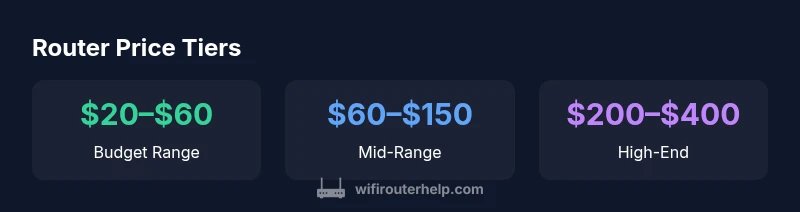
Average home routers range from about $30 to $300, with budget models around $20–$60 and mid-range units $60–$150; high-end gaming or tri-band routers can reach $200–$400. For most households, a reliable router falls in the $50–$150 range. These figures reflect WiFi Router Help Analysis, 2026. Prices vary by features like Wi‑Fi standard, MU‑MIMO, security, and ports.
What determines router price
Router price is driven by hardware capabilities, wireless standards, and software features. According to WiFi Router Help, the most impactful factors include the wireless standard (Wi‑Fi 5, 6, 6E), processor speed, RAM, number of bands, antenna design, and built-in technologies like MU‑MIMO, QoS, parental controls, and security features. Budget models typically offer basic coverage and support for less demanding networks; mid-range units add better range, more stable connections, and faster throughput; premium routers push the limits with multi‑gig Ethernet, tri‑band configurations, and advanced security suites. In practice, you’ll often see price brackets aligned with these capabilities: budget ($20–$60), mid-range ($60–$150), and high‑end ($150–$400+). It’s also important to consider bundling with a modem; some ISPs provide a modem-router combo at a bundled price or monthly rental, which can affect the effective cost. If you rent from an ISP, you may pay a recurring fee that telescopes into the total cost of ownership over years. The WiFi Router Help team emphasizes that the best value often isn’t the cheapest option but the one that meets your home’s demands for speed, reliability, and device count. When evaluating price, quantify your use case: number of devices, streaming quality, online gaming, smart-home gadgets, and coverage area. This context helps you select a router whose price aligns with your real needs rather than chasing the latest buzzword.
How price maps to features and performance
As you move from budget to premium tiers, you typically gain higher data throughput, broader coverage, more simultaneous connections, and advanced software features. For example, Wi‑Fi 6/6E routers support higher aggregate speeds and better efficiency in dense environments, while tri‑band models spread traffic across bands to minimize congestion. In practical terms, a budget router may suffice for basic web-browsing and streaming on a few devices, but a larger home with gaming and smart-home devices benefits from mid-range or higher. The decision should weigh not only peak speed but sustained performance across rooms, latency for gaming, and stability under load. Consider your internet plan: if you have gigabit service, you’ll want hardware capable of approaching those speeds. If your plan is slower, a mid-range router often delivers the best value by balancing speed, range, and features without overspending. Finally, assess long-term ownership costs, including firmware updates and potential upgrade timelines for future technologies.
Value drivers beyond sticker price
Beyond the upfront cost, value is driven by ongoing support and upgrade paths. A router with regular firmware updates, robust security features, and scalable performance will typically save money by avoiding early replacement. Look for models with clear update policies, good QoS controls for prioritizing traffic, and decent mobile app support for configuration. If you have multiple devices across a large home, prioritize a router with strong coverage and user-friendly management tools. While cheaper options might check the basics, you may encounter dead zones or lag during peak hours. In short, invest toward features that solve your real-world pain points: coverage gaps, streaming quality, gaming latency, and network security.
Practical budgeting: 4 common scenarios
- Small apartment (1–2 bedrooms): A budget to mid-range router typically covers this space well. Expect solid coverage and stable streaming.
- Medium to large home (3–4+ bedrooms): A mid-range to high-end router with better antennas and QoS helps reduce dead zones and supports more devices.
- House with many smart devices: Look for MU‑MIMO and robust security features, along with a future-proof plan (Wi‑Fi 6/6E capable).
- Gamers and power users: Prioritize high-throughput hardware, low-latency features, and multi-Gig Ethernet to minimize bottlenecks.
How to maximize value without overspending
- Define your must-haves: coverage, speed, number of devices.
- Compare price-to-feature ratios rather than price alone.
- Consider long-term costs, including potential upgrade cycles and ISP rental fees.
- Read recent reviews focused on real-world performance and reliability.
- Prepare a short list of candidate models and test them in your home environment when possible.
Router price tiers and typical features
| Tier | Typical Price Range | Key Features | Best For |
|---|---|---|---|
| Budget | $20–$60 | Basic security, single/mildly capable Wi‑Fi | Casual browsing, small apartments |
| Mid-range | $60–$150 | MU‑MIMO, better range, multi‑device handling | Most homes, streaming, multiple devices |
| High-end | $150–$300 | Wi‑Fi 6/6E, robust QoS, multi‑gig Ethernet | Gaming, smart homes, faster networks |
| Premium | $300–$400+ | Tri/quad-band, advanced security, future-proofing | Large homes, heavy load, long-term use |
People Also Ask
What most affects router price?
The biggest price drivers are Wi‑Fi standard (6/6E vs. 5), throughput, number of bands, antenna design, and built‑in features like security and QoS. These determine performance and future-proofing.
The main price drivers are the Wi‑Fi standard, speed, and how many features you get for security and QoS.
Do I need Wi‑Fi 6 or 6E?
Wi‑Fi 6/6E offers higher throughput and better efficiency in busy networks. If you have gigabit internet or many devices, it’s worth considering; otherwise, a solid Wi‑Fi 5/6 model can suffice.
If you have lots of devices or fast internet, go for Wi‑Fi 6/6E; otherwise, a good Wi‑Fi 5/6 router may be enough.
Is a modem-router combo better than separate devices?
Combos can be convenient and cheaper upfront, but they limit upgrade options and may lock you into one provider. Separate router and modem give flexibility and easier upgrades.
A combo is convenient, but separate devices give you more upgrade options and flexibility.
What’s the entry-level price for a capable router?
Entry-level capable routers typically fall in the $20–$60 range, suitable for basic internet and small spaces. Expect slower multi-device performance at peak times.
Entry-level capable routers usually cost $20–$60 and work for basic setups.
Are mesh systems more expensive than a single router?
Mesh systems generally cost more upfront but can offer seamless coverage for large homes. They’re ideal when a single router can't cover every room.
Mesh tends to be pricier, but it pays off with better coverage in large homes.
“Price is a proxy for capability. A mid-range router delivers most value for typical homes by balancing speed, coverage, and security.”
What to Remember
- Define needs before buying to match price with features.
- Expect price tiers to align with Wi‑Fi standard and throughput.
- Budget to mid-range covers most homes; upgrade for gaming/large houses.
- Factor ongoing costs, not just upfront price.
- Prioritize value over cheapest option for lasting performance.