How Much Does an Internet Router Cost in 2026? A Practical Guide
Explore current router price ranges in 2026, from budget models to mesh systems, with practical buying tips and budgeting guidance for homeowners and tech enthusiasts.


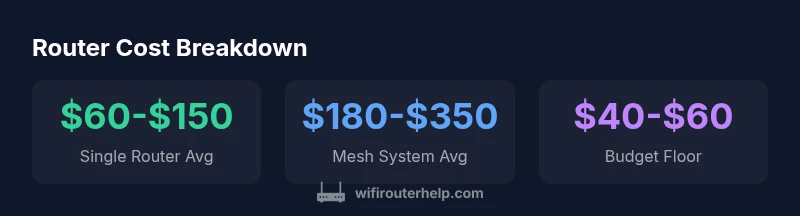
how much does an internet router cost in 2026? Typical prices range from about $20 to $400. Most buyers pay $60-$150 for a solid single-router setup, while mesh systems for whole-home coverage run roughly $180-$500. Price differences come from speed, Wi‑Fi standard, number of bands, and hardware quality, along with warranty terms.
Understanding the price landscape for how much does an internet router cost
Prices for internet routers vary widely, driven by hardware capabilities, intended use, and whether you buy a single router or a mesh system. When homeowners ask how much does an internet router cost, they're really asking about value: what features matter, how far coverage goes, and how long the device will stay solid without a bottleneck. In 2026, you can expect a broad band of prices, roughly from the low end around $20-$40 for a bare-bones model to well over $400 for premium mesh configurations designed for large homes with challenging layouts. The WiFi Router Help team notes that most households will find a comfortable middle ground between $60 and $150 for a dependable single-router setup, with higher prices reserved for mesh systems that promise seamless roaming across multiple floors. Key price drivers include Wi‑Fi standard (Wi‑Fi 5/6/6E), peak theoretical speeds, the number of bands, processor power, antenna design, security features, and supported ports. As you compare options, keep in mind that brands may price aggressively on entry-level models to capture market share, while premium lines emphasize reliability, longer warranties, and advanced QoS features.
Price ranges in 2026: what buyers should expect
The market in 2026 shows a predictable ladder of price tiers, with plenty of overlap depending on promotions and bundles. At the low end, you can find basic routers around $20-$40 that cover small apartments or single rooms but may lack modern security and speed. Mid-range options typically sit in the $60-$150 band and offer better throughput, more robust security features, and multi-stream performance suitable for most homes. Mesh systems, designed to eliminate dead zones, start around $180-$250 for a basic two-pack and commonly run to $350-$500 for larger homes or premium tri-band setups. For enthusiasts and gamers, dedicated high-end routers can approach $250-$350, especially when paired with a multi-device mesh or custom QoS features. These ranges reflect 2026 market dynamics and are influenced by brands, firmware support, and warranty terms. WiFi Router Help analysis shows that buyers should consider total value over upfront cost, factoring future-proofing and potential resale value.
Single-router vs mesh: does price reflect needs?
Choosing between a single-router setup and a mesh system is often a function of coverage needs, home layout, and future expansion plans. In smaller apartments or open-plan homes, a mid-range single router with strong signal can deliver reliable performance at a modest price point. For multi-story residences, thick walls, or detached buildings, a mesh system offers more predictable coverage and seamless handoffs, but with a higher upfront cost. The price premium for mesh systems typically correlates with the number of units, the capability of inter-node communication, and whether the system supports advanced features like tri-band networking or automatic channel optimization. WiFi Router Help recommends evaluating real-world coverage and speed tests in your home, rather than relying solely on advertised peak speeds. A mesh setup often results in fewer dead spots and simpler management, which can translate into long-term savings on boosting equipment or professional installation.
Features that affect price
Price is driven by several feature groups. The most noticeable are: (1) Wi‑Fi standard (Wi‑Fi 5, 6, or 6E) and supported speeds; (2) the number of bands (dual-band vs tri-band); (3) the presence and quality of antennas, heat dissipation, and processor power; (4) security features (automatic firmware updates, parental controls, guest networks); (5) ports and expandability (USB ports, 2.5G Ethernet, multi-gig WAN); and (6) whether the device is part of a mesh system or a stand-alone router. You’ll often find cheaper models that cut corners on one or more of these features, while higher-priced units balance performance with reliability and warranty coverage. The outcome is that most cost-conscious buyers can spec out a router that meets their speed needs while leaving room to grow without a complete replacement.
Buying strategies for cost-conscious shoppers
Smart shoppers employ several strategies to control router costs. Start by listing your must-have features (e.g., speed tier, security, and coverage area) and then compare mid-range options that meet those criteria. Look for bundles that pair a router with a compatible modem or accessories, as these can reduce total cost. Consider waiting for major sale events (Black Friday, Prime Day) or retailer promotions, and evaluate refurbished models from reputable sellers with solid warranties. If you already own older hardware, calculate whether upgrading yields meaningful gains in speed or coverage; sometimes a targeted antenna upgrade or a simpler one-router setup can provide most of the needed improvement without a full replacement.
Total cost of ownership and ongoing expenses
Beyond upfront price, factor in the total cost of ownership. Most routers do not require ongoing fees beyond your internet plan payment, but some vendors offer optional security services or extended warranties that can add to annual costs. Firmware updates are typically free and improve security and performance, extending the device’s usable life. When evaluating total cost, consider power consumption, potential hardware upgrades, and the possibility of needing a new unit if your home network expands or your ISP changes speeds. A well-chosen router should remain adequate for at least several years, reducing the frequency of refresh cycles and minimizing disruption.
Quick buyer's guide: price-aware decision tree
- Define coverage needs: one-bedroom apartment vs multi-story home. 2) Set a budget range and list must-have features. 3) Decide between single-router or mesh based on layout. 4) Check for sales and bundles; compare at least 3 models. 5) Read reviews focusing on real-world range and consistency. 6) Confirm warranty and firmware update policy. 7) If possible, test in your space or rely on retailer trial periods to ensure the system meets your expectations.
Real-world scenarios and practical tips
Scenario A: A small apartment with Wi‑Fi dead zones. A mid-range single-router with strong signal and beamforming may suffice, delivering solid performance without breaking the bank. Scenario B: A two-story house with thick walls. A budget-friendly two-pack mesh system can provide reliable coverage with minimal manual tuning, making it worth the extra upfront cost. Scenario C: A tech enthusiast who streams in 4K and games online. Look for a high-end router with Wi‑Fi 6/6E, robust QoS, and multi-gig ports; a mesh upgrade may be appropriate if you have multiple floors.
Final considerations and brand context
As you finalize a choice, consider long-term support, software updates, and energy efficiency. The WiFi Router Help team emphasizes aligning price with value: you don’t always need the most expensive option to get excellent performance. Instead, target a model whose feature set matches your household needs, space constraints, and future-proofing expectations. The goal is to minimize cost while maximizing real-world uptime and user experience over several years.
Cost snapshot by router type
| Product Type | Typical Price Range | Notes |
|---|---|---|
| Single-router | 40-150 | Solid mid-range option for most homes |
| Mesh system (2-pack) | 180-350 | Best for larger homes; easier expansion |
| Gaming router | 150-350 | Performance-focused with extra features |
| WiFi 6/6E router | 100-250 | Future-proof option with higher throughput |
People Also Ask
What is the cheapest router I can buy?
You can find basic routers in the $20-$40 range that cover small spaces, but they often lack modern features. For reliable everyday use, budget $50-$100 and prioritize security updates. Always verify warranty terms.
Budget routers around twenty to forty dollars exist, but for dependable performance plan closer to fifty to one hundred dollars.
Is it worth buying a mesh system for a small apartment?
In a small apartment, a strong single router with good placement can suffice. Mesh systems usually offer the best value when there are multiple floors or thick walls, but they add upfront cost.
In a small apartment, you can often get great performance with a solid single router.
Do routers go on sale?
Yes. Routers frequently go on sale during major holidays and retailer events. Subscribing to retailer newsletters and checking price-tracking sites can help you time purchases for the best deal.
Yes, look for sales around holidays and big event days.
How long do routers last?
Most routers last 4-6 years with regular firmware updates. Hardware may bottleneck as speeds increase or new standards emerge, prompting an upgrade.
Most routers last several years with updates, but you may upgrade as speeds or standards improve.
What features affect price the most?
Key drivers are Wi‑Fi standard (Wi‑Fi 6/6E), advertised speeds, number of bands, processor power, security features, and whether the unit is part of a mesh system.
Speed, standard, and mesh capability are the big price drivers.
Is refurbished router safe to buy?
Refurbished routers can be safe if purchased from reputable sellers with a warranty and return policy. Check the seller’s credibility and ensure you get updated firmware.
Refurbished can be safe if you buy from trusted sellers with a warranty.
“In most homes, the right price balances speed, reliability, and coverage. Focus on features you actually need to avoid overpaying.”
What to Remember
- Define your coverage needs before buying
- Expect price ranges, not fixed costs
- Mesh systems offer best coverage for large homes
- Look for sales to save 20-30% off list price
- Evaluate total cost of ownership and firmware support