How Much Does a Good Router Cost? A Practical Guide for 2026
Learn realistic price ranges for good routers in 2026, what drives cost, and how to choose a model that fits your home network and budget.


Most homeowners will pay between $100 and $250 for a good router that supports modern Wi-Fi 6 or Wi-Fi 6E, with mid-range models delivering the best balance of speed, range, and features. Entry-level units can be under $100, while high-end gaming or mesh systems typically cost $250–$500 or more. Consider your home, devices, and internet plan when budgeting today.
Why price varies across router categories
Price is not a single number; it is driven by hardware, features, and intended use. A good router for most homes isn't the cheapest model, but it isn't always the most expensive either. The question how much does a good router cost is best answered by considering three axes: performance (throughput and range), features (Wi‑Fi standard, MU‑MIMO, OFDMA, beamforming, security), and future-proofing (firmware updates, warranty, expandability with mesh). WiFi Router Help analysis shows that households with gigabit internet and multiple connected devices tend to benefit from models in the mid-range or higher. If you have a smaller space with a single device, an entry-level router may suffice, enabling you to connect multiple devices but potentially limiting peak speeds during heavy usage. Mesh systems add cost but can dramatically improve coverage in larger homes. When you pick a router, match the price to your home's size, internet plan, and device count rather than chasing the latest spec for its own sake.
Price tiers explained: entry-level, mid-range, high-end
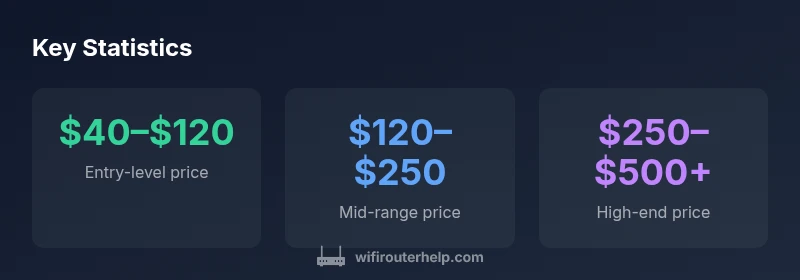
Three broad price bands cover most households. Entry-level routers typically cost under $120 and deliver reliable performance for light to moderate use. Mid-range units hover in the $120–$250 range and balance speed, coverage, and features like MU-MIMO and better security. High-end routers can exceed $250 and go over $500 for mesh-capable, Wi‑Fi 6/6E designs with premium processing power. The main takeaway is to align the tier with your internet plan, home size, and device count. If you have a large home or many smart devices, investing in a mid-range or high-end model often yields better long-term value.
Features that drive cost and value
Price is tightly tied to capabilities. Key features that push cost upward include support for the latest Wi‑Fi standard (Wi‑Fi 6/6E), higher maximum throughput, multi-band configurations (3-band/tri-band), and technologies like MU‑MIMO, OFDMA, beamforming, and enhanced QoS. Built-in security features, parental controls, guest networks, and robust firmware support also add value. Port flexibility (multiple gigabit WAN/LAN ports), USB ports for storage or printers, and ease of setup can sway price too. For households with many devices or gaming, the extra investment often translates into more stable connections and lower latency.
Total cost of ownership: firmware, warranties, and add-ons
Beyond the sticker price, consider long-term expenses. Some routers receive regular firmware updates for security and performance; others offer shorter support windows. A longer warranty can reduce replacement costs, while add-ons such as mesh extenders or a dedicated security subscription add ongoing costs. If you buy a unit with strong ongoing support, you may save money later by avoiding a premature upgrade.
When to buy and how to save
Smart timing and strategy matter. Major sales events (often in fall and around Prime Day) frequently discount mid-range and high-end routers, making a substantial difference to the final price. Refurbished or open-box models can offer good value if they come with a warranty and up-to-date firmware. Watching price trackers and bundling with a new internet plan or service can also improve overall value. Remember to verify that firmware updates will continue for your chosen model to maximize longevity.
How to compare routers for your home
Start with your internet speed and the number of devices. Then map your home layout to estimate coverage needs. Use a simple checklist: Wi‑Fi standard (Wi‑Fi 6/6E preferred), number of bands, MU‑MIMO and OFDMA support, security features, ports, and ease of setup. Compare throughput under real-world conditions and read reviews focused on reliability. Finally, compute total cost of ownership over 3–5 years to determine the best value for your budget.
Common myths about router pricing
Myth 1: More expensive equals better. Reality: price is best justified by the features you actually need. Myth 2: Mesh systems are always overpriced. Reality: for large homes, mesh can be the only practical way to achieve reliable coverage. Myth 3: All routers from the same brand are the same. Reality: different models have different processors, antennas, and firmware support. Assess your needs and compare specs directly.
Budgeting for your next router purchase
Create a simple budget aligned with your internet plan and home size. If you need reliable gigabit speed across multiple floors, plan for a mid-range or high-end unit and an optional mesh extender if coverage is incomplete. Use price alerts during forecasted sale windows and consider refurbished options with solid warranties. Finally, set aside funds for occasional firmware updates to maintain security and performance over time.
Router cost by tier
| Tier | Typical Price Range | Key Features |
|---|---|---|
| Entry-level | $40–$120 | 802.11n/ac; basic QoS; 2–3 antennas |
| Mid-range | $120–$250 | Wi-Fi 5/6; MU-MIMO; better coverage |
| High-end | $250–$500+ | Wi-Fi 6/6E; tri-band; mesh-ready; robust security |
People Also Ask
What is the typical price range for a reliable router in 2026?
In 2026, a reliable router for most homes typically costs between $100 and $250, with entry-level models under $100 and high-end options exceeding $250 for mesh-ready or Wi‑Fi 6/6E designs. The best value often lies in mid-range models that balance speed, coverage, and features.
Most homes should budget roughly $100 to $250 for a solid router, with higher prices reserved for mesh systems or the latest Wi-Fi 6/6E features.
Is a mesh system worth the extra cost?
If you have a large or multi-floor home, mesh can provide reliable coverage where a single router struggles. For smaller spaces, a strong mid-range router may suffice and be more cost-effective.
Mesh helps if your home is large or has dead zones; for small homes, a good single router often does the job.
Can I save money by buying used or refurbished routers?
Used or refurbished routers can save money, but verify firmware support and warranty. Security updates are critical, so choose vendors offering current firmware and a reasonable return window.
Buying refurbished can save money, but make sure the seller offers a warranty and current firmware.
Do I need a high-end router if my internet plan is gigabit?
Not always. For many households, a solid mid-range router with Wi‑Fi 6/6E and good range handles gigabit plans well. If gaming or many devices are present, upgrading to high-end may offer better latency.
A mid-range router often suffices for gigabit plans unless you have many devices or gaming needs.
What features should I prioritize in a mid-range router?
Prioritize Wi‑Fi 6/6E support, MU‑MIMO, OFDMA, good beamforming, multiple LAN ports, and strong firmware. Security features and easy setup add long-term value.
Look for Wi‑Fi 6/6E, MU-MIMO, OFDMA, and solid firmware to stay future-proof.
How long should a router last before replacement?
Most routers last 4–7 years with regular firmware updates. If you notice reduced speeds or poor range, it may be time to upgrade earlier.
Expect 4–7 years of service with updates; declining performance is a signal to upgrade.
“Choosing a router isn't only about sticker price; it's about the hardware you actually need to support your home's devices and internet plan.”
What to Remember
- Budget to match home size and internet plan
- Mid-range models offer best value for most homes
- Mesh can improve coverage but adds cost
- Check firmware support to maximize longevity
- Shop sales and consider refurbished options with warranty