How Many Devices Can a Router Connect? A Practical Guide for 2026
Learn how many devices your router can connect, the factors that limit connections, and practical steps to optimize your home network performance in 2026.


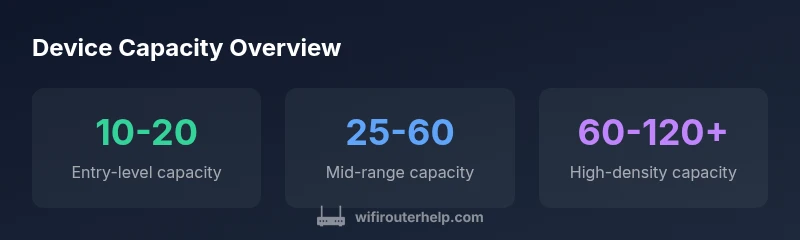
The number a router can connect simultaneously varies by model and load, but most home routers support roughly 10-20 devices on entry-level units, 25-60 on mid-range models, and 60-120+ on higher-end or mesh setups when traffic is balanced and backhaul is strong. Real-world performance depends on usage mix and network contention.
The question we all want to answer: router can connect how many devices? In practice, the answer depends on hardware, software, and how you use the network. According to WiFi Router Help, the number of simultaneous connections a router can support reliably varies widely by model and load. In a typical small apartment with basic streaming and web browsing, budget or entry-level routers might manage 10-20 devices at once. Mid-range devices can comfortably handle 25-50 devices with light to moderate use. For households with many smart devices, high-bandwidth tasks, or a mesh setup, 60-100+ connections are achievable under optimized conditions, but sustained performance hinges on traffic patterns and per-device bandwidth demands. The key takeaway is that capacity is a function of both the number of devices and the traffic those devices generate, not a single hard cap.
How hardware and wireless standards shape device capacity
Device capacity is not just a number printed on the box. It depends on the router’s CPU speed, RAM, the Wi‑Fi standard (802.11ac/ax, etc.), and features like MU‑MIMO and OFDMA. Newer standards can handle more simultaneous streams and allocate spectrum more efficiently. A dual-band or tri-band router with robust hardware can manage denser environments, but enabling advanced features without proper configuration can actually hinder performance. In short, the right combination of modern radios, processing power, and firmware optimization determines how many devices your network can support before performance degrades.
Estimating capacity for your home
Start with a device census: count total devices and categorize by activity level (routine browsing, video streaming, gaming, smart-home sensors). Then estimate concurrent usage scenarios (e.g., two people streaming, several IoT devices sending data, and a few in video calls). Sum the estimated bandwidth needs and add a 20–30% headroom for overhead. Finally, factor in your internet plan and the backhaul between your router and your modem or mesh nodes. This approach yields a practical ceiling tailored to your home rather than a generic spec.
Planning for growth: mesh vs single-router setups
If you anticipate growth or a large number of connected devices, consider a mesh network. Mesh systems distribute traffic across multiple nodes and backhaul links, effectively increasing aggregate capacity and coverage. They’re particularly valuable when devices are spread across large homes or multi-story layouts. However, mesh adds cost and management complexity, so weigh your current and projected needs before upgrading. Mesh can help, but shipment of devices still depends on traffic patterns and backhaul efficiency.
Practical optimization for higher device density
To squeeze more performance from a given router, enable QoS to prioritize critical tasks, use smart channel selection, and turn on band steering where appropriate. Keep firmware updated to benefit from performance and security improvements. Use wired Ethernet where possible for backhaul to reduce wireless contention. Segment guest networks to isolate traffic, and disable unnecessary features (WPS, UPnP) that can create performance and security risks. Small adjustments can yield meaningful gains when device counts rise.
Real-world scenarios: what gamers, streamers, and smart homes do
In a busy home with multiple 4K streams, online gaming, and smart devices, a mid-range router with MU‑MIMO and a stable backhaul may handle 30–50 devices effectively. In a tech-forward home with a high density of IoT devices and frequent video calls, upgrading to a high-end router or mesh system can push the practical limit higher, but performance will still depend on how evenly traffic is balanced across bands and how much local traffic competes for airtime.
Estimated device capacity by router type
| Router Type | Approx Max Devices (range) | Typical Use Case | Notes |
|---|---|---|---|
| Entry-level | 10-20 | Small apartment, light usage | Best value; limited headroom |
| Mid-range | 25-60 | Most homes with mixed devices | Balanced performance and features |
| High-end / Mesh | 60-120+ | Large homes, dense smart homes | Best for high density; depends on backhaul |
People Also Ask
How many devices can a typical home router support?
Most consumer routers comfortably support 10-20 devices with light use; 20-40 for moderate activity. Real-world results depend on traffic and bandwidth needs.
Most home routers support around ten to forty devices depending on usage.
Can I increase capacity without buying a new router?
Yes. Update firmware, enable QoS, use Ethernet backhaul, and segment traffic with guest networks to improve performance for many devices.
Yes. Update firmware and optimize settings before buying new hardware.
Does mesh networking increase the number of devices that can connect?
Mesh expands coverage and can improve how many devices perform well by distributing load, but the hard cap still depends on backhaul and traffic patterns.
Mesh helps coverage and load sharing, not a magic device count.
What role do MU‑MIMO and OFDMA play in capacity?
MU‑MIMO and OFDMA let many devices share channels more efficiently, reducing contention during peak usage.
These features help many devices share the network more smoothly.
What is the difference between 'max devices supported' and 'effective performance'?
Max devices is a theoretical limit; effective performance depends on traffic type, bandwidth needs, and interference.
Theoretically max is not the real world cap—traffic type matters.
How can I test my network capacity?
Run concurrent tests with multiple devices performing typical tasks (streaming, gaming, video calls) and monitor throughput and latency to gauge real capacity.
Test with real-life tasks to see how many devices perform well at once.
“Device count is a rough metric; real performance hinges on traffic mix, QoS, and backhaul efficiency. Plan for density, not just a hard cap.”
What to Remember
- Assess capacity with actual use, not just specs
- Upgrade hardware or add mesh for dense environments
- Optimize with QoS and wired backhaul when possible
- Plan for growth by considering bandwidth and traffic patterns
- Regularly update firmware to maintain performance