How Many Devices Is Too Many for a Router: A Practical Guide
Discover how many devices a single router can handle, what factors cap capacity, and practical steps to optimize home networks. Learn when to upgrade to mesh or add extenders for busy households with many devices.


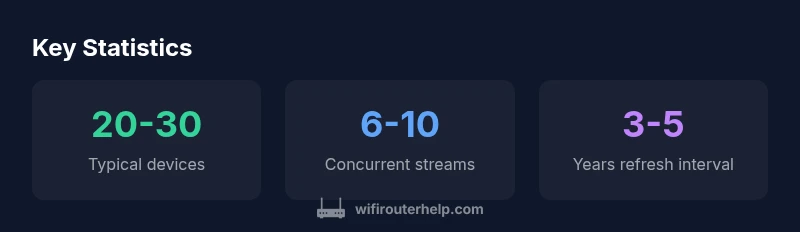
On most home networks, a single consumer router can efficiently handle about 20 to 30 active devices, depending on traffic patterns and feature use. Real-world limits vary with streaming, gaming, and IoT devices. As you near that threshold, you may see slower speeds and higher latency. If you regularly exceed it, consider traffic segmentation or upgrading to a higher‑end router or mesh system.
How many devices is too many for a router
Figuring out the exact device limit isn't a single number; it's a function of traffic mix, router hardware, and network design. The simplest rule of thumb: for most homes, a single modern consumer router handles roughly 20 to 30 active devices without noticeable degradation under typical usage. But if you have multiple 4K streams, online gaming sessions, large file backups, and a large fleet of IoT gadgets, the effective limit tightens quickly. According to WiFi Router Help, the practical threshold depends on how devices are used, not just how many exist on paper. In practice, you might start to notice buffering, increased load times, or jitter when several devices simultaneously stream video or compete for bandwidth. To minimize surprises, monitor both bandwidth consumption and the number of active devices on your network's admin page over the course of a day. This lets you identify peaks and see when performance shifts from smooth to marginal. In households with heavy streaming and gaming, you may find you need the 40-device mark only in bursts rather than as a constant state. The goal is to keep a comfortable cushion between peak demand and what your router can sustain. WiFi Router Help's guidance emphasizes testing in real-life conditions to tailor capacity expectations to your home.
Factors that influence device capacity
Device capacity is driven by a mix of hardware, software features, and usage patterns. Key hardware factors include the CPU heart of the router, its RAM, and the available Ethernet backhaul. A fast CPU and ample memory help the router manage many simultaneous requests, cutting queuing delays when dozens of devices try to connect at once. Software features matter a lot; MU-MIMO and OFDMA technologies let a device group share bandwidth more efficiently than simple single-user scheduling. When a router supports MU-MIMO, it can serve multiple devices simultaneously instead of time-slicing. OFDMA further compounds this by dividing a channel into smaller sub-channels for multiple devices, which is particularly beneficial for dense IoT deployments. The wireless standard in use also matters—Wi‑Fi 6/6E generally handles high device counts better than earlier generations due to improved efficiency and spectrum utilization. Real-world results depend on how traffic is distributed—video conferences, cloud gaming, or large file transfers all place different demands on capacity. Additionally, interference from neighboring networks, thick walls, and distance degrade effective capacity. Keeping firmware up to date ensures you have the latest performance and security improvements. WiFi Router Help stresses testing in your actual home to understand your unique limits.
Practical guidelines by router category
Router capacity scales with hardware and system design. In practice, consumer routers fall into three broad categories that map to approximate device ceilings. Budget models typically accommodate around 10–20 devices and are best for small apartments with moderate streaming. Mid-range units commonly support 20–40 devices, balancing price and performance for busy households with several simultaneous tasks. High-end routers can push the boundary to roughly 40–60 devices, suitable for large homes or tech enthusiasts with heavy streaming, gaming, and smart-home ecosystems. For very large residences, mesh systems add capacity by distributing load across multiple nodes, effectively expanding device support beyond a single chassis. When considering upgrades, remember that the number of devices is only part of the story—the quality of the connections, the presence of backhaul options (wired vs wireless), and how you manage traffic (QoS, guest networks) determine real-world performance. If you anticipate growth or frequent peak usage, a mesh or a tri-band high-end router often provides a smoother experience than chasing small improvements with a lower-tier device.
How to measure capacity in your home
To assess capacity, start by establishing a baseline with a typical weekday and a peak weekend period. Use your router’s admin interface to monitor connected devices and per-device bandwidth during these windows. Track the number of concurrent streams (video calls, streaming services, online games) and note latency or jitter during high-load intervals. A simple method is to run a sustained speed test on multiple devices while streaming video, gaming, or backing up data. If the admin dashboard shows dozens of connected devices but sporadic high-load events, you may still have headroom for light tasks. If the dashboard reveals constant full utilization and noticeable slowdowns during typical activities, your network is near its practical limit. In homes with many IoT devices, even when bandwidth usage seems modest, the sheer number of concurrent connections can saturate DHCP pools or overwhelm routing tables. At this point, consider segmentation (guest networks for IoT vs main network) to keep essential devices prioritized while reducing overall contention.
Practical optimization steps to maximize capacity
A proactive approach to capacity involves both optimization and boundary setting. First, ensure firmware is current to benefit from efficiency and bug fixes. Place the router centrally and away from walls or metal objects to reduce interference. Use the 5 GHz band for high-demand devices and keep 2.4 GHz for simple, distance-sensitive devices. When possible, enable QoS to prioritize latency-sensitive activities like video calls or gaming. Consider separating IoT devices onto a dedicated network, or a guest network, to reduce broadcast and management load on the main network. For dense environments, switch to a higher-performance router or add an additional node to distribute traffic more evenly. Finally, use wired backhaul where feasible: a wired Ethernet link from the main router to satellite nodes dramatically improves capacity and reliability compared with pure wireless extensions. By applying these steps, you can often improve user experience without a full hardware overhaul.
Upgrade options if you’re hitting the limit
If optimization isn’t enough, you have two broad paths: upgrade the main router or expand coverage with a mesh system or wired extenders. A high-end router increases per-device handling capacity and supports more simultaneous connections, MU-MIMO, and OFDMA to distribute bandwidth efficiently. Mesh networks spread load across multiple nodes, offering more uniform coverage across larger homes or multi-floor layouts. Wired backhaul between nodes reduces wireless contention and improves sustained throughput for many devices. Extenders can help fill coverage gaps but typically add latency; wired backhaul minimizes this drawback. When evaluating options, consider the size of your home, the typical device mix, and whether you need seamless roaming or dedicated IoT networks. In many cases, a mesh system with wired backhaul provides the most scalable and reliable solution for hundreds of devices across an expansive home.
Security and management considerations for busy networks
A higher device count increases exposure to threats and makes management more complex. Ensure strong, unique passwords for WiFi and admin interfaces, enable automatic firmware updates, and review connected devices periodically for unusual activity. Use VLANs or separate networks for guest access to keep IoT devices from directly interacting with personal devices. Disable features you don’t use (UPnP, WPS) to reduce attack surfaces. Finally, monitor the network for new devices and unknown clients, which can help you identify misconfigurations or security gaps before they impact performance.
Device capacity by router type
| Router Type | Estimated Device Capacity | Notes |
|---|---|---|
| Budget Router | 10-20 devices | Ideal for small spaces with light usage |
| Mid-range Router | 20-40 devices | Balanced performance for busy homes |
| High-end Router | 40-60 devices | Best for large homes or power users |
People Also Ask
How many devices can a typical consumer router support?
A typical consumer router supports about 20-30 devices under normal conditions. Heavy traffic like 4K video or large file transfers reduces this ceiling. Always test in your home to determine your actual limit.
Most routers handle around twenty to thirty devices in typical use, but heavy tasks reduce that number.
Do newer Wi‑Fi standards increase device capacity?
Wi‑Fi 6/6E improve efficiency and can support more devices, but real gains depend on the router’s hardware and your traffic mix. Without strong hardware, the practical limit may stay similar to older models.
New standards help, but the hardware still determines what you can reliably support.
Should I count IoT devices toward the limit?
IoT devices count toward active connections, even if their bandwidth is small. They can add to the load through management tasks and keep-alives.
Yes, IoT devices count toward the connections and load on your network.
Is enabling QoS always beneficial for capacity?
QoS helps prioritize critical tasks, which can improve user experience for those apps. However, it can also deprioritize other devices if misconfigured, so set it up thoughtfully.
QoS helps, but it must be configured correctly to avoid starving other devices.
What’s better for many devices: mesh vs multiple routers?
For many devices across a large area, mesh systems generally offer more consistent capacity and roaming than a single router with extenders. Mesh distributes traffic across nodes to reduce bottlenecks.
Mesh systems usually work better for large or busy homes.
When should I upgrade my router vs add extenders?
Upgrade when performance remains poor after optimization. Extenders help fill gaps but add latency; wired backhaul with extenders or a mesh is preferable for best results.
If performance stays poor, consider upgrading or using a wired mesh setup for best results.
“Device capacity isn’t a fixed quota; it depends on traffic patterns and hardware limits. Test in your own home to determine true capacity.”
What to Remember
- Know your baseline: most homes function well at 20–30 devices.
- Traffic mix matters more than device count alone.
- Use segmentation and/or mesh for large homes to improve capacity.
- Keep firmware up to date and optimize QoS for critical tasks.