How Many Routers Can You Have in a House: A Practical Guide
Explore practical guidance on how many routers you can use in a home, when to choose mesh, and how layout, size, and walls influence deployment for reliable coverage in 2026.


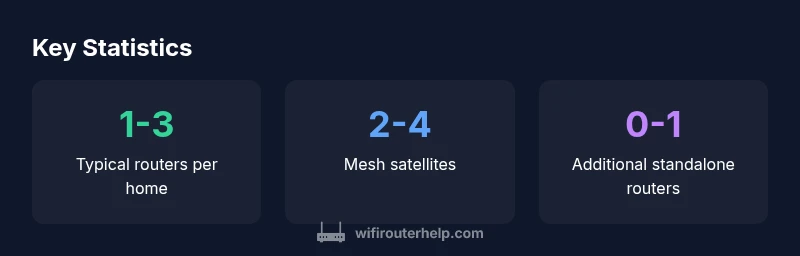
Typically, there is no hard cap on how many routers you can deploy in a house. In practice, most homes use one main router and one or two additional access points, or switch to a mesh system for wide coverage. The exact number depends on house size, floorplan, wall materials, interference, and your target Wi‑Fi reliability.
Coverage goals and router counts
Coverage goals largely determine how many routers you need. If you want a strong signal in every room, including basements and attics, you'll typically deploy more devices than a single-device setup. The practical rule of thumb is to start with one robust main router placed centrally, then evaluate dead zones. According to WiFi Router Help, real-world homes rarely achieve perfect coverage with a single device, and a few strategically placed devices can effectively blanket most floor plans. To estimate how many you might need, map out your space: count rooms, note where thick walls or metal appliances exist, and consider how many floors you have. Tools like heat maps or simple speed tests can reveal gaps. Your goal should be to maintain consistent speeds across common areas while avoiding oversaturation from too many APs. In small apartments, a single strong unit may suffice, while multi-level homes often benefit from additional access points or a mesh spine. Budget, aesthetics, and ease of management all factor into the final decision. The key takeaway: start simple, test, then expand if needed.
Mesh networks vs separate routers: choosing the right approach
Mesh systems and multiple standalone routers both aim to blanket a home with reliable Wi-Fi, but they work differently. A single router with repeaters or standalone APs may suffice in smaller homes, but signals can drop as you move away from the center. Mesh systems, by contrast, create a unified network with a single SSID and automatic handoffs, reducing dead zones and network management complexity. If you want seamless roaming and easier device management across multiple floors, a mesh approach often shines. For smaller layouts or existing wired backbones, a primary router with strategically placed access points can deliver strong coverage without the full investment in a mesh system. The decision hinges on your space, your budget, and how much you value uninterrupted roaming versus individual AP control.
How layout and materials influence router counts
Layout and wall materials have a major impact on how many routers you need. Dense materials like concrete, brick, or metal studs can significantly attenuate signals, creating stubborn dead zones. Multi-floor homes introduce vertical challenges where stairwells and foyers become signal chokepoints. Open-concept floorplans often benefit from fewer devices due to line-of-sight propagation, while homes with many walls or large rooms typically require more nodes. In general, plan for higher counts if your home has: multiple floors, basements, metal architectural features, or rooms separated by thick partitions. You can reduce device counts by strategically placing the main router higher up, away from cordless phones or microwaves, and by using high-quality antennas or a mesh spine where needed. The goal is consistent, dependable coverage rather than chasing maximum signal strength in a single corner.
Practical deployment patterns by home size
- Small homes/apartments (up to ~1,000 sq ft): 1 router, possibly 1 access point if walls are thick. This keeps management simple and reduces interference risk.
- Medium homes (~1,000–2,500 sq ft, 2–3 bedrooms): 1 main router plus 1–2 mesh satellites or a second AP wired back to the main unit to ensure coverage in far corners.
- Large or multi-floor homes (>2,500 sq ft): Mesh systems are often the most practical choice, typically 2–4 satellites or more depending on layout and stairwells. A wired backbone (Ethernet) between nodes improves reliability and speeds. Remember to test coverage in common areas, bedrooms, and workspaces to confirm you’re meeting your goals.
Step-by-step planning for deployment
- Define coverage goals: list rooms and zones that must receive reliable Wi-Fi, including garages and basements.
- Create a floorplan map: note walls and potential interference sources (appliances, thick doors, metal).
- Choose a topology: mesh for roaming reliability; main router with APs for budget-conscious setups.
- Position devices: centralize the main router, place satellites or APs away from interference sources, and consider wiring backhaul where feasible.
- Test and adjust: run speed tests and heat-map scans across the home, iterating placements to close gaps and reduce interference.
Common pitfalls and mistakes to avoid
- Overloading a single channel: spreading too many devices on the same channel creates congestion.
- Ignoring backhaul: wireless backhaul can bottleneck performance; wired backhaul improves stability.
- Skipping real-world testing: theoretical coverage rarely matches lived experience; test in every key area and adjust.
- Poor placement: high shelves and away from electronics typically boost performance; avoid cramped corners and closets.
- Not considering future needs: plan for growth, adding devices or expanding to more floors as your family and devices grow.
Comparison of router deployment types
| Deployment Type | Typical Range of Routers | Best Use Case |
|---|---|---|
| Single Router | 1 | Small homes / apartments |
| Main Router + Mesh Satellites | 2-4 | Medium to large homes / multi-floor |
| Dedicated Access Points | 2-3 | Homes with wired backbone / upgraded performance |
| Whole-house Mesh System | 3-6 | Large properties with complex layouts |
| Hybrid setups | 2-5 | Edge cases with mixed wired/wireless goals |
People Also Ask
Is there a strict limit to how many routers I can have in a home?
There is no universal limit. You can deploy as many routers or access points as your space and budget allow, provided they are configured properly and do not cause excessive interference. The goal is reliable coverage, not a fixed device count.
There isn't a strict limit—set up what you need to cover all areas, then test and adjust.
Will adding more routers slow down my network?
If devices share the same backhaul or channels and are not configured correctly, performance can suffer. Using separate backhaul or a mesh system with smart handoffs typically preserves speed while expanding coverage.
More routers can help, but only if set up with good backhaul and proper channel planning.
Mesh systems or multiple stand-alone routers—how do I choose?
Mesh systems are usually better for seamless roaming in larger homes, while a main router plus wired APs can work well for budget-conscious setups with a wired backbone.
Mesh is great for roaming; wired APs can be a solid alternative if you have Ethernet in the walls.
How can I tell if I have enough coverage?
Run Wi-Fi speed tests in each room and use a heat-map app to identify weak zones. If there are dead spots in common areas, you likely need to adjust placement or add nodes.
Test throughout your house—look for weak spots and plan fixes accordingly.
Should I disable DHCP on secondary routers?
Typically only one device should run DHCP. If you add APs or a mesh spine, configure them as APs or use the mesh controller to manage IPs.
Usually, only one DHCP server; others should be in access point mode or managed by the mesh system.
Do I need a wired backbone for best results?
A wired backbone (Ethernet) between nodes dramatically improves reliability and speeds, but it is not strictly required for functional coverage. Wireless backhaul can work well in smaller homes.
Wired backhaul is best, but wireless can suffice in many setups.
“Deployments should match your home's layout and device usage, not chase a fixed router count. The right number balances coverage, performance, and cost.”
What to Remember
- Plan coverage first, not device count
- Mesh systems simplify roaming and management
- Wire backhaul where possible to maximize performance
- Match router counts to home size and layout
- Test coverage in every critical area and adjust as needed