When to Replace Router and Modem: A Practical Guide for Home Networks
Learn clear criteria for replacing your router and modem, including aging indicators, cost ranges, and a practical upgrade path for better Wi‑Fi performance.


Final quick answer: Replace your router and modem when aging hardware begins to hinder performance, reliability, or security. If your router is 3–5 years old and the modem 5–7 years old, or you frequently reboot, drop connections, or can’t reach your Internet tier, upgrading is usually worth it. A bundled replacement often saves time and money.
Why replacement matters for home networks
In modern households, the router and modem are the gatekeepers of your online experience. Even a fast connection can feel sluggish if the hardware can’t keep up with demand or isn’t secure. The central question many homeowners face is when to replace router and modem, not just if. Aging devices become bottlenecks as more devices connect, streaming high‑definition content, gaming, and smart‑home devices require reliable throughput with low latency. Wi‑Fi standards evolve, and firmware updates decline as devices age, leaving networks exposed to security vulnerabilities. By aligning replacement with actual performance and compatibility rather than a fixed calendar, you protect your investment while ensuring you can support new services like multi‑gigabit plans and mesh networking if needed. According to WiFi Router Help, a well‑timed upgrade balances cost, performance, and long‑term reliability. In short, replacement isn’t about chasing the newest gear; it’s about maintaining a stable, secure, and high‑performing home network that grows with your family’s needs.
Signs you should replace your router and modem
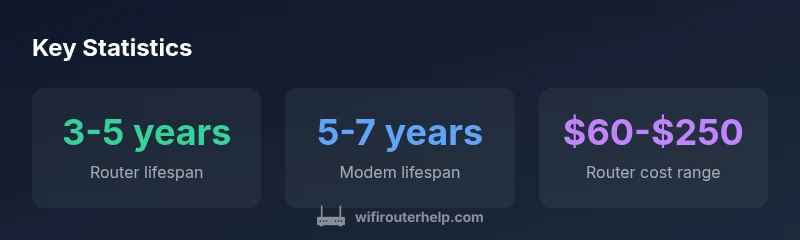
Look for repeated outages, persistent drops in speed, or devices that won’t connect reliably to your network. If you notice buffering during HD streams, lag in online gaming, or frequent resets after a power cycle, your hardware likely needs refreshing. Age is a practical rule of thumb: routers typically show wear after 3-5 years, while modems often show strain after 5-7 years, especially on higher‑speed plans. In addition, if you must update firmware every other month or your current gear lacks support for newer standards (for example, Wi‑Fi 6/6E or WPA3), upgrading is a wise move. A new router or modem can provide improved security, better coverage, and smarter features like QoS, guest networks, and easier device management. If you’re unsure, run a simple home network health check and compare results against your Internet plan’s advertised speeds. This practical check helps justify replacing gear when the value clearly outweighs the cost.
Lifespan expectations and tech advances
Device lifespans have drifted with technology, but the rate of improvement in Wi‑Fi standards means older gear quickly becomes a bottleneck. Routers behind Wi‑Fi 5 (ac) or Wi‑Fi 6 (ax) can still function, but they may not reliably support multiple devices streaming 4K video or gaming at the same time. Modems must also stay current with DOCSIS standards (3.0 vs 3.1, for instance). Considering the pace of hardware updates, a three to five year horizon for routers and five to seven years for modems is common in consumer networks, though higher‑end devices can last longer with careful management. Where compatibility and security are concerned, older devices stop receiving timely updates, increasing vulnerability to threats and reducing performance. The decision to replace should align with lifestyle changes (more smart devices, new work setups) and the availability of faster internet plans. A thoughtful upgrade can unlock features like beamforming, MU‑MIMO, and improved mesh integration, which previous hardware simply cannot deliver.
Budgeting for replacement: cost ranges and ROI
Cost planning is a key part of the replacement decision. Typical budgets reflect whether you buy a router, a modem, or a combined gateway. For many households, a router alone falls in the $60‑$250 range, while a standalone modem typically costs $50‑$150. Bundled gateway devices for modem and router can run from about $100 up to $350 depending on features such as Wi‑Fi standards, security, and build quality. When calculating ROI, consider the potential benefits: higher speeds, better coverage, reduced outages, and improved device management. If you’re on a multi‑year plan and want to future‑proof for several devices, investing in a mid‑range router with strong QoS and beamforming can be the most cost‑effective choice. WiFi Router Help analysis suggests balancing upfront cost with long‑term savings on repairs, support calls, and energy use. Always compare total ownership costs, not just the sticker price, and factor in whether your ISP supports bridge mode if you plan to use your own equipment.
Testing your current setup and building a case for replacement
Start with baseline speed tests and coverage mapping. Run speed tests from different rooms and times of day, and compare results to your plan’s advertised speeds. Use a Wi‑Fi analyzer to identify dead zones and interference sources. Check stability by noting how often you lose connections or experience buffering. Then estimate the cost of potential outages and compare it to the price of replacement. If the current gear frequently drags down performance or fails to handle the number of devices you own, replacement is likely cost‑effective. Document these findings so you can present a clear case to family members or a service technician. A well‑documented test result strengthens your bargaining position and helps you pick a setup that meets your needs for years to come.
Modem vs router: upgrading strategy
Understanding what to upgrade first depends on your pain points and internet plan, especially when to replace router and modem. If most issues are coverage and device compatibility, upgrading the router can yield the largest gains. If the modem can’t handle the speed tier or has compatibility issues with your ISP, upgrade the modem too, or embrace a gateway that combines both roles. In some markets, renting equipment from the ISP is more expensive over time than owning, so a self‑provided gateway can be a good long‑term choice. When selecting, look for support for current standards (Wi‑Fi 6/6E), MU‑MIMO, multiple antennas, and robust CPU capacity. Also verify compatibility with your plan and whether the device can operate in bridge mode if you need to connect your own router. This approach minimizes bottlenecks and ensures smoother handoffs between networks across rooms.
How to upgrade: buying tips, installation, and ISP considerations
Plan a simple buying checklist and a step‑by‑step install. Start by assessing the number of connected devices and your speed tier, then choose a router, modem, or gateway that supports your needs and budget. Verify that the device is compatible with your ISP and offers bridge mode if you intend to use your own router. When installing, set a strong password, update firmware, enable WPA3 where available, configure guest networks, and enable QoS for gaming or video conferencing. If you’re using a separate modem and router, place the router in central locations for best coverage and consider a mesh extension for larger homes. Finally, keep firmware up to date and create a simple maintenance plan so you won’t be back here next year asking when to replace again.
Maintenance tips to extend life and plan future upgrades
To extend your gear’s life, keep temperatures moderate, clean vents, and perform regular reboots or resets to maintain performance. Schedule periodic reviews of your network’s coverage, speed, and security settings, and stay alert to signs of aging hardware. Consider annual or biannual checks against your internet plan to decide if you are leveraging your investment. Keep a short‑term upgrade plan for devices nearing the end of their supported lifecycle and track firmware updates from manufacturers. With a proactive mindset, you’ll know when it’s time to replace and can time it for minimal disruption.
Typical timing and costs for router/modem upgrades
| Component | Lifespan (years) | Upgrade triggers | Typical cost (USD) |
|---|---|---|---|
| Router | 3-5 years | Slow speeds, dead zones, new standards (Wi-Fi 6/6E) or older firmware | 60-250 |
| Modem | 5-7 years | Outdated DOCSIS, frequent resets | 50-150 |
| Combo gateway | 4-6 years | Space constraints, ease of use, bridge-mode issues | 100-350 |
People Also Ask
When should I replace my router and modem?
A good rule of thumb is to replace when the gear causes frequent outages, slow speeds, or security concerns. If your router is 3–5 years old and your modem is 5–7 years old, it’s worth evaluating an upgrade. If you’re paying for repairs or your devices can’t handle your plan’s speeds, upgrading makes sense.
Replace when you notice repeated outages or slow speeds, especially if your gear is several years old and can’t keep up with your plan.
Should I upgrade the router first or the modem?
In most homes, upgrading the router first yields the biggest gains in coverage and user experience. If your modem cannot handle your plan’s speeds or is unstable, upgrade it too. In many cases, buying a bundled gateway is the simplest and most cost‑effective path.
Start with the router, then consider the modem if your plan requires faster speeds.
Can a new router improve gaming latency?
A newer router with QoS and better processing can reduce jitter and improve gaming latency, but your ISP and routing path also play major roles. If gaming is a priority, upgrade both router and modem if they’re older.
Yes, but remember the ISP path matters too.
Do I need a new modem if my ISP provides one?
Some ISPs require approved modems; owning your own can save money over time. Check compatibility, bridge mode, and whether the ISP supports third‑party gateways before buying.
ISPs may require certain modems; check compatibility first.
How often should I update firmware?
Check for updates monthly or when prompted. If the device is old and no longer gets updates, replacement is often the better option to maintain security and performance.
Keep firmware current; if updates stop, think replacement.
What budget should I plan for replacement?
Router costs typically range in the lower hundreds, modems similarly range in that area, and gateways combine both functions. Plan for about $100–$350 depending on features and performance needs, aiming to balance upfront cost with long‑term reliability.
Budget roughly in the hundreds depending on features; plan for long‑term reliability.
“Upgrading your home networking gear isn’t about chasing the latest tech; it’s about maintaining reliable, secure connections as your devices and needs grow. A well‑timed replacement prevents outages and improves everyday performance.”
What to Remember
- Check device age and performance regularly
- Upgrade when coverage or speed drops noticeably
- Consider bundled upgrades for value and simplicity
- Test speeds before/after to verify gains
- Keep firmware updated and plan future upgrades