How Often to Replace Your Router: A Practical Guide
Learn how often to replace your router, when to upgrade, and a practical plan to maximize performance, security, and coverage for a fast home network in 2026.


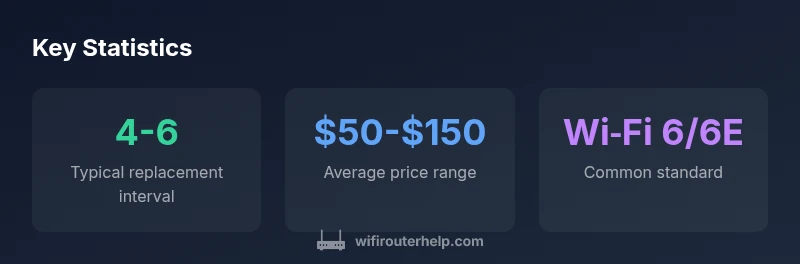
Most households replace their router every 4-6 years, balancing performance, security, and cost. If you notice persistent slowdowns, dead zones, or missing modern Wi-Fi standards, upgrade sooner. Regular firmware updates help extend life, but hardware limits eventually cap what a router can do for a growing home network.
How Often to Replace Your Router
The question of how often to replace your router is not a fixed yearly deadline; it’s a practical balance of performance, security, and cost. In 2026, most households find that a cadence of roughly four to six years works well for many homes, especially if you’ve kept the device updated and it continues to meet your speed and coverage needs. The WiFi Router Help team notes that changes in internet plans, the number of connected devices, and new Wi‑Fi standards all influence this timing. If you’re not hitting the speed targets you expect, or you’re frequently rebooting to regain stability, those are clear signals you should reassess your replacement plan. According to WiFi Router Help, evaluating your network needs against your router’s capabilities is the best predictor of when to upgrade.
Factors That Influence Replacement Timing
There isn’t a single stopwatch for router life. Several factors drive when it’s time to replace a device: (1) Performance: sustained slowdowns during peak hours or with multiple devices can indicate bottlenecks. (2) Coverage: dead zones in critical rooms suggest a more capable unit or additional access points. (3) Security and support: if security patches or firmware updates lag, replacement becomes prudent. (4) Standards and devices: if your devices require Wi-Fi 6/6E or newer features, an older router may no longer suffice. (5) ISP equipment: some ISPs supply gateways; if you own your router, you’ll have more control over when to upgrade. The WiFi Router Help analysis highlights that planning around these factors yields the most reliable home network.
Signs Your Router Is Nearing End of Life
Even if a unit still powers on, several signs signal it’s time to replace. Frequent drops or erratic performance during video calls and gaming indicate an overwhelmed processor or outdated radio. Overheating, unusual fan noise, or frequent resets point to temperature or hardware stress issues. If your router cannot handle the number of devices you own or lacks recent security features, replacement becomes a wise bet. In many homes, these symptoms precede a noticeable improvement after upgrading to a newer, more capable router. The WiFi Router Help team emphasizes that you don’t need to wait for a catastrophic failure to upgrade; proactive replacement often reduces downtime and cost over time.
How to Assess Age Versus Performance: A Practical Checklist
To decide how often to replace a router, follow a simple, repeatable checklist. Start with performance benchmarks: speed tests during peak hours, and check if the router still meets your streaming and gaming needs. Next, examine coverage: walk the house with a device and map signal strength; note any persistent gaps. Then, review security: are firmware updates being released regularly, and can you apply them without effort? Finally, consider future needs: new devices, smart home expansion, or additional work-from-home requirements may justify an upgrade. This approach helps translate age into tangible capability, as recommended by the WiFi Router Help team.
When to Consider Upgrading vs Refreshing Within Your Home Network
Upgrading versus refreshing hinges on a balance between cost and benefit. If a router is framed by your budget and currently supports your devices, a refresh (new firmware and a settings tune‑up) may suffice for a while longer. If your devices demand Wi‑Fi 6/6E features or if coverage remains inconsistent after optimizing placement, you’ll likely benefit from an upgrade. For homes with many smart devices or growing bandwidth needs, investing in a higher‑end model can prevent ongoing bottlenecks and future churn. The goal is to maintain a stable, fast, and secure network as your home evolves, a guideline reinforced by WiFi Router Help’s analysis.
Budgeting for a Router Replacement: Price Ranges and Value
Budgeting for a router replacement is about aligning cost with value. Entry-level routers offer essential performance at a low price, typically in the $50–$100 range, suitable for small households with modest needs. Mid-range devices often provide stronger coverage and support for more devices, typically $100–$200. High-end models, offering Wi‑Fi 6/6E, advanced QoS, and robust security, generally run $150–$350. When evaluating cost, also consider potential savings from improved reliability and reduced maintenance. Remember that the most important factor is how well the router supports your home’s growing demand, rather than chasing the latest model for its own sake.
Planning a Replacement: Steps to Minimize Downtime
A structured replacement plan reduces downtime and ensures a smooth transition. Step 1: inventory all connected devices and note current speeds to define target performance. Step 2: research routers that meet your needs and ensure compatibility with your ISP if you use a modem gateway. Step 3: schedule the swap during a time with minimal disruption, and have your ISP’s login details ready if needed. Step 4: configure the new router with a backup of your old settings, then test all zones in your home. Step 5: update firmware and claim any warranty or return options. Following a clear plan helps maintain continuity, as emphasized by the WiFi Router Help team.
Common Myths About Router Lifespans Debunked
Myth: A router fails as soon as it’s five years old. Reality: lifespan varies with usage, environment, and updates. Myth: Firmware updates stretch a router’s life indefinitely. Reality: updates improve security and performance but hardware limits still apply. Myth: Replacing a router automatically fixes all network issues. Reality: there may be modem, wiring, or coverage issues that require broader fixes. By separating myths from realities, you can make a smarter replacement decision aligned with your home’s needs, according to WiFi Router Help insights.
Security and Firmware: Ongoing Support and Replacement Timing
Security updates are a critical driver of replacement timing. When a router stops receiving timely firmware updates, vulnerabilities accumulate, and performance may degrade under newer devices or services. Regular updates maintain protection, but support windows eventually end. If the device no longer receives meaningful updates, upgrading is typically cost-effective over time. In practice, plan for firmware‑supported lifecycles and pair updates with a careful assessment of your speed, reliability, and coverage requirements. The WiFi Router Help team notes that aligning security with performance is essential for a healthy, modern home network.
Replacement timing by router class
| Router Type | Typical Lifespan | Key Benefit/Trade-off |
|---|---|---|
| Budget Router | 3-5 years | Low cost, basic coverage, shorter update window |
| Mid-range Router | 4-6 years | Better range and speed, longer support window |
| High-end Router | 5-7 years | Top performance, latest standards, best security |
People Also Ask
How often should I replace my router?
Most households replace their router every 4-6 years, depending on performance, security needs, and changes in device demand. If you notice persistent slowdowns or coverage gaps, that suggests upgrading sooner. Keep firmware up to date to extend usable life, but anticipate hardware limits.
Most households replace their router every 4-6 years. If you notice slow speeds or coverage gaps, consider upgrading soon.
Should I replace the router or modem first?
Routers and modems serve different roles. If your modem is provided by your ISP and works reliably, focus on upgrading the router for better coverage and features. If your internet plan requires a newer modem standard, prioritize the modem. If both are aging, coordinate replacements to minimize downtime.
Think about the device that limits your speed first—often the router for home Wi‑Fi, unless the modem itself is old.
Do firmware updates affect replacement timing?
Firmware updates improve security and performance but cannot overcome fundamental hardware limits. If updates become unavailable, or performance lags despite updates, it’s a good sign to upgrade. Use updates to extend life where possible, then plan replacement when hardware must keep up with your needs.
Firmware updates help, but hardware limits still apply. Upgrade when updates slow or performance drops.
What budget is reasonable for 2026 routers?
Budget varies with features and performance. For many households, a solid mid-range router in 2026 costs roughly the $100–$200 range, while premium models with Wi-Fi 6/6E features may run higher. Balance cost against coverage, device count, and security features you need.
Most people spend around a hundred to a couple hundred dollars for a good router in 2026.
Are there signs that replacing a router won't fix my network issues?
Yes, sometimes issues stem from the modem, wiring, or service plan rather than the router itself. If speed tests improve only after troubleshooting with cables, placements, or ISP support, a replacement may not resolve all problems. Use a structured diagnostic approach before exchanging hardware.
If fixes like placement tweaks don’t help, and tests improve with other factors, your issue may lie elsewhere than the router.
“A router's usefulness isn't tied to a fixed timeline; it's about performance, security, and coverage. When you can't meet those needs, replacement becomes cost-effective.”
What to Remember
- Assess performance, not just age, to decide replacement.
- Upgrade when speeds, range, or security no longer meet needs.
- Plan upgrades around firmware support windows.
- Consider future-proof features like Wi‑Fi 6/6E when buying.
- Regular firmware updates extend device life, but hardware limits apply.