Modem vs Router Spectrum: Understanding the Difference
Explore how modems, routers, and Spectrum gateways differ, when to use each, and how to optimize your home network. Expert guidance from WiFi Router Help.


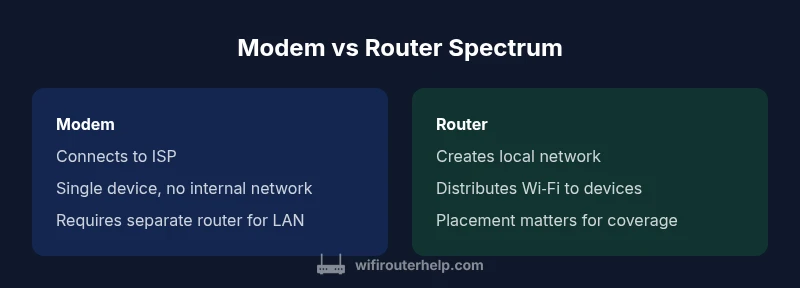
In Spectrum households, the terms modem and router describe two essential network devices. A modem connects your home to the Internet over Spectrum's infrastructure, while a router distributes that connection to multiple devices. Some Spectrum devices combine both roles into a gateway. Understanding the distinction helps you choose between separate equipment and all-in-one gateways.
What modem, router, and gateway do in a Spectrum home network
In homes served by Spectrum, understanding the roles of modem, router, and gateway is essential for a reliable network. A modem connects your local network to Spectrum's infrastructure, translating the provider's signal into data your devices can use. A router creates and manages your home network, directing traffic between devices, printers, and smart gadgets and providing Wi‑Fi access. A gateway combines both capabilities in one box, which some Spectrum plans offer as a single point of entry into your home network. The practical difference matters for coverage, control, and future‑proofing. A standalone modem plus router gives you more customization and upgrade options, while a gateway can simplify setup and reduce clutter. The choice often comes down to your home size, the number of devices, and whether you value modular upgrades over convenience. In the Spectrum ecosystem, there is a spectrum of options: renting gear from the provider, buying your own devices, or using a hybrid approach. This framing helps you evaluate each approach in real‑world scenarios. According to WiFi Router Help, the distinction between these devices is not just about speed; it's about how you want to manage security, firmware updates, and network segmentation.
Spectrum infrastructure and device choice
Spectrum's network delivery relies on a mix of cable technology and home equipment. The modem is the device that interfaces with Spectrum's network to obtain an Internet connection, while the router or gateway extends that connection to your local devices over Wi‑Fi or wired Ethernet. The decision between a gateway and separate devices depends on factors like home layout, device count, and tolerance for hardware management. Providers often offer gateways as convenient, all‑in-one solutions, but dedicated modems and routers can provide stronger customization options, better long‑term upgrade paths, and more granular control over security settings. When you understand these building blocks, you can tailor your setup to fit your space and usage patterns, rather than simply accepting a bundled solution.
All-in-one gateways vs separate devices: Pros and trade-offs
All-in-one gateways simplify installation: one box, one network name, and fewer cables. They are generally easier for non‑technical users and can be effective in small to mid-sized homes. However, their upgrade path is constrained by the vendor, and you may have fewer high‑end features or future-proof options. Separate modem and router setups maximize flexibility. You can upgrade the router to access newer Wi‑Fi standards without touching the modem, or swap the modem for better compatibility with evolving Spectrum plans. The trade-off is additional cables, more complex setup, and more devices to manage. For power users or homes with demanding coverage needs, the modular approach typically delivers better performance and room to grow.
Bridge mode, NAT, and firewall basics you should know
Bridge mode is a key concept when combining devices from different vendors or using a Spectrum gateway alongside a personal router. Enabling bridge mode on the gateway passes public IP handling to your own router, reducing double NAT and simplifying port forwarding. NAT (Network Address Translation) and firewall settings determine how traffic flows into and out of your network and how exposed devices appear to the Internet. Understanding these concepts helps you avoid common pitfalls like IP conflicts, limited remote access, or blocked gaming ports. If you’re using a separate modem and router, you’ll typically configure the router to handle DHCP and NAT while the modem remains in a passive role.
Practical performance factors: speed, coverage, and interference
Performance is influenced by more than just device type. The quality of your modem, router hardware, and their placement significantly affect speed, latency, and coverage. Modern routers support advanced features such as beamforming, MU‑MIMO, and tri‑band or dual‑band networks that improve reliability for multiple devices. Placement near the center of the home reduces dead zones, while high‑interference areas (dense walls, metal appliances) may require a mesh system or additional access points. In Spectrum scenarios, ensure the chosen equipment is compatible with DOCSIS standards and Spectrum’s service tier. This combination of hardware and placement decisions dramatically impacts real‑world experience more than any single spec on a box.
Security considerations and updates
Security should influence every choice, from hardware selection to firmware management. Regular firmware updates fix vulnerabilities and improve features. A dedicated router often provides finer control over firewall rules, VPN support, and guest networks, while gateways try to balance security with ease of use. If you rent a gateway from Spectrum, verify update cadence and security practices with your provider. Regardless of setup, enable strong Wi‑Fi encryption, keep default passwords out of service, and implement network segmentation for IoT devices. Staying current with updates is one of the most effective ways to protect home networks in a Spectrum environment.
Setup walkthrough: everyday home scenarios
Scenario A: Small apartment with a handful of devices. A gateway can cover this space with simple setup, and you’ll likely be fine with standard security settings. Scenario B: Family with multiple streaming rooms and gaming consoles. A separate modem and router or a high‑end router behind a modem delivers better performance and customization. Scenario C: A tech enthusiast who wants full control over network features. Separate devices are typically the better choice to tune QoS, security, and firmware updates. The right choice hinges on your space, device count, and how much you value control versus convenience.
Troubleshooting common Spectrum modem/router issues
Common issues include intermittent connectivity, slow Wi‑Fi, and devices not obtaining an IP address. Start with power cycling devices, checking cable connections, and verifying that the modem is syncing with Spectrum. If Wi‑Fi is slow, adjust router placement, reduce interference from microwaves or Bluetooth peripherals, and ensure you’re using the latest firmware. For persistent issues, check for double NAT situations when bridging or reconfigure port forwarding rules. If in doubt, consult Spectrum’s official support resources and WiFi Router Help’s troubleshooting guides for step‑by‑step actions tailored to your setup.
Buying guidance: how to decide and what to buy
When choosing between gateway versus separate devices, compare total cost, upgrade flexibility, and coverage needs. Modems in the wild range in price and capability; a mid‑tier modem paired with a capable router often delivers the best balance between cost and performance. Expect to consider options that support current DOCSIS standards, high‑quality routers with robust CPU performance, and reputable firmware support. If you have a large home or many smart devices, budget for mesh extenders or a reliable mesh system to ensure consistent coverage. Always check compatibility with Spectrum’s service tier before purchasing.
Maintenance, optimization, and monitoring
Regular maintenance is critical for sustained performance. Reboot devices after firmware updates, monitor connected devices for unusual activity, and reconfigure QoS rules as your household usage evolves. Periodic audits of connected devices help you identify orphaned gadgets that could be compromising your network’s efficiency. For ongoing health checks, use built‑in router dashboards or third‑party network monitoring tools to analyze speeds, latency, and device load. This proactive approach reduces downtime and maintains a strong home network over time.
Feature Comparison
| Feature | Modem | Router | Gateway (Modem+Router) |
|---|---|---|---|
| Function | Converts ISP signal for home use | Distributes data to devices via Wi‑Fi/Ethernet | All-in-one device combining both functions |
| Typical Use | Used with a separate router for local networking | Creates and manages home network | Simplifies setup with combined roles |
| Connection Type | WAN connection to ISP | LAN/WAN sides for internal network | WAN to ISP and LAN inside one unit |
| Coverage and Range | Depends on modem quality; coverage driven by router | Coverage depends on router hardware and placement | Unified coverage depends on device capabilities |
| Setup Complexity | Least complex when using a separate router | Moderate with a standard router | Easiest to set up for beginners |
| Best For | Users needing maximum customization | Homes with multiple rooms and devices | Small to mid-sized homes seeking simplicity |
| Price Range (estimated) | Modem: mid-range options | Router: mid-range to high-end options | Gateway: mid-range to premium options |
Benefits
- More control over performance and updates with separate devices
- Easier upgradability as needs grow or standards advance
- Potentially better network optimization for large homes
- Gateway reduces clutter and simplifies setup
The Bad
- Higher initial cost for separate devices
- More cables and setup steps
- Managing multiple devices can be complex for beginners
- Gateway options may limit future upgrade paths
Separate devices offer better long-term flexibility; gateways provide simplicity for smaller spaces.
If you value control and upgrade potential, choose modular gear. For quick setup and fewer devices, a gateway is often sufficient, especially in smaller homes.
People Also Ask
What is the main difference between a modem and a router?
A modem connects your home network to your Internet service provider, while a router creates and manages your home network, distributing Internet access to devices. In many setups, you can use a gateway that combines both functions. The choice affects control, security, and upgrade options.
A modem connects you to the Internet; a router shares that connection with your devices. Some setups use a single gateway that does both.
Can I use Spectrum's gateway instead of separate devices?
Yes, Spectrum gateways are designed for simplicity and can be adequate for many homes. If you need customization, advanced features, or better long-term upgrades, separate modem and router setups may be preferable.
Yes, you can use Spectrum's gateway. For more control, consider separate devices.
What is bridge mode and when should I enable it?
Bridge mode disables the gateway's routing features and passes Internet access to your own router. This avoids double NAT and can improve performance when you use a separate router. Enable it only if you plan to manage your own router settings.
Bridge mode lets your own router handle the network. Use it if you’re adding a separate router.
Is a high-end router necessary with fast Internet?
Not always. For many households, a mid-range router with good coverage and recent Wi‑Fi standards provides ample performance. In busy homes with many devices or 4K streaming, higher-end hardware can sustain speeds more reliably.
Often a mid-range router is enough, but busy homes may benefit from better hardware.
Do I need to update firmware on modem and router?
Yes. Regular firmware updates fix bugs, patch security issues, and improve features. Check for updates via the device management pages and enable automatic updates if available.
Yes—keep firmware up to date for security and performance.
How do I know if I should buy a separate router?
Consider a separate router if you require advanced features like robust QoS, VPN support, or mesh networking for larger spaces. If your priority is simplicity and minimal setup, a gateway may suffice.
If you want control and features, go separate; otherwise, a gateway works well.
What to Remember
- Assess home size and device count before choosing gear
- Prioritize flexible upgrades for long-term value
- Consider bridge mode to optimize how you integrate own router
- Security and firmware updates matter as much as hardware
- Test placement to maximize coverage before buying extra gear