Modem Router vs Router: A Comprehensive Guide for Homes
An analytical comparison of integrated modem-router devices vs separate modem and router setups. Learn setup steps, performance, security, and upgrade paths to choose the best fit for your home network. WiFi Router Help provides practical guidance and actionable recommendations.


Modem router vs router describes two main paths to home networking: an integrated device that combines modem and router, or two separate devices—one modem and one router. The choice affects setup simplicity, upgrade potential, security, and future-proofing. This comparison highlights practical considerations, so homeowners can pick the setup that fits their space, speed, and tech goals.
Definitional Foundations
According to WiFi Router Help, a modem is the device that communicates with your Internet Service Provider to bring the internet into your home, while a router creates the local network and assigns IP addresses to devices. The distinction matters because many homes end up with two devices doing two jobs, or in some cases, a single all-in-one device attempts to do both. The WiFi Router Help team found that consumers often conflate these terms when the internet provider supplies a single combined unit. Understanding these roles helps you choose between a modem router (integrated) and a dedicated modem plus router setup. In practice, the decision guides you toward simplicity or flexibility, with trade-offs in upgrade paths, security management, and feature depth. This section lays the groundwork by clearly defining each component, their typical functions, and how they interact when arranged in one box or as two separate devices.
- Definitions matter: a modem is the bridge to your ISP; a router manages your home network.
- Integration vs separation changes how you manage updates, security, and features.
- Your space, ISP plan, and future needs should drive the choice, not just the box you receive from the provider.
Integrated vs Separate: Core Differences
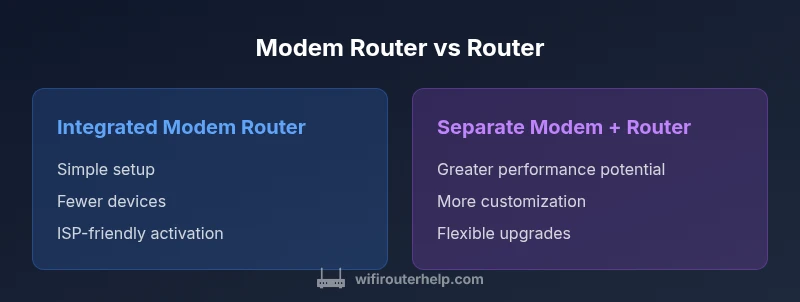
The most obvious difference is the form factor and the number of devices involved. An integrated modem-router combines two functions into a single physical unit, which generally means fewer cables, simpler initial setup, and a streamlined support path from one manufacturer. A separate modem and router configuration uses two devices: a modem (often provided by the ISP or bought independently) and a standalone router (which you select for performance and features). This separation enables targeted upgrades—swap in a more capable router while keeping your existing modem when your plan changes or coverage needs evolve. The WiFi Router Help team notes that the separation path often yields better network reliability, clearer troubleshooting, and more control over security settings, at the cost of a bit more complexity. Bridging modes and careful NAT handling are common topics when you mix and match devices.
- Integrated devices simplify setup and space; they can be perfectly adequate for small households.
- Separate devices offer greater control, flexibility, and room to upgrade without replacing the entire system.
- Compatibility and proper configuration (bridge mode, NAT, and QoS) are critical in either path for a smooth experience.
Performance Considerations: Throughput, Coverage, and Interference
Performance in modem-router vs router setups hinges on more than advertised speeds. An integrated device bundles the modem and router resources, which can lead to shared processing power and potential contention when you push high throughput or dense wireless environments. A standalone router allows you to choose a high-performance wireless access point with advanced antennas, beamforming, and QoS features, while the modem handles internet access independently. In real-world homes, coverage gaps often point to router placement and band selection as much as to hardware capabilities. The key is to balance the router’s capabilities (Wi‑Fi standard, MU‑MIMO, band steering) with your plan’s speed and your home’s size and layout. WiFi Router Help reminds readers to consider practical factors like wall materials, device density, and interference from neighbors when evaluating modem-router vs router setups.
- Performance is multi-faceted: throughput, range, and reliability depend on both hardware and placement.
- Upgrading to a modern router can yield substantial gains even if your modem remains the same.
- For larger homes or multi-user environments, a robust standalone router often delivers the best long-term performance.
Setup and Maintenance: What Changes When You Choose One Path Over the Other
Setup complexity varies significantly between the two paths. A single integrated device typically offers a guided setup wizard, automatic firmware updates, and simplified ISP activation. In practice, this means shorter initial configuration and fewer compatibility concerns. A separate modem and router requires more planning: you may need to bridge modes, adjust NAT settings, and configure the router’s WAN connection, DHCP scope, and firewall rules. maintenance becomes a two‑arm process, with updates choreographed across two devices. The benefit is modularity: if the router gains new features or security enhancements, you can upgrade without touching the modem. If the modem’s firmware becomes obsolete, you still keep the router. The key recommendation from WiFi Router Help is to document IP schemes and bridge settings to avoid double NAT or routing conflicts during changes.
- Expect a faster, simpler setup with an integrated device.
- Expect more steps, but greater control with separate devices.
- Keep a clear map of network settings (IP addresses, DHCP ranges, and bridge mode status) to minimize misconfiguration during upgrades.
Security and Privacy Implications
Security considerations differ based on whether you use a modem-router combo or a two-device setup. Integrated devices centralize firmware updates and firewall rules, which can be convenient but create a single point of failure. A separate modem and router offer stronger isolation: the router manages internal protections while the modem handles the external connection. This separation can improve security hygiene, as you can rotate or upgrade each component independently. Regular firmware updates, strong admin passwords, and enabling features like guest networks and firewall rules remain essential in both configurations. The WiFi Router Help team emphasizes that active monitoring of connected devices and the use of network segmentation reduce risk in any setup, particularly in homes with many smart devices.
- Regular updates and strong credentials are foundational for all homes.
- Bridging mode and proper NAT configuration require attention to prevent exposure or double NAT issues.
- Segmentation (guest networks, IoT isolation) improves safety, regardless of configuration.
Flexibility and Upgradability: Future-Proofing Your Home Network
Future-proofing is about keeping options open. An integrated modem-router can suffices for many households, especially in apartments or smaller homes where space and ease are priorities. However, as your devices multiply and your internet speed increases, the value of a separate modem and router grows. You can upgrade the router to keep pace with evolving Wi‑Fi standards, security features, and traffic patterns without replacing the modem. This separation also makes it easier to change ISPs without changing your entire home network if your contract ends or you move. The main trade-off is a bit more initial setup, and a preference for a structured, modular approach often wins for tech enthusiasts who want granular control over QoS, parental controls, and device-level policies.
- Separate devices offer the most flexibility for future upgrades.
- Integrated devices are a strong choice for minimalism and ease.
- The right path aligns with your household size, device density, and comfort with network tinkering.
Cost and Value Over Time
Cost considerations for modem-router vs router setups extend beyond sticker prices. An integrated device can be cheaper upfront and simpler to maintain, potentially reducing service calls and setup time. A separate modem plus router path generally entails higher initial costs due to two devices and possibly a higher-quality router. Over time, ongoing costs include longer-term upgrade cycles and spare parts, as you replace the router or the modem independently as needed. WiFi Router Help notes that total cost is often driven by the desired performance tier, reliability, and feature set (such as advanced QoS, VPN support, and security features). A strategic approach is to plan for the next two to four years, considering potential speed upgrades and the likelihood of needing more robust coverage in multi-story homes or dense living spaces.
- Upfront cost is typically lower with an integrated device; long-term value may favor separation.
- Consider future internet speed upgrades and how each path adapts to those changes.
- Factor in features that matter in your daily use (gaming, streaming, telepresence).
ISP Compatibility and Bridging Modes
Bridging modes and compatibility with Internet Service Providers (ISPs) are critical in modem-router vs router discussions. Some ISPs readily support bridged mode on standalone modems, allowing you to pair a high-performance router with the existing modem. Others may require you to use their own gateway device. In a two-device setup, you have more flexibility to select a router that suits your performance goals and to enable bridge mode for clean routing. In an integrated setup, bridging may be limited or vendor-dependent, so confirm with your ISP and the device’s documentation before purchasing. The key takeaway is to map your plan’s speed, your home’s layout, and your preferred security posture to decide which arrangement minimizes compatibility friction while maximizing performance.
- Bridging works best when you want full control over routing features.
- Reduced complexity can be preferable in smaller spaces with simpler plans.
- Always verify ISP compatibility and support policies before committing to a solution.
Real-World Patterns by Home Type
Households come in many sizes and configurations, and patterns emerge when choosing modem-router vs router setups. For one-bedroom apartments, an integrated device often satisfies most users, delivering reliable coverage with minimal clutter and fewer setup steps. For multi-story houses or homes with several workstations, a standalone router paired with a capable modem generally provides broader coverage, better customization, and the ability to tailor network policies to different rooms or devices. In homes with many smart devices, network segmentation and QoS policies become more critical, and a two-device approach tends to deliver the most robust results. The WiFi Router Help team emphasizes that there is no one-size-fits-all answer; the right choice balances space, speed, the number of users, and your comfort with configuration.
- Small spaces benefit from simplicity.
- Larger homes justify modular upgrades and stronger routers.
- A mixed environment may benefit from a mixed approach, such as a high-performance router with a basic ISP modem.
Troubleshooting Scenarios You Might Encounter
No network setup is completely problem-free, but understanding where issues originate helps you diagnose quickly. In an integrated device, a modem/router outage affects both internet access and local network services, so you may need to reset or replace a single unit. In a two-device setup, you can isolate problems by testing the modem independently from the router, which makes it easier to pinpoint source issues such as firmware incompatibilities, IP conflicts, or DNS resolution problems. Common steps include verifying bridge modes, checking firmware versions, ensuring correct NAT settings, and confirming that QoS or firewall rules aren't inadvertently blocking essential traffic. The guidance from WiFi Router Help is to approach problems methodically: start with the device that is most likely to be the bottleneck, then test with minimal configurations to rule out incorrect settings.
- Isolate the device causing trouble to narrow down the fault.
- Keep firmware updated and reset to defaults if configurations drift.
- Document your network layout to speed up troubleshooting in the future.
Best Practices: Getting Maximum Performance and Reliability
To maximize performance in either path, start with placement: position your primary device high, clear of obstructions, and away from competing electronics. Use the correct wireless channel and band preferences, and enable essential protections like WPA3, guest networks, and a firewall. Regularly check for firmware updates and review security settings to prevent unauthorized access. For those who choose separate devices, align the modem’s capabilities with a router that offers advanced features such as targeted QoS, parental controls, and device-level access management. If you anticipate growth—more users, more IoT devices, or higher-speed internet—plan a staged upgrade strategy that prioritizes a modern router while keeping the modem compatible with your plan. In contrast, if simplicity is paramount, a well-supported integrated device with robust update policies can serve well for years. The core message from WiFi Router Help is to tailor the setup to your home's size, usage patterns, and comfort with configuration, revisiting the decision as needs evolve.
Decision Guide: When to Choose Each Path
If you value plug‑and‑play setup, compact hardware, and straightforward ISP activation, an integrated modem-router is a sensible starting point, especially in small spaces. If you anticipate growth, high traffic, complex device ecosystems, or future internet speed upgrades, a separate modem plus router is the more future‑proof path. Consider your home’s size, wall materials, number of smart devices, and your willingness to manage network settings. In the end, the best choice is the one that consistently delivers reliable coverage, solid security, and a straightforward upgrade path as your needs evolve. The WiFi Router Help team encourages homeowners to map their top priorities (simplicity, performance, or upgradeability) and test a practical setup before committing long-term.
Comparison
| Feature | Integrated Modem Router | Separate Modem + Router |
|---|---|---|
| Ease of setup | Very simple, single device setup | Two-step setup (modem and router) with potential bridge mode configuration |
| Upgrade path | Limited to single device upgrades | Flexible upgrades by swapping router or modem independently |
| Performance potential | Adequate for small homes and typical workloads | Higher potential with a high-end router and modern modem |
| Security management | Unified firmware and firewall rules | Independent updates allow targeted security improvements |
| Troubleshooting | Troubleshooting centralized to one device | Can isolate issues by device, but requires more steps |
| Space and clutter | Fewer devices, minimal cable clutter | Two devices mean more cables but better layout options |
| Best for | Small apartments, renters, simple setups | Larger homes, power users, smart homes |
Benefits
- Simplified setup and fewer cables
- Unified updates and support from a single vendor
- Compact footprint for small spaces
- Easier ISP activation and warranty handling
The Bad
- Limited upgrade flexibility within a single device
- Potential single point of failure for both functions
- Fewer advanced features unless the device is high-end
- Upfront cost may be higher if you need a newer integrated unit for speed upgrades
Separate modem + router is generally the better long-term choice for most homes
For most households, the flexibility, performance headroom, and upgradeability of two devices outweigh the simplicity of a single integrated unit. An integrated device remains attractive for small spaces or users who prioritize ease of setup. The WiFi Router Help team recommends evaluating your home size, internet plan, and willingness to tinker with settings before deciding.
People Also Ask
What is the fundamental difference between a modem-router and a standalone router?
A modem-router combines two functions (modem and router) into one device, simplifying setup but limiting upgrade flexibility. A standalone router works with a separate modem, offering more customization and easier upgrades. The choice depends on your space, budget, and desire for control.
A modem-router is one box for both internet access and local networking, while a standalone router uses two devices for more control and future upgrades.
Can my ISP provide a gateway that is both a modem and router?
Yes, many ISPs provide a gateway device that combines both functions. This is convenient but can limit advanced features and future upgrades if you outgrow the device. If you need more control, you can switch to a separate router later as long as your modem supports bridge mode.
Some ISPs give you a single gateway; you can switch to separate devices later if you want more control.
What is bridge mode and when should I use it?
Bridge mode disables the router function in your gateway so your own router handles all routing duties. Use it when you want full control over network settings or when you need to avoid double NAT in a two-device setup.
Bridge mode lets your router handle traffic, avoiding conflicts from two devices doing routing.
Is it cheaper to stick with an integrated device long-term?
Upfront costs can be lower with an integrated device, but long-term, separate devices may offer better value through targeted upgrades without replacing the modem. Your choice should consider how often you plan to upgrade and the importance of advanced features.
Integrated devices can be cheaper upfront; separate devices might save money later with targeted upgrades.
How do I know which setup my home needs?
Assess the home size, device count, internet plan speed, and your comfort level with configuration. If you value simplicity and have a small space, start with an integrated device. If you anticipate growth or demand high performance, go with separate devices.
Think about size, speed, and how much you want to tinker with settings to decide.
What are common pitfalls to avoid with modem-router setups?
Avoid double NAT by using bridge mode when necessary, ensure firmware is up to date, and document your IP scheme and port forwarding rules. Misconfigurations can cause connectivity or security issues.
Don’t skip updates and avoid double NAT by using bridge mode when needed.
What to Remember
- Choose separate devices for growth and performance
- Opt for an integrated device for simplicity and space-saving
- Plan for future upgrades when your internet speed increases
- Bridge mode and proper NAT settings are crucial in mixed setups
- Keep firmware and security settings up to date