Wireless Router vs Access Point: A Practical, Data-Driven Comparison
An analytical, step-by-step comparison of wireless routers and access points. Learn how they differ, when to use each, setup tips, and value considerations to optimize your home network in 2026.


Wireless router vs access point: for most homes, start with a single router for simplicity and security, and add a dedicated access point for coverage gaps. Routers are easy to manage, while APs offer scalable growth for larger spaces. The choice hinges on coverage needs, budget, and whether you prefer a simple all-in-one setup or modular expansion.
What are the Wireless Router and Access Point, and Why They Matter
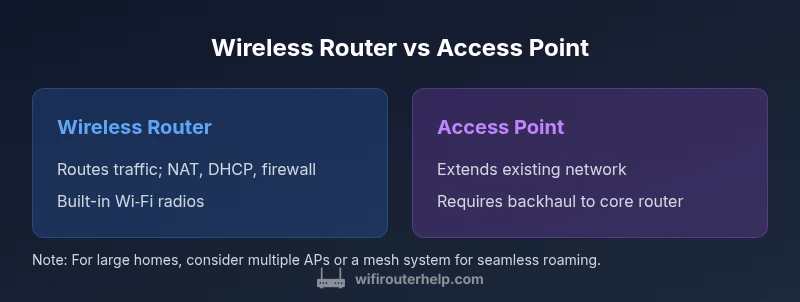
In modern homes, two devices shape how you connect to the internet: a wireless router and an access point. A wireless router is the central hub that handles internet traffic, NAT, DHCP, and firewall rules, while an access point is a network extension that broadcasts Wi-Fi and connects to an existing network via an ethernet backhaul or wireless backhaul. Understanding the distinction between these two elements is essential when planning a home network upgrade or troubleshooting coverage gaps. The choice between a wireless router vs access point influences coverage, performance, and how scalable your network can become. According to WiFi Router Help, many homeowners start with a single router to simplify setup and security, then add APs to fill dead zones as the home grows. That approach often delivers the best blend of control and convenience.
How They Function Differently in a Home Network
A wireless router connects to the internet via a WAN uplink and performs network address translation (NAT), DHCP, and firewall duties for your LAN. It also provides one or more Wi‑Fi radios to serve devices directly. An access point, by contrast, does not route traffic or assign IP addresses by itself; it extends the existing network’s wireless coverage by relaying frames between wireless clients and the central router. APs can connect via Ethernet backhaul or, in some cases, wireless backhaul to the router. When you compare the wireless router vs access point, think of the router as the core, and APs as the extensions that broadcast Wi‑Fi where the main signal struggles.
Use-Case Scenarios: When a Router Alone Suffices vs AP Expansion
In small homes or apartments with a single level and a relatively small footprint, a reliable consumer router can provide ample coverage, fast speeds, and simple setup. As homes grow taller, wider, or busier (think many smart devices, or a home office with video conferencing), coverage gaps emerge. This is where access points shine, offering scalable coverage without sacrificing performance. A router+AP setup lets you place APs in dead zones (often near stairwells or far rooms) to maintain strong signal throughout the home, while keeping your core network under one managed umbrella.
Core Technical Differences to Compare
Key differentiators include coverage strategy, backhaul options, management style, security architecture, and scale. Routers typically provide NAT, a built-in firewall, DHCP, and Wi‑Fi from a single device. APs provide expanded wireless coverage without routing; they require a central router or controller. When considering the wireless router vs access point, factor in backhaul stability (Ethernet backhaul is ideal, wireless backhaul is convenient but can introduce interference), ease of management, and whether you need seamless roaming or simple, discrete coverage extensions.
Setup and Management Considerations
A router-based setup is straightforward: connect to your modem, configure security (passwords, guest networks), and manage firmware updates from one device. A router+AP setup adds placement considerations, such as choosing AP locations for optimal signal and using Ethernet backhaul when possible. You may also rely on centralized management or a controller/mesh system to simplify administration. For many users, a hybrid approach—one router with a few APs—offers a practical balance between control and coverage while preserving security posture across the network.
Performance Implications: Single-Story vs Multi-Story Homes
Performance hinges on backhaul and channel management. In single-story layouts with Ethernet backhaul to APs, you can extend robust Wi‑Fi where needed without overloading the router. In multi-story homes, APs become more valuable for eliminating dead zones and enabling consistent speeds across floors. WiFi Router Help analysis shows that proper backhaul planning dramatically affects achievable throughput and roaming quality. If you lack wired backhaul, consider mesh-enabled APs that coordinate roaming while preserving network policy consistency.
Budget, Value, and Upgrade Paths
A simple router setup often wins on upfront cost, but long-term flexibility can be superior with APs, especially in larger homes or multi-device environments. Budget ranges can vary widely by performance tier, features, and vendor ecosystem. A router-only system may be less expensive initially, whereas a strict AP expansion path can deliver superior coverage at incremental costs. Your upgrade path should align with projected home growth, device density, and whether you anticipate adding more APs or integrating a mesh ecosystem for seamless roaming.
Practical Step-by-Step Guide to Choosing
- Map your home: measure square footage and identify dead zones. 2) Decide on backhaul: Ethernet backhaul is best for performance, wireless backhaul offers flexibility. 3) Pick a base router with solid security and update cadence. 4) If dead zones exist, plan AP placement to cover them, prioritizing central corridors and stairwells. 5) Consider a mesh-capable system if roaming between rooms matters. 6) Budget for future growth: add one or two APs as needed rather than replacing the router.
Common Pitfalls and Troubleshooting Tips
Avoid common mistakes like placing APs too close to the router, failing to enable WPA3, or neglecting firmware updates. Ensure backhaul integrity, use appropriate channel settings to minimize interference, and verify that roaming remains smooth as you add APs. If you encounter slow speeds, test with wired backhaul first to confirm the backbone bandwidth is sufficient. For persistent issues, revert to a controller-based or mesh-managed approach to simplify troubleshooting and policy enforcement.
Authoritative sources
- FCC.gov: Understanding home Wi‑Fi coverage and interference considerations. https://www.fcc.gov
- NIST.gov: Guidelines for Wi‑Fi security and best practices. https://www.nist.gov
- Wi-Fi Alliance: Standards for interoperable wireless networking and roaming. https://www.wi-fi.org
Comparison
| Feature | Wireless Router | Access Point |
|---|---|---|
| Backhaul | Built-in WAN for routing + Wi‑Fi | Ethernet backhaul to router or wireless backhaul to main network |
| Management | Standalone UI; basic cloud options on some models | Centralized management with controller/mesh when multiple APs are used |
| Security Features | NAT firewall, WPA3, guest network, basic QoS | Same options plus centralized policy enforcement across APs |
| Coverage Scalability | Good for single-room or small apartments | Excellent for large homes; scalable by adding APs |
| Ideal Environment | Simple, compact spaces with modest demand | Multi-room, multi-story homes or offices with high device density |
| Price Range | $100-300 | $60-200 |
Benefits
- Easier initial setup with a single device
- Scalable coverage by adding APs
- Reduces router congestion with dedicated APs
- Flexible placement to optimize signal
The Bad
- Higher upfront hardware costs for separate APs
- Increased setup complexity and ongoing management
- Requires backhaul planning (Ethernet or wireless)
Access points provide superior coverage and scalable networks; routers are best for simple, cost-efficient setups.
For larger homes or spaces with dead zones, APs win on coverage and scalability. For small homes, a single router delivers solid performance with less complexity. The right choice depends on your space, budget, and tolerance for management overhead.
People Also Ask
What is the main difference between a wireless router and an access point?
A wireless router connects to the internet, assigns IP addresses, and routes traffic on its own. An access point extends an existing network's wireless coverage without performing routing duties, relying on a central router or controller.
A router is the traffic manager for your network; an access point simply adds Wi‑Fi coverage to that network.
Can a wireless router function as an access point?
Some routers can switch to an access point mode, but you’ll lose routing features in that mode. It’s useful for simple setups, but doesn’t replace a dedicated AP in a scalable, large network.
Yes, some routers can operate as APs, but you’ll trade routing features for coverage expansion.
Which is better for multi-story homes?
Access points or a mesh system typically outperform a single router in multi-story homes by providing stable backhaul and consistent roaming across floors.
APs or mesh systems generally give better coverage across multiple stories.
Do APs require Ethernet backhaul?
Not always. APs can use wireless backhaul, but Ethernet backhaul tends to give the best performance and reliability, especially in busy networks.
Ethernet is best, but wireless backhaul can work if wired runs aren’t feasible.
How do I set up multiple APs with one router?
Place APs to optimize coverage, connect them via Ethernet to the router or a central switch, and enable a unified SSID and security policy if supported by your controller or mesh system.
Put APs where signals are weak, connect them, and unify your network settings.
Are APs more secure than a single router?
Security isn't inherently better or worse; it depends on configuration. Centralized management across APs can improve policy consistency and reduce misconfigurations.
Security comes down to setup; APs with centralized management can help keep policies aligned.
What to Remember
- Assess your home size before choosing hardware.
- Plan backhaul upfront to maximize performance.
- APs excel in coverage; routers win on simplicity.
- Budget for future growth and management effort.