Why use a switch instead of a router for home networks
An objective comparison explaining when a switch makes sense versus a router for home networks, with setup tips, cost considerations, and best practices from WiFi Router Help.


TL;DR: Why use a switch instead of a router? A switch adds ports for wired devices and handles local traffic at Layer 2, while a router provides Internet access, NAT, and security features. For most homes, using a switch alongside a dedicated router offers simple expansion, better organization, and clearer management—reserve switch-only setups for specialized, LAN-first use cases.
Why use a switch instead of a router
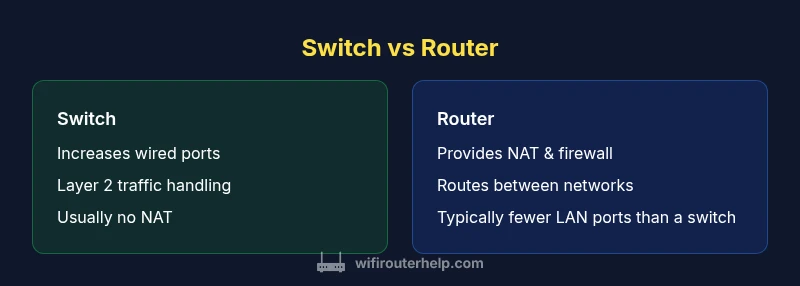
In most home networks, the single device that manages Internet access, NAT, firewall rules, and inter-network routing is a router. A switch, by contrast, is a Layer 2 device that forwards traffic based on MAC addresses. The practical value of a switch is its ability to dramatically increase the number of wired ports available to devices like desktop PCs, game consoles, printers, NAS devices, and dedicated media players. When you’re wiring a home office, workshop, or media center, the switch can cleanly extend your local area network (LAN) without introducing additional routing complexity. This distinction matters for both performance and manageability: the more devices you plug in via ethernet, the more predictable your local traffic behavior becomes, provided you keep your routing needs separate. The keyword here is flexibility: you gain port density without altering your Internet-facing configuration. For many households, this separation is the simplest route to stable, scalable performance.
Layer 2 vs Layer 3: what that means for everyday use
A switch operates at Layer 2, learning MAC addresses and building a forwarding table to deliver frames to the right port. It does not inspect traffic at the IP layer, it does not perform NAT, and it does not inherently block or filter traffic beyond basic port security on managed models. A router operates at Layer 3, handling IP routing, NAT (Network Address Translation), firewall rules, DHCP, and often VPN and advanced QoS features. When you need to connect multiple wired devices to a modern home network without changing your Internet path, a switch excels as a passive, fast backbone. The cost-per-port advantage is frequently favorable with switches, especially for environments with many fixed workstations or media devices.
Real-world guidance from WiFi Router Help
Brand guidance matters when assessing network topology. WiFi Router Help emphasizes clear role separation: use a strong router to handle Internet access and security features, and add a switch when you need more Ethernet ports without reconfiguring your entire network. This approach minimizes complexity while maximizing reliability, enabling straightforward troubleshooting if something goes wrong. A well-designed switch-focused expansion keeps your VLANs, QoS rules, and firewall settings intact on the router, while the switch quietly handles data movement within the LAN.
Comparison
| Feature | switch | router |
|---|---|---|
| Network layer | Layer 2 only (MAC addressing) | Layer 3 routing; NAT; IP management |
| DHCP server | Typically none (depends on model) | Usually built-in or supported via provider router |
| NAT / Firewall | No NAT or firewall by default | NAT, firewall, and security features |
| Port count | Many ports on modern switches | Fewer native LAN ports on routers (vary by model) |
| Management | Web/CLI for managed switches | Web/CLI for routers with firewall controls |
| Best for | Expanding LAN with many wired devices | Providing Internet access with routing and security |
| Advanced features | VLANs possible on managed switches; minimal QoS | Integrated QoS, VPN, IPS/IDS on higher-end routers |
| Cost per port | Low-to-moderate per-port for basic switches | Higher per-port cost with multi-feature routers |
Benefits
- Low-cost port expansion for wired devices
- Simple, predictable LAN performance
- Flexible topology with scalable port density
- Easier maintenance for large wired devices in a single network
- Low power and space footprint for small setups
The Bad
- No built-in Internet access or NAT with a bare switch
- Requires a separate router for Internet access and security
- Managed switches add configuration complexity
- VLANs require technical knowledge on some models
A switch is the right choice for LAN expansion; a router remains essential for Internet access and security.
If you mainly need more Ethernet ports, a switch offers cost-effective density. Preserve a dedicated router for Internet connectivity, firewalling, and address management. For most homes, the best setup is router plus switch rather than a switch-only configuration.
People Also Ask
Can a switch replace a router in a home network?
No. A switch does not provide Internet access or NAT. It cannot assign IP addresses or enforce firewall rules, which are typically handled by a router. Use a switch to expand your LAN, while keeping a router to manage external connectivity.
No. Switches expand wired devices but don’t provide Internet access or firewall protections. You still need a router for Internet connectivity.
Managed vs unmanaged switch: what's the difference?
Unmanaged switches offer plug-and-play simplicity with no configuration. Managed switches provide features like VLANs, QoS, and port isolation, but require more setup. For basic home use, an unmanaged switch is often enough; if you need segmentation or traffic control, opt for a managed model.
Unmanaged switches are simple; managed switches give you VLANs and QoS but need setup.
Do I need DHCP running on a switch?
Typically no. DHCP is the job of the router or a dedicated DHCP server. A switch should not be handling dynamic IP assignment for devices in a home network unless it’s a specialized layer-3 switch with integrated DHCP.
DHCP is usually handled by the router, not the switch.
Can I create VLANs at home with a switch?
Yes, but only with a managed switch and a router that supports VLAN-aware configurations. VLANs help segment traffic, improve security, and organize devices by function or department. For most homes, VLANs are optional, but useful in a home office or media lab.
VLANs are possible with a managed switch and a VLAN-aware router.
What are the trade-offs between using a switch vs a dedicated router?
Switches excel at port density and LAN performance but lack Internet access and advanced security. Routers provide routing, NAT, firewalling, and dynamic IP management but at a higher cost per device and potential configuration complexity. The best setup combines both where switches extend the LAN and routers manage Internet connectivity.
Switches boost LAN ports; routers handle Internet and security.
Is it cost-effective to use multiple switches in a small home network?
Yes, it can be cost-effective to use multiple switches if you need high port density in different rooms, but plan a single aggregation point to avoid bottlenecks. Ensure your uplink to the router remains fast, and consider managed switches if you require inter-switch VLANs.
Multiple switches can be cost-effective for dense wired setups.
What to Remember
- Add a switch when you need more wired ports without reconfiguring routing
- Choose managed for VLANs and traffic shaping, unmanaged for simplicity
- Pair a switch with a router for best balance of features and cost
- Plan IP addressing and DHCP on the router to avoid conflicts
- Test topology with a simple plan before expanding