Is Router Better Than Switch? A Clear Comparison
A practical, analytical comparison of routers vs. switches for home networks, covering use cases, features, security, expandability, and cost to help you decide which device fits your setup.


Is a router better than a switch for most home networks? In practice, a router (often with built‑in Wi‑Fi, NAT, and firewall) offers simpler setup, better security, and wireless access, while a switch excels for wired expansion. The right choice depends on whether you prioritize wireless coverage, security features, or purely wired bandwidth.
Clarifying terms: what a router does vs what a switch does
When people ask is router better than switch, they usually mean consumer devices found in homes and small offices. A router is a device that connects multiple networks and manages traffic between them. In a typical home setup it provides NAT (network address translation), a basic firewall, and often DHCP to assign IPs to devices on your local network. Some routers include wireless radios, so laptops, phones, and smart devices can connect without a separate access point. A switch, by contrast, primarily forwards Ethernet frames within a single network. It does not typically route traffic between networks, and by default does not provide NAT or Wi‑Fi. Switches are great for expanding wired ports and improving local bandwidth efficiency in a wired‑only segment. In short, if you need internet sharing and wireless access, a router is usually the starting point; if you need many wired ports with simple traffic handling, a switch can play a key role. According to WiFi Router Help, understanding these roles is the first step in choosing the right device. is router better than switch
When a router makes sense in a home network
For most households, the router serves as the gateway between your home network and the wider internet. It handles NAT so multiple devices can share a single public IP, provides a firewall to block unsolicited traffic, and often supplies DHCP to assign local IPs. If the router includes built‑in Wi‑Fi, it also serves as the wireless access point for laptops, phones, and smart devices. A single, well‑configured device can simplify parental controls, guest access, and security monitoring. The WiFi Router Help team emphasizes evaluating coverage needs, the number of connected devices, and whether you want to segment networks for guests and IoT. If you rely heavily on wireless devices or want an easy, all‑in‑one solution, a router is usually the preferable starting point.
When a switch is advantageous
A wired‑centric setup benefits from a switch, especially when you need more Ethernet ports than a typical router provides. A switch expands the number of wired connections without adding wireless complexity. Managed switches can offer features like VLANs, link aggregation, and QoS to prioritize traffic between devices or segments. In practice, a small home lab, media center, or home office with many desktops, printers, or storage devices can become congested behind a router if port count is limited. In such scenarios you keep the router at the edge for routing and security, and place a switch behind it to handle dense wired expansion. This approach preserves security while maximizing wired performance for critical devices.
Core differences: scope, features, and responsibilities
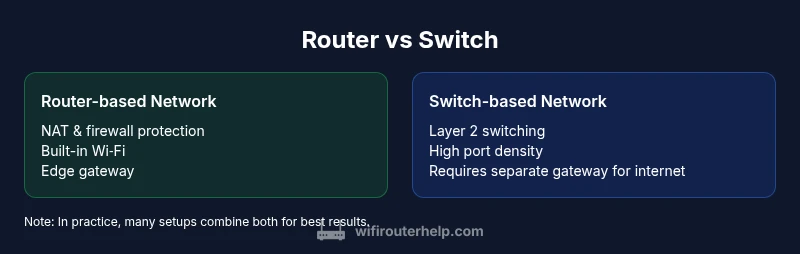
The fundamental distinction lies in scope. A router connects different networks, performs network address translation (NAT), enforces firewall policies, and often provides wireless services. A switch operates at Layer 2, forwarding frames within the same network segment and typically offering many wired ports. Some switches are managed and support VLANs, QoS, and advanced traffic control, but they do not replace the routing/NAT function of a router. Consumer routers often fuse several capabilities (Wi‑Fi, NIC management, guest networks) into one device, which simplifies configuration but may limit upgrade paths. Understanding this separation helps prevent overbuying or under‑utilizing devices. If your goal is a simple, safe, and scalable home network, start with a router; add a switch only when you need more wired ports or more granular traffic control.
Wireless vs wired: coverage and performance
Wireless coverage is a major consideration. A router with built‑in Wi‑Fi provides mobility and reduces device clutter, letting you position one device to cover living spaces, bedrooms, and offices. Switches, by themselves, offer no wireless connectivity unless paired with an access point. For environments with robust wireless requirements, you may couple a router with one or more access points or deploy a mesh system. For pure wired performance, a high‑quality switch behind a gateway can deliver extremely reliable throughput to wired devices, while keeping wireless performance focused on the router or mesh units. The decision should balance coverage quality with wired reliability for devices like NAS, gaming consoles, and desktop PCs.
Security implications and threat surface
NAT on a router acts as a first line of defense by masking internal IPs and limiting unsolicited inbound traffic. A built‑in firewall and security features such as guest networks, parental controls, and firmware updates also reside with the router. A switch, especially if unmanaged, provides little to no security boundary; it simply forwards frames. If you require segmentation or enhanced security, plan to deploy a managed switch behind a router to isolate traffic between departments or device types. In practice, the router’s security settings often determine the overall safety of the home network, with the switch playing a lower‑risk, expansion role.
Expandability and future-proofing
For many buyers, expandability matters more than raw single‑device power. Routers with built‑in Wi‑Fi are convenient but can limit your future options if your wireless needs evolve beyond the device’s capabilities. A dedicated switch, especially a managed model, typically offers flexible port densities and VLAN support, making it easier to scale wired networks. A hybrid approach—router at the edge plus switches for expansion—provides a balanced path forward. Additionally, as new standards emerge (e.g., faster Wi‑Fi generations or new QoS features), you can upgrade only the component that’s limiting performance rather than the entire gateway.
Setup complexity and management
For many households, the simplest configuration is to purchase a single router with built‑in Wi‑Fi and basic settings. This minimizes configuration steps and reduces the risk of misconfiguring access control, NAT, or firewall rules. If you add a switch, the setup remains straightforward: connect the switch to the router’s LAN port and start plugging in wired devices. Managed switches introduce an extra layer of control for VLANs and QoS, but they require more knowledge. WiFi Router Help notes that management complexity should be weighed against the benefits of advanced features when planning network upgrades.
Cost considerations and value
Cost is not just price; it’s value. A budget router with wireless and basic security typically costs less than purchasing a high‑end router plus a separate, feature‑rich switch. If you mainly need wireless coverage for a small apartment, a router solution is often the best value. In larger homes, a router plus a managed switch behind it can provide better performance, flexibility, and long‑term scalability, especially when you anticipate growing device counts, bandwidth needs, or the desire for network segmentation. Avoid paying for features you won’t use, but don’t oversimplify if you foresee future expansion.
Real-world network designs: 2 case studies
Case Study A: A compact apartment relies on a single gateway device with built‑in Wi‑Fi. The router provides NAT, firewall protection, DHCP, and a guest network. A small NAS is wired to a single LAN port for fast file access, and no dedicated switch is needed due to the moderate device count. Case Study B: A two‑story house hosts multiple desktops, gaming consoles, and a home office with a dedicated storage server. The designer uses a router at the edge for routing and security, plus an 8‑ to 16‑port managed switch behind it to handle dense wired connections and VLANs for different usage groups (work, gaming, IoT). This setup balances wireless convenience with robust wired performance.
Common myths about routers and switches
Myth 1: A switch can replace a router in a home network. Reality: A switch cannot provide internet access or NAT, and it lacks firewall protection unless paired with a router. Myth 2: More LAN ports on a router are always better. Reality: Port count matters, but the router’s processing power and wireless needs should guide the decision. Myth 3: A mesh system makes routers obsolete. Reality: Mesh systems are routers in a different form factor; they still perform routing and often provide optimized wireless coverage across large spaces. Myth 4: Managed switches are only for businesses. Reality: Managed switches are increasingly common in homes with multiple wired devices and VLAN needs, offering more control over traffic and segmentation.
How to decide: a step-by-step decision checklist
- List your devices and whether they require wireless access. 2) Determine if you need guest networks, parental controls, or device‑level security. 3) Assess your port needs now and in the near future. 4) Decide whether you want VLANs or QoS for prioritizing gaming or streaming. 5) Choose a router with suitable wireless coverage, or plan a separate access point strategy behind a gateway. 6) Consider a router‑first approach with a future‑proof switch as your expansion option if needed.
Final caveats for mixed devices
Many homes operate with a hybrid approach: a gateway router handles routing, security, and Wi‑Fi, while a switch behind it expands wired capacity. In such setups, ensure you configure proper VLANs if you’re using a managed switch, and keep firmware up to date on all devices. Remember that network design is a balance between convenience, performance, and future needs. Keep the end user experience in mind: the simplest, most reliable setup that meets your requirements is often the best choice.
Comparison
| Feature | Router-based network | Switch-based network |
|---|---|---|
| Primary role | Routing between networks; NAT and firewall; typically includes Wi‑Fi | Layer 2 switching; no NAT or Wi‑Fi by default |
| Wireless availability | Built‑in Wi‑Fi (router‑level access) | No wireless unless paired with an access point or mesh system |
| Port options | Moderate LAN ports; WAN/Internet port present | High port density; no dedicated WAN port in most cases |
| Security features | NAT, firewall, guest networks, sometimes VPN | Security depends on device; often relies on router for protection |
| Management | User-friendly UI; cloud management on many models | Can be unmanaged or managed; more granular controls on some models |
| Expandability | Moderate expansion via APs or mesh; single device convenience | Excellent port expansion; VLANs and QoS possible on managed models |
| Best for | Homes needing internet sharing, wireless coverage, and gateway features | Wired-heavy setups needing many ports and potential segmentation |
| Cost range | Typically higher upfront for a gateway with Wi‑Fi | Often lower per-port cost but requires separate gateway for internet |
Benefits
- Simplifies network management with a single device
- Built-in Wi‑Fi integration saves space and setup time
- NAT and firewall provide basic security out of the box
- Parental controls and guest networks are often included
- Scales well with home networks that prioritize wireless access
The Bad
- Limited LAN port count compared to adding a large switch
- Potentially higher cost for feature-rich gateways
- Advanced features may require learning managed interfaces
- A faulty gateway can impact all network access if issues arise
Router-first design is the default recommendation for most homes; switches shine when you need heavy wired expansion behind a gateway
For standard home networks, a router with built‑in Wi‑Fi and security features is typically the best starting point. Add a dedicated switch if your wired device count demands more ports or advanced traffic management. The WiFi Router Help team supports a router-first approach with scalable expansion when needed.
People Also Ask
Is a router better than a switch for a typical home network?
For most homes, a router is the better starting point because it provides internet access, network address translation (NAT), firewall protection, and wireless connectivity. A switch alone cannot share internet access or enforce security. If wireless coverage is a priority, a router adds convenience and simpler management.
For most homes, start with a router; add a switch only if you need more wired ports or advanced traffic control.
Can a switch replace a router?
No. A switch primarily moves data within a local network and does not connect to the internet by itself, nor does it provide NAT or firewall protection. To share internet access, you still need a router at the edge of your network.
A switch can’t replace a router for internet access or security.
Do I still need a router if I have only wired devices?
Yes. Even with wired devices, you typically need a router to provide internet access, NAT, and basic security. A switch can extend the wired footprint, but a router is required at the edge to connect to your ISP connection.
You’ll still need a router to connect to the internet, even with wired devices.
What is NAT and why is it important?
NAT stands for Network Address Translation. It lets many devices share a single public IP address and helps mask internal network structure, improving security by making direct access harder for external threats.
NAT helps you share one public IP safely with all your devices.
Are mesh systems better than a traditional router?
Mesh systems are designed to improve wireless coverage across larger spaces and multiple floors. They still perform routing and can provide a cohesive Wi‑Fi experience, but they’re not inherently superior to a router for security or wired expansion unless wired backhaul or advanced features are needed.
Mesh systems focus on Wi‑Fi coverage; they’re great for bigger homes but aren’t a magic fix for all needs.
How do I decide port count and density?
Estimate the number of devices that will be wired now and in the near future (desktops, NAS, games consoles, home office gear). Plan for a bit of growth and consider a switch behind your router if you anticipate many wired devices.
Count current devices, add a buffer for future growth, and plan accordingly.
What to Remember
- Start with a router to cover wireless needs and gateway security
- Add a switch when wired port density or VLANs become a priority
- Plan for future expansion with a gateway-plus-switch setup rather than a single all‑in‑one device
- Use managed switches only if you need VLANs or QoS; otherwise an unmanaged switch keeps things simple
- Maintain security by keeping firmware up to date and using guest networks when appropriate