Difference Between Router and Switch: An Analytical Comparison
An in-depth, analytical comparison of router vs switch. Learn how each device functions, their key differences, and practical guidance for home and small-office networks to plan a scalable setup.


Router and switch perform distinct roles in a network. A router directs traffic between networks, including the internet, while a switch connects multiple devices within a single network. In typical home and small-office setups, a router with built‑in switch ports handles both tasks, but a separate switch can add wired ports when needed. Understanding the difference between router and switch helps plan a reliable, scalable network.
What is a router and what is a switch?
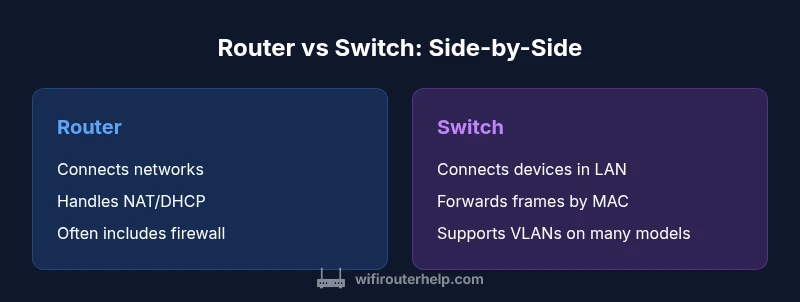
At a high level, a router is the device that connects your local network to other networks, most notably the internet. It reads IP packets, makes decisions about the best path, and can perform network address translation (NAT) to map multiple private addresses to a single public address. A switch, by contrast, sits inside the local network and forwards frames based on MAC addresses. It connects devices such as computers, printers, and IP cameras to the LAN. In practical terms, the router is your gateway to the outside world, while the switch expands the number of devices you can connect inside the network. According to WiFi Router Help, understanding the difference between router and switch helps planners avoid overestimating or underutilizing either device in home networks.
- The router handles inter-network communication and internet access.
- The switch handles intra-network connectivity and traffic within the LAN.
- Many consumer devices combine routing and switching into a single box, which simplifies setup for most households.
The layered model: where routing and switching live
Networking concepts are often described in layers. Layer 2 is the data-link layer, where switches operate, using MAC addresses to forward frames within the same network. Layer 3 is the network layer, where routers operate, using IP addresses to route packets between different networks. Some devices known as multilayer switches blend both capabilities, offering fast switching with integrated routing. This architectural distinction matters when you design subnets and plan how many devices will be on each network segment. The practical effect is that a router provides network segmentation at a higher level, while a switch provides high-speed connectivity within a segment.
- Layer 2 switches excel at fast local traffic.
- Routers enable subnetting and access control between networks.
- Multilayer switches blur the line by handling both within a single piece of hardware.
How data moves: forwarding decisions
When data needs to travel outside the local network, the router consults its routing table to determine the best next hop toward the destination. Inside the LAN, a switch consults its MAC address table to decide where to forward frames. This split of labor means routers prioritize reachability and policy, while switches optimize speed and collision avoidance within a network. In practice, a typical home setup routes traffic to the internet through the router, and the switch handles wired devices on the same network segment. As you scale, you might add a second switch or a multilayer switch for more complex traffic patterns.
- Routing decisions rely on IP address information.
- Switching decisions rely on MAC addresses within the LAN.
- A well-designed network often uses both capabilities in tandem.
IP addressing, DHCP, and NAT responsibilities
Most routers include a built‑in DHCP server to assign IP addresses to devices on your home network. They also commonly provide NAT, which maps many private addresses to a single public address for internet access. Switches typically do not provide NAT or IP address assignment; they focus on forwarding frames using MAC addresses. Some advanced switches or routers offer DHCP relay, VLAN-aware functionality, or basic IP routing, but in standard home networks, NAT and DHCP remain router duties. This division clarifies why you generally don’t rely on a switch for internet access or address management.
- Routers manage IP addressing, NAT, and external connectivity.
- Switches simply forward traffic to connected devices within the LAN.
VLANs, segmentation, and traffic isolation
VLANs enable you to break a single physical network into multiple logical networks. High-end switches support VLAN tagging and edge security features, which can improve performance and security within a business or advanced home network. Routers, meanwhile, provide inter-VLAN routing or subnets, allowing traffic to pass from one VLAN to another under policy control. When your network grows, you may configure a router-on-a-stick approach or use a multilayer switch that performs routing between VLANs directly.
- VLANs enhance security by isolating devices on separate subnets.
- Inter-VLAN routing requires routing capabilities.
- A combination of router and switch functionalities often yields the best scalability.
Security considerations and management
Security features vary widely between routers and switches. Routers often include built-in firewall capabilities, VPN support, parental controls, and cloud management options. Switches, especially those intended for business use, may offer port security, 802.1X authentication, and QoS options, but typically lack full firewall functionality. Management interfaces range from consumer-friendly mobile apps to enterprise-grade web consoles. For robust home networks, using a router with strong security features while supplementing with managed switches for segmentation can be effective.
- Security features on routers typically include NAT, firewalls, and VPNs.
- Managed switches add control over access and traffic prioritization.
- Regularly updating firmware on both devices improves protection and performance.
Performance considerations: capacity, latency, and features
Port density, uplink speed, and CPU-assisted features drive performance. A router’s performance depends on its processing power and the efficiency of its NAT and firewall functions. A switch’s speed hinges on switch fabric, port density, and backplane bandwidth. In practice, for most homes, the built‑in routing and a mid‑capacity switch will suffice. In larger environments, a router with strong routing performance and a high‑capacity switch fabric—or a dedicated multilayer switch—may be warranted to sustain high traffic and low latency across many devices.
- Higher port counts improve wired device support without additional equipment.
- A fast uplink to the internet helps avoid bottlenecks when many devices are online.
- QoS and traffic shaping can optimize performance for gaming or streaming.
Home, small office, and enterprise use cases
Home networks often require a simple router with a few built‑in switch ports. Small offices benefit from a router with decent VPN support and several LAN ports, possibly augmented by a dedicated switch for wired devices. Enterprises typically deploy dedicated routers, core switches, and edge switches with sophisticated VLANs and routing policies. The core idea is to match device capabilities to the network’s scale, traffic types, and security requirements. A balanced approach often uses both a capable router and a high‑quality switch.
- Choose a consumer router with essential security features for homes.
- For a small office, layer‑2 switches plus a router with VLAN support offer flexibility.
- In larger networks, consider multilayer switches and SDN for centralized control.
Common mistakes and misconceptions
One common misconception is that a switch can substitute a router for internet access. Without routing and NAT, devices on a LAN cannot reach external networks efficiently. Another pitfall is over‑reliance on a single box; a failed router can disrupt internet access, while multiple switches without proper routing can fragment traffic. Finally, neglecting VLAN planning can lead to broadcast storms or poor security. Planning and documenting your topology reduces these risks.
- Don’t assume a switch can perform routing tasks.
- Avoid placing all devices on one flat network without segmentation.
- Document your subnetting and VLAN layout for easier troubleshooting.
Practical planning: a simple decision framework
To decide how to compose a home or small-office network, start by listing your needs: number of wired devices, the need for VLANs, security requirements, and internet speed. If internet access and subnet control are important, begin with a router that offers robust features and add a managed switch for expansion. If you anticipate frequent device growth or heavy wired traffic, plan for a larger switch with higher port density and, if needed, a multilayer switch for routing between subnets. Finally, review firmware update policies, warranty terms, and vendor support to ensure long-term reliability.
Authority sources and further reading
For foundational concepts and industry standards, consult established sources. These references provide context on how routers and switches work, and how professionals think about network design:
- https://www.cisco.com/c/en/us/products/routers/what-is-a-router.html
- https://tools.ietf.org/html/rfc1812
- https://www.britannica.com/technology/network-router
Comparison
| Feature | Router | Switch |
|---|---|---|
| Layer of operation | Layer 3 (routing capabilities) | Layer 2 (data-link; sometimes Layer 3 on multilayer switches) |
| Primary job | Direct traffic between networks and to the internet | Forward frames within the local network |
| Addressing/Protocols | IP routing, NAT, DHCP commonly on routers | MAC addressing; VLANs on many switches; some support VLAN tagging |
| Security features | Firewall, NAT, VPN support common | Limited security features (basic port security); enhanced on managed switches |
| Typical use case | Home/branch networks to internet | LAN infrastructure and device interconnect within LAN |
| Expansion options | Subnets, inter-network routing; usually complemented by a switch | Port expansion and segmentation within a LAN; VLANs supported on many switches |
| Performance considerations | Routing throughput depends on CPU; performance scales with uplinks | Switching performance depends on fabric and port density; minimal latency within LAN |
Benefits
- Consolidates internet access, firewall, and LAN in one device for simplicity
- Enables rapid setup with fewer devices in small spaces
- Routers provide essential services (DHCP, NAT, VPN) out of the box
- Managed switches offer strong network segmentation and control
The Bad
- Routers can become bottlenecks if underpowered for high traffic
- Switch-focused setups may require additional devices for internet access and routing
- A single device failure can disrupt both LAN and internet if not properly designed
- Home-grade switches typically lack advanced security features found in routers
Choose a router-first approach for internet access and security, add a managed switch when you need more LAN ports or segmentation.
Routers handle external connectivity and IP-level management, while switches optimize internal LAN traffic. A mixed setup often delivers the best balance of simplicity, security, and scalability for homes and small offices.
People Also Ask
What is the main difference between a router and a switch?
The main difference is that a router connects different networks and provides internet access, while a switch connects devices within the same network to share data. Routers handle IP addressing and firewall rules; switches primarily forward data based on MAC addresses within your LAN.
A router connects your network to other networks and the internet, while a switch connects devices inside your network. Routers manage IP addresses and security; switches manage local data transfer.
Can a switch replace a router in a home network?
No. A switch cannot provide internet access or NAT. It lacks the ability to route between different networks. Some advanced switches can perform basic routing, but for typical home setups a dedicated router is needed for internet connectivity.
A switch isn’t a substitute for a router when you need internet access or network address translation.
What is a Layer 3 switch?
A Layer 3 switch combines switching and routing capabilities in one device. It can forward frames like a switch and route between VLANs like a router, making it suitable for larger LANs that require inter-VLAN routing without a separate router.
A Layer 3 switch can route as well as switch, blending both roles.
Do I need a dedicated router if I already have a modem?
Yes, a dedicated router is typically required to provide NAT, firewall protection, and wireless access. The modem connects you to your ISP, but the router creates your home network and routes traffic. Depending on your setup, a modem-router combo device can perform these roles in a single box.
Your modem connects you to the internet; a router creates and protects your home network.
What should I consider when planning VLANs at home or in a small office?
Consider how you want to isolate devices (work devices vs. guests), the number of subnets you need, and whether your router can route between VLANs. A managed switch with VLAN support helps you enforce segmentation and security, while a router provides inter-VLAN routing with policy control.
Think about separating devices into groups and whether you need routing between those groups.
What to Remember
- Decide based on need for external access vs. internal network expansion
- Use a router with built-in firewall and DHCP for simplicity
- Add a switch when you need more wired ports or VLANs without routing changes
- Plan for future growth with scalable port counts and management features