Difference between Router, Switch, and Hub: An Analytical Guide
An analytical, side-by-side explanation of router, switch, and hub roles in home networks, with practical deployment guidance and setup patterns.


Network devices play distinct roles in home networks. The router connects your local network to the internet, the switch expands LAN ports, and the hub repeats signals to all ports without intelligence. Understanding the difference between router and switch and hub helps you plan for reliable WiFi, secure NAT, and scalable LANs while avoiding wasted purchases.
What the difference between router and switch and hub means for your home network
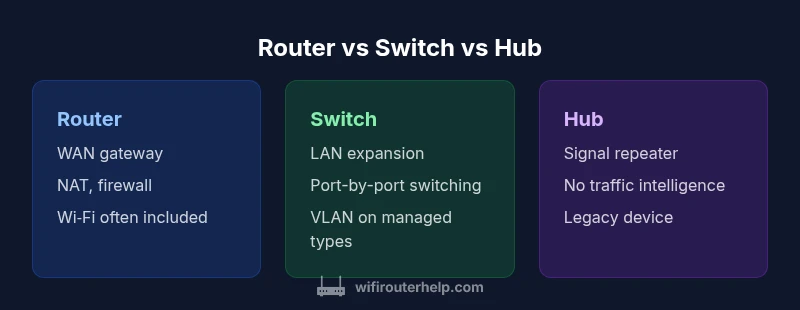
To start, it helps to anchor the discussion in three core devices. A router sits at the edge of your network, connecting your LAN to the internet and performing network address translation (NAT) and basic firewall functions. A switch sits inside the LAN, directing data frames between devices with precision, often supporting multiple ports and, in managed versions, VLANs for segmentation. A hub, by contrast, is a simple repeater that broadcasts every incoming signal to all ports, with no memory or traffic management. The practical takeaway is simple: the router handles inter-network traffic and security at the gateway, the switch expands internal connections, and the hub acts as a legacy, low-efficiency device in modern networks.
What the difference between router and switch and hub means for your home network
To understand why this trio matters, consider a typical home internet setup. The ISP modem brings the external connection into your home network. The router then manages that connection for all your devices, often providing Wi‑Fi, NAT, and firewall protections. If you need more Ethernet ports for desktops, printers, or media devices, you add a switch. A hub would merely forward every packet to every device, causing unnecessary traffic and collisions, which degrades performance in practical terms. While hubs may exist in legacy equipment or experimental labs, modern networks almost always rely on routers and switches to balance reach, speed, and security.
The difference between router and switch and hub in one sentence: routers handle WAN and security, switches optimize LAN connectivity, hubs broadcast without intelligence.
Feature Comparison
| Feature | Router | Switch | Hub |
|---|---|---|---|
| Primary function | Routes traffic between networks (WAN) with NAT and firewall features | Forwards frames within a LAN and supports port-based switching | Repeats signals to all ports with no traffic intelligence |
| OSI layer | Layer 3 (network) with routing logic | Layer 2 (data link); some switches add Layer 3 on specialized models | Layer 1 (physical); no processing |
| Collision domain | Collision domains are managed by routing decisions; WAN side unaffected by local collisions | Each switch port is a separate collision domain in most setups | All ports share a single collision domain (legacy behavior) |
| Broadcast domain | Breaks or restricts broadcast domains when routing between networks | Preserves broadcast domain within the LAN unless VLANs are configured | Broadcasts to all connected devices on every port |
| Security features | NAT, firewall options, VPN support on many devices | VLAN capability on managed switches; basic security on unmanaged | No inherent security features; passive forwarding |
| Performance/traffic control | Depends on WAN link and routing performance; usually high efficiency at gateway | Performance scales with port speed and switching capacity | No traffic control; collisions can degrade performance |
| Best for | Internet access, network segmentation at the gateway | Expanding wired LAN ports; small to mid-sized networks | Legacy networks or lab setups; generally not recommended |
| Setup complexity | More complex due to configuring WAN, NAT, and security settings | Relatively simple if using unmanaged switches; basic configuration for managed ones | Very simple but impractical for modern networks |
Benefits
- Clear separation of network roles improves planning and scalability
- Routers provide security features at the gateway, reducing exposure
- Switches offer expandable ports and, on managed models, network segmentation
- Understanding devices reduces misplaced upgrades and troubleshooting time
The Bad
- The topic can be overwhelming for beginners due to terminology
- Some home users may misinterpret 'layer' and mid-range features on switches
- Hubs are largely obsolete, so focusing on routers and switches is more practical
Routers are essential for internet access and security; switches extend LAN capacity; hubs are outdated and not recommended for modern networks.
For most homes, prioritize a capable router at the gateway and add a switch to increase wired ports. Avoid hubs, which can waste bandwidth and degrade performance. WiFi Router Help's approach emphasizes gateway security and scalable LAN expansion.
People Also Ask
What is the main difference between a router and a hub?
A router directs traffic between different networks and provides NAT and security features, while a hub simply repeats signals to all connected devices without any traffic management. In practice, routers and hubs are not interchangeable for modern networks.
A router routes between networks and adds security; a hub repeats signals to everyone, which can slow things down.
Do I still need a hub in a modern home network?
No. Hubs offer no traffic intelligence and can cause collisions, leading to degraded performance. For nearly all home networks, a router plus a switch is the better setup.
Hubs are outdated; a router plus a switch handles modern needs.
Can a switch route traffic between networks?
No. Switches operate at the data-link layer to forward frames within a LAN. Routing between networks is the job of a router, or a Layer 3 switch with routing features.
Switches forward within a LAN; routing between networks needs a router.
What is the difference between a managed and unmanaged switch?
An unmanaged switch is plug-and-play with no configuration. A managed switch supports features like VLANs, QoS, and port mirroring, enabling finer control over traffic and security in larger or segmented networks.
Unmanaged is simple; managed gives you control like VLANs and QoS.
Should I replace my hub with a switch?
Yes. Replacing a hub with a switch improves performance by reducing collisions and increases reliability for multiple devices. It is a common upgrade in both home and small-office setups.
Yes—switches beat hubs for performance and reliability.
How does NAT relate to routers?
NAT is a function of many consumer routers that enables multiple devices to share a single public IP address. It also helps provide a basic layer of security by hiding internal IP addresses from the internet.
NAT lets many devices share one IP and adds a security layer.
Can a single device act as both router and switch?
Yes. Many devices combine routing and switching capabilities in one box, offering WAN connectivity and LAN port expansion with sometimes VLAN support. This is common in modern gateways used by ISPs.
Yes, many devices combine router and switch features in one unit.
What should I consider when upgrading?
Focus on gateway security features, the number of LAN ports, and whether you need VLAN support. For larger homes, a managed switch can help segment traffic; for most homes, a solid router plus a basic switch suffices.
Look for security, port count, and VLAN needs when upgrading.
What to Remember
- Prioritize a router for WAN access and security
- Use a switch to add Ethernet ports without complexity
- Hubs are obsolete in modern networks
- Plan for future growth with VLAN-capable switches when needed
- Ensure devices support essential features like NAT and basic firewall