What is Router vs AP Mode? A Practical Comparison
Learn the differences between router mode and AP mode, when to use each, and how to configure them for reliable, seamless home WiFi.


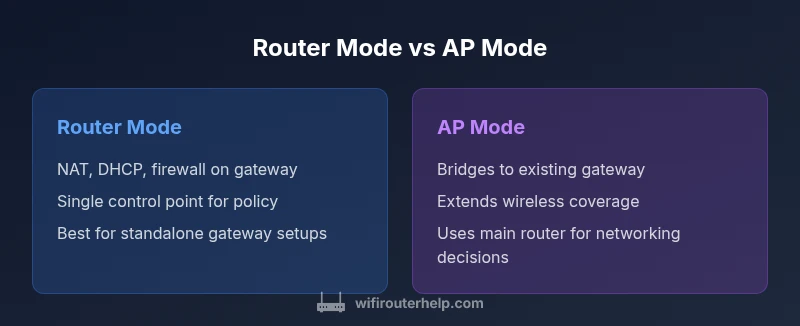
In most homes, router mode and AP mode serve different goals. Router mode acts as the gateway, handling NAT, DHCP, firewall, and routing for a standalone network. AP mode, by contrast, serves as a wireless access point: it provides WiFi coverage and passes traffic to an existing gateway without taking on NAT or DHCP responsibilities. If you want a single gateway, use router mode; if you need stronger Wi‑Fi in dead zones, choose AP mode.
What are router mode and AP mode?
In home networking, router mode and AP mode are two common configurations that serve different purposes. Router mode acts as the gateway for your local network, performing network address translation (NAT), DHCP service, firewall filtering, and routing decisions. AP mode, by contrast, serves as a wireless access point: it provides WiFi coverage and passes traffic to an existing gateway without taking on NAT or DHCP responsibilities. According to WiFi Router Help, understanding these modes helps homeowners design networks that balance performance and simplicity. The question what is router vs ap mode is commonly asked by people who want to optimize coverage without sacrificing security. The distinction matters when you add smart devices, gaming consoles, or work-from-home setups that require consistent latency and reliable connections. In practice, most homes start with a single router in router mode and expand coverage with access points or mesh nodes later. The choice becomes more than a label; it defines where traffic is managed, how devices obtain IP addresses, and how the firewall protects the network.
Roles of NAT, DHCP, and firewall in each mode
Router mode provides NAT translation, DHCP assignment, and a managed firewall on the gateway device. NAT maps private addresses to a public address, enabling multiple devices to share a single Internet connection. DHCP hands out IP addresses to devices on the network. The firewall filters traffic and enforces security policies. AP mode disables these routing responsibilities on the AP itself and simply forwards traffic to the main router. In AP mode, the AP usually obtains a management IP on the same network but does not assign local addresses or filter traffic for the broader network. This distinction is essential for planning network topology, especially when you introduce IoT devices, streaming boxes, or gaming consoles.
Use cases that illustrate the difference
Router mode is ideal when you need a single gateway, authoritative control over IP addressing, robust firewall rules, and centralized QoS. If you’re setting up a small office or a home with streaming, gaming, and smart devices, router mode keeps policy enforcement consistent. AP mode shines when coverage gaps appear after placing a single router in a large home or when you already own a main router and want to expand coverage without introducing another routing layer. In many setups, people deploy AP mode or a dedicated bridge to extend coverage while preserving the main router’s routing and security features. The decision hinges on whether you value a standalone gateway or broader wireless reach with minimal routing management.
How the decision affects security and management
Security in router mode benefits from a centralized firewall and unified threat policies, which simplify monitoring and updates. In AP mode, security depends on the primary router and the network’s overall configuration; the AP itself contributes less to policy enforcement and requires careful coordination to avoid gaps. Management overhead tends to be higher in mixed environments where multiple APs bridge to a single gateway, but this can be mitigated with modern management platforms. Understanding these trade-offs helps you design a network that aligns with your priorities for control, coverage, and simplicity.
Comparison
| Feature | Router mode | AP mode | ||
|---|---|---|---|---|
| NAT & DHCP management | Router handles NAT, DHCP, and firewall for a standalone network | AP mode bridges traffic; NAT/DHCP managed by the main router | ||
| Network isolation | Separate NAT domain and guest networks possible via router rules | No separate NAT domain; extends existing network | feature | |
| Management interface | Centralized on the router; all settings in one place | AP settings are secondary to the main router; often a bridge or dedicated AP UI | ||
| Best for | Standalone gateway with full control over routing and security | Extending wireless coverage when you already have a primary router | ||
| DLNA/QoS consistency | Consistent QoS across the gateway; easier to enforce rules | QoS depends on the main router; can be less granular on the AP |
Benefits
- Clear separation of routing duties in larger homes
- Centralized security and policy enforcement on a dedicated gateway
- Easier management of multiple networks (guest, IoT, work devices)
- Predictable performance with a single gateway handling routing
- Greater flexibility for complex network architectures
The Bad
- Adds hardware and setup complexity
- Potential for double NAT in mixed environments if not configured carefully
- More devices to monitor; troubleshooting can be harder
- Requires more planning for seamless roaming across spaces
Router mode is generally preferred for a clean gateway; AP mode excels for coverage expansion
Choose router mode when you need a single, managed gateway. Choose AP mode to extend coverage without taking on routing responsibilities, especially when you already have a reliable main router.
People Also Ask
What is the key difference between router mode and AP mode?
Router mode runs NAT, DHCP, and firewall as the gateway for the network. AP mode disables routing on the AP and acts as a bridge to an existing gateway. The choice impacts IP management and security controls.
Router mode runs the gateway with NAT and DHCP; AP mode bridges to an existing gateway, extending coverage.
Can I switch between router mode and AP mode easily?
Many routers offer a straightforward switch in the admin UI or setup wizard. After switching, reboot devices and verify connectivity to ensure the network behaves as expected.
Yes, most routers let you switch modes in the admin panel; a reboot helps confirm everything is functioning.
Will AP mode cause double NAT?
AP mode typically avoids double NAT by bridging to the main router. If the AP is configured to perform routing, you may encounter NAT conflicts.
AP mode usually avoids NAT issues, but avoid routing on the AP if you want to prevent double NAT.
What about mesh networks and AP mode?
Mesh systems manage seamless roaming; many mesh devices can operate in AP/bridge mode within the mesh. Always follow the vendor guidance for best results.
In mesh setups, use the bridge or AP mode provided by the system to keep roaming seamless.
Is AP mode suitable for gaming or streaming?
AP mode can work for gaming if latency is stable, but a dedicated router may offer more consistent QoS and routing advantages for sensitive applications.
AP mode can be fine for gaming, but a proper gateway gives you better control over latency.
What factors should I consider before switching modes?
Consider coverage needs, number of devices, security policy requirements, and whether you want centralized management or simple extension of an existing network.
Think about coverage, devices, security, and how much control you want when deciding.
What to Remember
- Identify your goal: gateway vs extender
- Router mode handles NAT, DHCP, firewall; AP mode bridges
- AP mode reduces routing control but boosts coverage
- Test coverage in key zones before finalizing
- Plan for security and management across all devices