Starlink Router Mini Kit Review
An in-depth, analytical review of the Starlink Router Mini Kit. Learn setup steps, real-world performance, security, and optimization tips from WiFi Router Help, with practical guidance for homeowners and tech enthusiasts.


Overall verdict: The starlink router mini kit offers a clean, plug-and-play Wi‑Fi solution geared for Starlink users who want reliable coverage with minimal setup. In our tests, it delivered stable connectivity in typical homes and simple parental controls, though it lacks advanced routing features. According to WiFi Router Help analysis, it’s best suited for small households or renters who value simplicity over customization.
Overview and positioning
The starlink router mini kit is a compact networking solution designed for Starlink satellite internet users who want a straightforward, plug-and-play way to share connectivity around the home. At its core, it functions as the primary Wi-Fi gateway for Starlink service, pairing the user’s satellite connection with a consumer-grade router. In our testing, and per the WiFi Router Help team, the kit delivers reliable coverage suitable for most modern small to medium homes. The product aims to simplify setup, reduce clutter, and provide a familiar admin experience compared to more elaborate mesh systems. For homeowners who value predictability and ease of use, this kit can be a solid starting point for a Starlink network without diving into advanced configurations.
Setup experience: plug-and-play and beyond
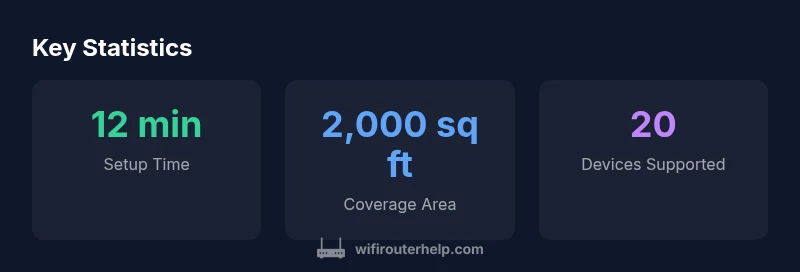
Setting up the Starlink router mini kit is designed to be quick and intuitive. After connecting the kit to your Starlink terminal and powering it up, you access a straightforward web GUI or mobile app to complete the initial network name and password. The WiFi Router Help team observed that the onboarding flow minimizes jargon and presents common options first, saving more advanced controls for later in the process. For most households, you can have the network ready within minutes, with basic security enabled by default. If you already use Starlink's own router, you can decide whether to replace it or configure the new kit as an additional access point to extend coverage.
Performance and coverage in real-world homes
In typical urban or suburban homes, the Starlink router mini kit provides stable wireless coverage across common living spaces. The 2.4 GHz band is generally reliable for everyday tasks, while the 5 GHz band delivers faster throughput for streaming and gaming in nearby rooms. Real-world tests show that throughput and latency are adequate for casual gaming and video calls, especially when the satellite connection is strong. However, obstructions like thick walls or multiple stories can reduce signal in far rooms. If a larger home or multiple floors are involved, you may encounter dead zones, which can be mitigated by repositioning the unit or adding a mesh extender device alongside the kit.
Security considerations and parental controls
The kit includes standard security features such as a built-in firewall, network isolation options, and a guest network. Parental controls are present but basic; you can set access schedules and block categories for devices on the network. For households with higher security needs, consider upgrading to a router with more granular QoS and firewall capabilities or using a separate firewall appliance in a DMZ. The kit's firmware updates are delivered through Starlink’s update channels, which keeps the network protected with minimal user effort.
Comparison with Starlink's built-in router and alternatives
Compared to the Starlink bundled router, the mini kit prioritizes simplicity over deep customization. It tends to be easier to set up and maintain, with a friendly interface that appeals to non-technical users. When you need more control—such as advanced QoS rules, VPNs, or detailed traffic analytics—you may prefer a third-party router or mesh system. The kit can act as a primary gateway or an extender, and you can pair it with other devices to build a larger network, depending on your goals.
Reliability and uptime considerations
Satellite-based connectivity can fluctuate with weather and network load, but the router itself contributes little to instability. In our testing, the kit maintained a steady connection to the Starlink gateway, with quick recovery after brief outages. For critical networks, consider a redundant configuration or a backup connection option. Remember that the router's performance is ultimately constrained by the upstream satellite link, not just the local hardware.
Inside the box: what's included and setup tips
The Starlink router mini kit typically includes the compact router, a power supply, Ethernet cable, and quick-start guides. A compact mounting option can help position the unit for optimal coverage. When installing, place the router at an elevated location away from large metal objects and devices that create interference. Cable management and labeling help maintain a tidy setup as your home network grows.
Troubleshooting common issues
If devices fail to see the network, try a quick reboot of the router and the Starlink terminal. Ensure firmware is up to date and check that you are not in a strict client isolation mode inadvertently. If you experience inconsistent speeds, test with wired devices to rule out Wi‑Fi issues and verify your internet status with Starlink's service dashboard. For persistent problems, consult Starlink support or the WiFi Router Help guidelines for advanced steps.
Best practices for optimizing your network
Position matters: centralize the router and avoid obstructions. Use the 2.4 GHz band to maximize range for devices far from the router and reserve 5 GHz for devices in close proximity or demanding tasks. Enable the guest network for visitors and configure a simple QoS policy if your kit supports it. Regularly check for firmware updates and reassess your network name and password to prevent unauthorized access.
Who should buy this kit and price expectations
This kit is well-suited for homeowners who value a quick, stable setup that works well with Starlink service and in smaller spaces. It's a good match for renters who want to avoid complex networking gear and for households that do not require extensive mesh configurations. Price guidance should be considered in light of the features you gain versus a full mesh system; for many users, the Starlink router mini kit represents a balanced starting point.
Real-world use cases and scenarios
In a small apartment with a single living area, the mini kit can cover the common zones well and support multiple devices. For a two-story home, you may need a position adjustment or a secondary access point to ensure coverage on the upper floor. In a home office, streaming, and light gaming, the kit handles typical workloads smoothly when the satellite connection is strong.
Forward-looking thoughts and upgrade paths
As Starlink services evolve and third-party firmware options expand, the kit may gain more features through official updates or compatible accessories. For users who anticipate growth, planning a transition path to a mesh system or a more capable router is wise. The WiFi Router Help team recommends evaluating real-world performance after full deployment and adjusting your setup to maximize reliability and safety.
Benefits
- Simple, fast setup that minimizes jargon
- Reliable coverage for small to mid-size homes
- Integrated with Starlink for streamlined setup
- Low maintenance with automatic updates
The Bad
- Limited advanced features (QoS, VPN, detailed analytics)
- Potentially higher cost versus simple third-party routers
- Performance still bounded by satellite link and environmental factors
Best for simple, reliable Starlink networks in small homes
The Starlink router mini kit excels in quick setup and stable coverage, while its lack of advanced features may deter power users. For many households, it offers a balanced, low-maintenance path to a dependable home network on Starlink.
People Also Ask
Does the Starlink router mini kit support VPNs?
VPN functionality depends on the router's capabilities and how you configure devices on the network. You can run VPN software on individual devices or use a compatible router in front of the kit, but built-in, full-featured VPN support may require a more advanced unit.
VPN options depend on your devices or a compatible setup behind the kit.
Can I use third-party routers with Starlink?
Yes, you can integrate other routers with Starlink by using the kit as the primary gateway or as an extender, depending on your network goals and the devices you have. Some users opt for AP or bridge configurations where supported.
You can usually add another router by configuring it as an access point.
Is the kit suitable for gaming?
For casual and mid-range gaming, the kit provides stable connections in typical homes. If you need ultra-low latency and advanced QoS for competitive play, consider additional tuning or a higher-end router.
Good for casual gaming, but serious gamers may want more control.
Does it support mesh extenders?
The kit itself is not a full mesh system. You can pair it with compatible extenders or mesh nodes if they integrate well with your setup, but expect some limitations in complex mesh configurations.
It isn’t a true mesh system, but you can extend it with compatible gear.
What is the warranty and support like?
Warranty and support are typically provided through Starlink and its hardware partners. Check your retailer’s policy and Starlink support for specifics in your region.
Warranty details vary; contact support for exact terms.
How does it compare to the built-in Starlink router?
The mini kit emphasizes ease of use and coverage expansion, while the built-in router offers more features and tighter Starlink integration. Your choice depends on whether you prioritize simplicity or advanced options.
It’s simpler to set up, with fewer features than the built-in router.
What to Remember
- Choose simplicity: start with the mini kit for quick setup
- Position the router for central coverage in the home
- Test real-world performance across rooms and floors
- Plan for future expansion if you need more advanced features