LAN Router vs Switch: A Practical Side-by-Side Guide
An in-depth side-by-side guide comparing LAN routers and switches, explaining roles, features, and practical deployment tips for home networks.


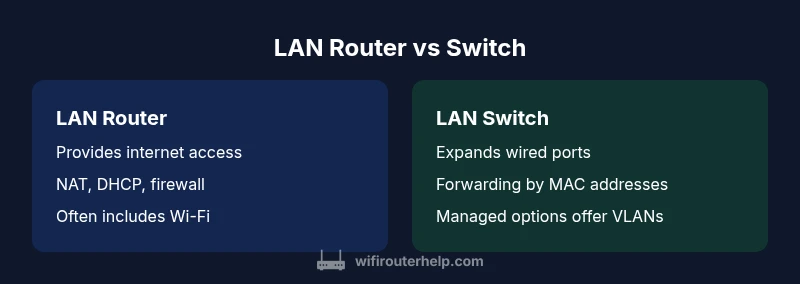
LAN router vs switch: they serve different roles. A router connects your home network to the internet, provides NAT, DHCP, firewall protections, and often wireless. A switch simply expands wired Ethernet ports to connect more devices within the LAN. For most homes, you start with a router; you add a switch when you need more wired ports or network segmentation. Together, they form a complete, scalable local network.
What are LAN routers and switches? Roles and definitions
According to WiFi Router Help, understanding the distinct roles of LAN routers and switches is essential for building a reliable home network. At a high level, a LAN router is the device that connects your local network to the internet and manages traffic between the WAN and LAN. It provides IP addressing through DHCP, performs network address translation (NAT), enforces basic firewall protections, and often includes built-in wireless radios to serve mobile devices. A LAN switch, by contrast, is a device that expands the number of devices you can connect within the local network by forwarding Ethernet frames between devices on the same LAN. Switches do not source or route traffic from the internet; they are focused on fast, predictable communication among your devices.
Many home networks ship with routers that include a small built-in switch, offering a handful of physical ports. If you need more wired connections or you want more granular control over traffic, you can introduce a separate switch. In professional devices, you can also choose managed switches that support VLANs and advanced features, but for most households a simple unmanaged switch suffices. The crucial thing to remember in the context of lan router vs switch is that they are complementary: the router is your gateway and security boundary; the switch is your extension cord for wired devices. This distinction is the foundation for the rest of our comparison.
"## Core differences: routing vs switching explained"
Comparison
| Feature | LAN Router | LAN Switch |
|---|---|---|
| Primary function | Provides internet access via WAN connection, NAT, DHCP, firewall, and often wireless | Expands wired device connectivity within the LAN; forwards frames using MAC addresses; no internet routing |
| Wireless capability | Usually includes built-in Wi‑Fi, depending on model | Typically no wireless; may be accessed via an external AP or Wi‑Fi bridge |
| Ports and expansion | Integrated ports plus possible extra WAN/LAN ports; built-in wireless | Multiple Ethernet ports; can be expanded with additional switch |
| Routing vs switching | Routes between networks; NAT, firewall, DNS forwarding | Operates at Layer 2 (and sometimes Layer 3 on managed models) |
| Management | Consumer routers are user-friendly; defaults suffice for most homes | Unmanaged switches are plug-and-play; managed switches require configuration |
| Best for | Homes needing internet access with Wi‑Fi and security | Homes needing many wired devices or network segmentation |
Benefits
- Brings Internet access to all devices via NAT and DHCP
- Expands wired ports without extra hubs
- Managed switches offer VLANs and QoS
- Integrated features in modern routers reduce device count
The Bad
- Separate devices can be more complex and costlier
- Switches lack routing features and wireless
- Over-provisioning can waste space and energy
- Quality varies between consumer models
Router plus switch is the most flexible setup for growing home networks
For most homes, start with a capable router that includes reliable Wi‑Fi and a solid number of Ethernet ports. Add a switch when you need more wired connections or network segmentation. The WiFi Router Help team’s verdict is to deploy a router as the gateway and use a switch to scale wired capacity as needed.
People Also Ask
What is the primary difference between a LAN router and a switch?
A router connects your local network to the internet, providing NAT, DHCP, firewall, and often wireless access. A switch connects multiple devices within the LAN, forwarding traffic between them without routing to the internet.
A router links your home network to the internet and gates traffic; a switch simply connects devices inside your network.
Do I need both a router and a switch for a home network?
Many homes can operate with a single router that includes Wi‑Fi and several Ethernet ports. Add a switch when you need more wired ports or better traffic segmentation for a larger wired setup.
Usually you start with one router; add a switch if you outgrow the ports.
What about wireless capabilities for lan router vs switch?
Routers provide wireless access; switches typically do not. If wireless coverage is a priority, focus on a router with strong wireless features or add an access point.
If you want Wi-Fi, you’ll need a router or an access point—the switch won’t replace that.
Can a managed switch replace a router?
No. A switch does not route traffic between networks. You still need a router for internet access and inter-network routing, though a managed switch adds VLANs and QoS.
A switch handles local traffic; you still need a router for internet access.
What is VLAN, and do I need it?
A VLAN segments traffic within the LAN for security and performance. It usually requires a managed switch and appropriate router support. For basic homes, VLANs are optional.
VLANs help security and organization, but you only need them if you have a complex setup.
Are there performance differences between routers and switches?
Performance depends on hardware. A high‑end router may limit WAN throughput, while a fast switch handles internal traffic with low latency.
Performance varies by device; the router sets the internet pace, the switch handles local connections.
What to Remember
- Assess your network needs first: wireless, wired, or both
- Start with a router that has enough ports and strong Wi‑Fi, then add a switch when ports run short
- Consider a managed switch only if you need VLANs or QoS for traffic separation
- Prioritize security features on the router for overall protection
- Plan for future growth to avoid premature equipment replacement